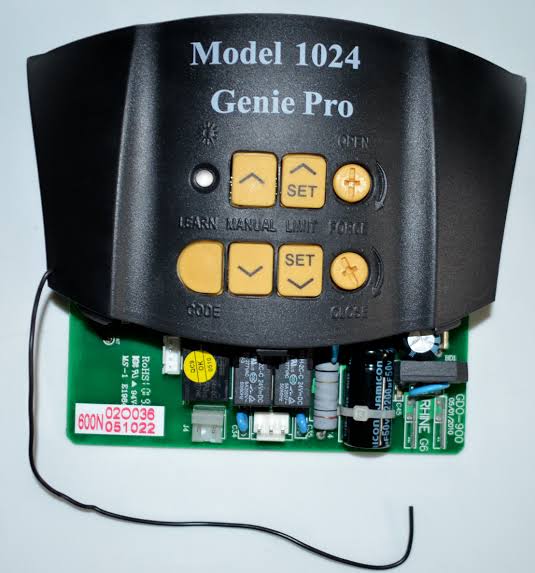
Is your new remote control refusing to sync with your garage door? You are not alone. Many homeowners struggle when trying to figure out how to program Genie garage door opener model 1024, but the process is actually quite straightforward once you know the right sequence. This guide will walk you through every step, ensuring you regain full access to your garage without the need for an expensive service call.
Understanding Your Genie Model 1024 System
Before diving into the buttons and lights, it helps to understand what you are working with. The Genie Model 1024 is a reliable workhorse in the residential garage door market. It typically operates on a fixed-code or rolling-code frequency, depending on the manufacturing year. Knowing this distinction is crucial because it dictates which programming method you will use.
Most modern iterations of the 1024 series utilize Intellicode technology, which enhances security by changing the code every time you press the remote button. However, older models may still use dip switches. For this guide, we will focus on the standard push-button programming method, which is the most common requirement for users today.
According to Wikipedia, garage door openers have evolved significantly since their inception in the 1920s, moving from simple mechanical chains to sophisticated encrypted wireless systems. This evolution means that while the core function remains the same, the programming protocols have become more secure and slightly more complex.
Step-by-Step Guide: How to Program Genie Garage Door Opener Model 1024
Programming your remote involves syncing the transmitter (your handheld remote) with the receiver (the motor unit in your garage). Follow these precise steps to ensure a successful connection.
Step 1: Locate the Learn Button
First, you need to access the motor head unit. This is usually mounted on the ceiling of your garage. Look for a small LED light and a button nearby. On the Genie 1024, this is often labeled as “Learn,” “Program,” or sometimes just indicated by a small icon. It is typically located on the back or side of the motor housing.
- Tip: You may need a sturdy ladder to reach this safely. Ensure the ladder is stable before climbing.
Step 2: Clear Old Codes (Optional but Recommended)
If you are replacing a lost remote or suspect interference from old devices, it is best to clear the memory first.
- Press and hold the “Learn” button for about 10 seconds.
- Wait until the LED indicator light turns off.
- Release the button. This erases all previously programmed remotes and keypads.
Note: If you are simply adding a new remote to existing ones, skip this step.
Step 3: Initiate Programming Mode
- Press and release the “Learn” button quickly.
- The LED light should turn on or start blinking. This indicates the unit is now in “learning mode” and ready to accept a new signal.
- You typically have 30 seconds to complete the next step before the unit times out.
Step 4: Sync the Remote Control
- Take your handheld remote control.
- Press and hold the button you wish to program (usually the main large button).
- Keep holding it until the LED light on the motor unit blinks or turns off.
- Release the remote button.
Step 5: Test the Connection
Stand clear of the garage door and press the programmed button on your remote. The door should activate immediately. If it does not, repeat Steps 3 and 4, ensuring you are within range (usually 10–20 feet) during the programming process.
Troubleshooting Common Programming Issues
Even with careful following of instructions, things can go wrong. Here are the most common hurdles users face when learning how to program Genie garage door opener model 1024 and how to fix them.
| Issue | Possible Cause | Solution |
|---|---|---|
| LED Light Does Not Turn On | Power issue or faulty button | Check if the unit is plugged in. Inspect the learn button for physical damage. |
| Remote Works Intermittently | Weak batteries or interference | Replace remote batteries with fresh alkaline ones. Move away from large metal objects. |
| Door Reverses Immediately | Safety sensor misalignment | Check the photo-eye sensors near the floor. Ensure nothing is blocking their beam. |
| Programming Times Out | Too slow between steps | Reset the unit and try again, moving faster between pressing the Learn button and the remote. |
Why Do Batteries Matter?
It might seem trivial, but weak batteries are the number one cause of programming failure. A remote with low voltage may transmit a signal strong enough to open the door occasionally but too weak to complete the handshake protocol required during programming. Always use high-quality alkaline batteries rather than heavy-duty or rechargeable ones for initial setup.
Advanced Tips for Optimal Performance
Once you have successfully programmed your remote, consider these tips to maintain long-term reliability.
- Keep Remotes Away from Heat: Leaving remotes in a hot car can damage the internal circuitry and reduce battery life.
- Update Keypads Separately: If you have a wireless keypad, it must be programmed separately using a similar process but often requires entering a PIN code. Refer to your specific keypad manual for those steps.
- Check Antenna Direction: The motor unit has a small hanging antenna. Ensure it is hanging vertically and not wrapped around metal brackets, which can block the signal.
Frequently Asked Questions (FAQ)
1. Can I program multiple remotes to the same Genie 1024 opener?
Yes, the Genie Model 1024 can store multiple remote codes. Typically, it can hold up to 7–8 different devices, including remotes, keypads, and vehicle homelink systems. Simply repeat the programming steps for each additional device.
2. What do I do if I lost all my remotes and cannot access the garage?
If you are locked out, you will need to use the manual release cord inside the garage to open the door manually. Once inside, you can reprogram new remotes. If you cannot get inside at all, you may need to contact a professional locksmith or garage door technician to assist with entry.
3. Is there a difference between programming a Genie 1024 and other models?
While the general concept is similar across brands, the specific button sequences vary. The Genie 1024 uses a specific “Learn” button protocol. Other models might use dip switches or require a specific number of presses. Always consult your specific model’s manual if available.
4. How often do I need to reprogram my remote?
Under normal circumstances, you should never need to reprogram your remote unless you reset the motor unit, replace the remote, or experience significant signal interference. If you find yourself reprogramming frequently, check for nearby sources of radio frequency interference, such as LED light bulbs or neighbors’ devices.
5. Can I use a universal remote with the Genie 1024?
Yes, many universal remotes are compatible with Genie openers. However, you must ensure the universal remote supports Genie’s specific frequency and coding type (Intellicode). Follow the universal remote’s instruction booklet for the specific code set required for Genie products.
Conclusion
Learning how to program Genie garage door opener model 1024 is a valuable skill that saves you time and money. By following the simple steps of locating the learn button, initiating the mode, and syncing your remote, you can have your garage door operational in minutes. Remember to keep your batteries fresh and your sensors clean for the best performance.
Did this guide help you get your garage door working again? Share this article with friends or family who might be struggling with their own garage openers, and let us know in the comments if you have any other tips for maintaining Genie systems!



Leave a Reply