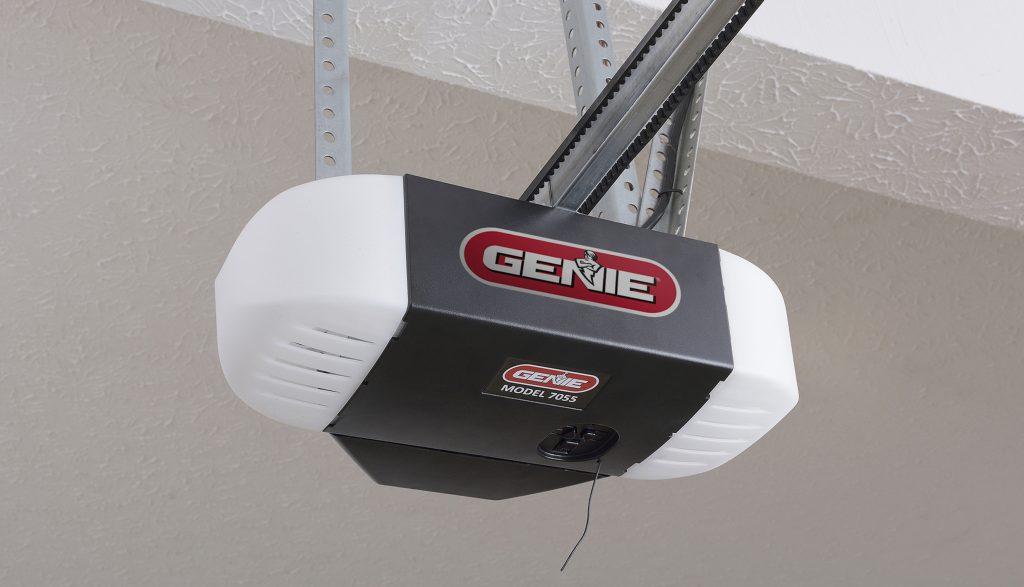
Is your garage door refusing to respond to your remote? You are not alone. Many homeowners face frustration when their Genie Model 7055 stops syncing after a power outage or battery change. Knowing how to program Genie garage door opener model 7055 is essential for restoring convenience and security to your home without calling a technician. This guide will walk you through the process clearly and safely.
Understanding the Genie Model 7055 System
Before diving into the programming steps, it is helpful to understand what makes the Genie 7055 unique. This model is part of Genie’s reliable line of belt-drive openers, known for quiet operation and durability. Unlike older chain-drive models, the 7055 uses advanced radio frequency technology to communicate with remotes and keypads.
According to industry standards, most modern garage door openers operate on a rolling code system. This means the code changes every time you press the button, preventing hackers from intercepting the signal. For more technical details on how rolling codes enhance security, you can refer to this Wikipedia article on garage door openers.
Key Features of the Model 7055
- Quiet Belt Drive: Reduces noise compared to chain drives.
- Intellicode Technology: Provides billions of code combinations for security.
- Battery Backup: Keeps the door operational during power outages (if equipped).
Tools and Preparation Before Programming
Success starts with preparation. Attempting to program your opener without the right tools can lead to errors and wasted time. Ensure you have the following items ready before you begin:
- A Stable Ladder: To safely reach the motor head unit mounted on your ceiling.
- Fresh Batteries: Use new AA or 9V batteries in your remote control. Weak batteries are the number one cause of programming failure.
- Clear Workspace: Remove any vehicles or obstacles from under the garage door.
- Patience: The process takes about 10–15 minutes. Rushing can cause sync errors.
Pro Tip: If your remote has been sitting unused for months, replace the batteries even if they seem fine. Voltage drops can prevent the remote from sending a strong enough signal to the receiver.
Step-by-Step Guide: How to Program Genie Garage Door Opener Model 7055
Follow these precise steps to sync your remote control with the Genie 7055 opener. This method applies to standard Genie remotes and wireless keypads.
Step 1: Locate the Learn Button
Climb your ladder and look at the back or side of the motor head unit. You will see a small LED light and a button labeled “Learn” or “Program.” On the Genie 7055, this button is usually purple or orange.
- Press and release the Learn button once.
- The LED light will turn on and remain solid. This indicates the unit is in “programming mode.”
- You have approximately 30 seconds to complete the next step before the mode times out.
Step 2: Sync the Remote Control
While the LED light is still solid:
- Take your remote control.
- Press and hold the button you wish to program (e.g., Button 1).
- Hold it until the LED light on the motor head blinks or turns off.
- Release the remote button.
If successful, the LED light on the motor head will blink twice or turn off completely. This confirms the code has been accepted.
Step 3: Test the Connection
Step down from the ladder and stand clear of the door. Press the programmed button on your remote. The garage door should activate immediately. If it does not move, repeat Steps 1 and 2, ensuring you press the remote button firmly.
Step 4: Programming Additional Remotes
You can program up to 7 different devices to one Genie 7055 opener. Repeat the process above for each additional remote or keypad. Remember to press the Learn button on the motor head each time you add a new device.
Troubleshooting Common Programming Issues
Even with careful steps, things can go wrong. Here are the most common issues users face when learning how to program Genie garage door opener model 7055 and how to fix them.
| Issue | Possible Cause | Solution |
|---|---|---|
| LED Light Does Not Turn On | Power issue or faulty button | Check if the opener is plugged in. Try pressing the Learn button firmly. |
| Remote Does Not Sync | Weak batteries or distance | Replace remote batteries. Stand within 5 feet of the motor during programming. |
| Door Moves but Reverses | Obstruction or sensor misalignment | Check safety eyes for dirt. Ensure nothing blocks the door’s path. |
| Programming Mode Times Out | Too slow in pressing remote | Press the Learn button again to restart the 30-second window. |
Why Won’t My Old Remote Work After Programming?
If you previously had working remotes that now fail, you may have accidentally cleared the memory. Holding the Learn button for too long (usually 10+ seconds) resets the entire system. If this happens, you must reprogram all your remotes and keypads from scratch.
Advanced Tips for Maintaining Your Genie 7055
Programming is just the beginning. To ensure your Genie 7055 lasts for years, follow these maintenance best practices:
- Lubricate Moving Parts: Every six months, apply a silicone-based lubricant to the rollers and hinges. Avoid WD-40 as it attracts dust.
- Check Sensor Alignment: The safety sensors near the floor must face each other directly. A misaligned sensor will prevent the door from closing.
- Update Firmware: Some smart-enabled Genie models allow firmware updates via an app. Check the Genie website for any available updates for your specific serial number.
FAQ Section
1. How do I reset my Genie 7055 garage door opener?
To reset the memory, locate the Learn button on the motor head. Press and hold it for approximately 10 seconds until the LED light goes out. This erases all programmed remotes and keypads. You will need to reprogram all devices afterward.
2. Can I program a universal remote to the Genie 7055?
Yes, most universal remotes compatible with Genie Intellicode systems will work. Follow the universal remote’s manual to set the dip switches or code search function to match Genie’s frequency. Then, use the standard Learn button method described above.
3. What does it mean if the LED light blinks rapidly?
A rapidly blinking LED often indicates a problem with the safety sensors or an obstruction. Check that the sensor lenses are clean and aligned. If the issue persists, consult the user manual for error code specifics.
4. How far away can I be from the garage to use the remote?
Typically, Genie remotes have a range of 100–150 feet in open space. However, walls, metal siding, and interference from other electronics can reduce this range. If you experience reduced range, check the remote’s battery first.
5. Is it safe to program the opener myself?
Yes, programming the remote is safe and does not involve handling high-voltage wiring. However, always keep your hands and fingers clear of the door sections and moving parts while testing the device.
Conclusion
Learning how to program Genie garage door opener model 7055 is a straightforward task that saves you time and money. By following the steps outlined above—locating the Learn button, syncing your remote, and testing the connection—you can restore full functionality to your garage door in minutes. Remember to keep your batteries fresh and your sensors clean for optimal performance.
Did this guide help you get your garage door working again? Share this article with friends or family who might be struggling with their Genie opener. Don’t forget to bookmark this page for future reference!



Leave a Reply