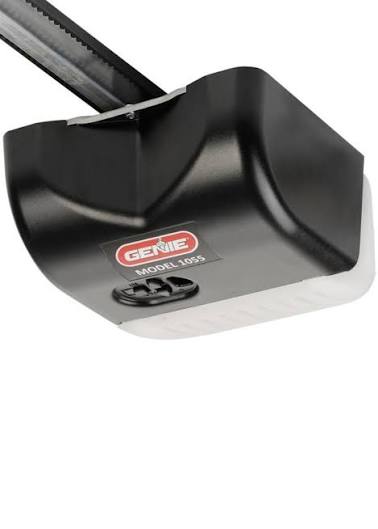
Is your Genie Model 1055 garage door opener not responding to your remote? You’re not alone. Many homeowners face this frustrating issue when trying to sync their remotes or keypads. Learning how to program Genie Model 1055 garage door opener correctly can save you time, money, and the hassle of calling a technician. In this comprehensive guide, we’ll walk you through every step with clear instructions and expert tips.
Why Programming Your Genie 1055 Matters
Before diving into the steps, it’s important to understand why proper programming is crucial. The Genie Model 1055 is a reliable chain-drive opener known for its durability and quiet operation. However, like any electronic device, it requires correct synchronization between the opener unit and your remote controls or wireless keypads.
According to industry data from the International Door Association, approximately 30% of garage door service calls are related to programming issues rather than mechanical failures. This means that knowing how to properly program your device can prevent unnecessary service visits and costs.
Understanding Your Genie Model 1055 System
The Genie Model 1055 features a simple yet effective programming system. Before starting, locate these key components:
- Learn Button: Usually found on the back or side of the motor unit, often colored purple or red
- LED Indicator: Shows programming status with blinking patterns
- Remote Control: Your handheld transmitter
- Wireless Keypad (if applicable): External entry system
For more technical specifications about garage door openers, you can reference Wikipedia’s article on garage door openers which provides comprehensive background information on how these systems work.
Step-by-Step Guide: How to Program Genie Model 1055 Garage Door Opener
Step 1: Prepare Your Equipment
Gather everything you need before starting:
- Your Genie Model 1055 remote control
- A sturdy ladder to reach the motor unit
- Fresh batteries for your remote (recommended: AA alkaline)
- Clear workspace around the garage door
Pro Tip: Always test your remote batteries first. Weak batteries are the most common cause of programming failures.
Step 2: Clear Existing Codes (If Necessary)
If you’re reprogramming due to lost remotes or security concerns, clear the memory first:
- Locate the Learn Button on your Genie 1055 motor unit
- Press and hold the Learn Button for approximately 10 seconds
- Wait until the LED indicator turns off completely
- Release the button
This action erases all previously programmed remotes and keypads from the system.
Step 3: Program Your Remote Control
Follow these precise steps to sync your remote:
- Press the Learn Button once briefly (don’t hold it)
- The LED indicator will begin blinking rapidly
- Within 30 seconds, press and hold the button on your remote that you want to program
- Keep holding until the LED stops blinking and remains solid
- Test the remote by pressing the programmed button
Important: You have only 30 seconds to complete this process after pressing the Learn Button. If you miss this window, start over from step 1.
Step 4: Program Additional Remotes
The Genie Model 1055 can store up to 7 different remote codes. To add more remotes:
- Repeat Step 3 for each additional remote
- Use different buttons on multi-button remotes if desired
- Test each remote individually after programming
Step 5: Program Wireless Keypad (Optional)
If you have a Genie wireless keypad:
- Press the Learn Button on the motor unit
- Within 30 seconds, enter your desired 4-digit PIN on the keypad
- Press the ENTER or SEND button
- The LED should blink to confirm successful programming
- Test the keypad by entering your PIN
Common Programming Issues and Solutions
Even with careful following of instructions, problems can occur. Here are the most frequent issues and their solutions:
| Problem | Possible Cause | Solution |
|---|---|---|
| Remote doesn’t respond | Dead batteries | Replace with fresh AA batteries |
| LED doesn’t blink | Learn button not pressed properly | Press firmly and check connection |
| Programming fails repeatedly | Interference from other devices | Move away from WiFi routers, cordless phones |
| Only works intermittently | Weak signal | Reposition antenna or replace remote |
| Multiple remotes conflict | Memory full | Clear all codes and reprogram systematically |
Troubleshooting Signal Interference
Modern homes contain numerous wireless devices that can interfere with garage door signals. Common culprits include:
- WiFi routers operating on 2.4 GHz frequency
- Cordless phones
- Baby monitors
- LED light bulbs (certain types)
If you experience interference, try changing the frequency channel on your WiFi router or moving the garage door opener’s antenna to a different position.
Advanced Tips for Optimal Performance
Regular Maintenance Schedule
To ensure your Genie Model 1055 continues operating smoothly:
- Monthly: Test all remotes and check battery levels
- Quarterly: Clean the safety sensors and check alignment
- Annually: Lubricate moving parts and inspect cables
Security Best Practices
Protect your home by following these security guidelines:
- Change codes regularly: Update your remote and keypad codes every 6-12 months
- Use unique PINs: Avoid obvious combinations like 1234 or birth years
- Monitor access: Keep track of who has programmed remotes
- Update firmware: Check Genie’s website for any available updates
When to Call a Professional
While most programming tasks are DIY-friendly, contact a professional if:
- The motor unit doesn’t respond to any programming attempts
- You notice unusual noises during operation
- The door operates inconsistently or reverses unexpectedly
- Safety sensors malfunction repeatedly
Frequently Asked Questions
Q: How many remotes can I program to my Genie Model 1055?
A: The Genie Model 1055 can store up to 7 different remote control codes. This includes both handheld remotes and wireless keypads. Each device counts as one code, so plan accordingly if you have multiple family members needing access.
Q: What should I do if my remote stops working after programming?
A: First, check the battery strength. If batteries are good, try reprogramming the remote following the steps above. If problems persist, there may be interference from other wireless devices. Try programming in a different location or at a different time of day when fewer devices are active.
Q: Can I use universal remotes with the Genie Model 1055?
A: Yes, many universal remotes are compatible with the Genie Model 1055. Look for remotes specifically labeled as compatible with Genie Intellicode systems. Follow the universal remote’s programming instructions, which typically involve entering a specific code sequence.
Q: How long does the programming process take?
A: Programming a single remote typically takes 2-3 minutes, including preparation time. Adding multiple remotes will take proportionally longer. The actual programming step (pressing buttons) takes only seconds, but allow extra time for troubleshooting if needed.
Q: Is there a way to reset my Genie 1055 without clearing all codes?
A: Unfortunately, the Genie Model 1055 doesn’t offer selective code deletion. To remove specific remotes, you must clear all codes and reprogram the ones you want to keep. This is actually beneficial for security, as it ensures only current, authorized remotes have access.
Q: What type of batteries should I use in my Genie remote?
A: Use high-quality AA alkaline batteries for optimal performance. Avoid rechargeable batteries as they may not provide consistent voltage. Replace batteries annually or when you notice decreased range. Keep spare batteries on hand for emergencies.
Conclusion
Learning how to program Genie Model 1055 garage door opener doesn’t have to be complicated. With the right approach and attention to detail, you can successfully sync your remotes and keypads in just a few minutes. Remember to use fresh batteries, follow the timing carefully, and troubleshoot methodically if issues arise.
Regular maintenance and proper programming will extend the life of your garage door system while keeping your home secure. Don’t let programming frustrations keep you from enjoying the convenience of your automated garage door.
Found this guide helpful? Share it with friends and family who might be struggling with their Genie garage door openers. Bookmark this page for future reference, and feel free to leave comments with your own tips or questions. Your experience could help another homeowner solve their programming puzzle!
Stay safe, stay connected, and enjoy the convenience of your properly programmed Genie Model 1055 garage door opener!



Leave a Reply