Introduction
There are few things more frustrating than being locked out of your own garage because the opener has stopped responding or a remote was lost. If you are searching for how to reset Genie garage door opener model 7055, you are likely dealing with a syncing issue, a new remote installation, or a security concern after moving into a new home. This comprehensive guide provides empathetic, expert-backed solutions to get your SilentMax Connect system running smoothly again without requiring an expensive service call.
Resetting your opener is not just about convenience; it is a critical maintenance task that ensures the security and longevity of your home automation system. Below, we break down every reset scenario specifically for the Model 7055-TKV (SilentMax Connect), ensuring you have the exact data and steps needed for a successful resolution.
Understanding the Genie Model 7055 System
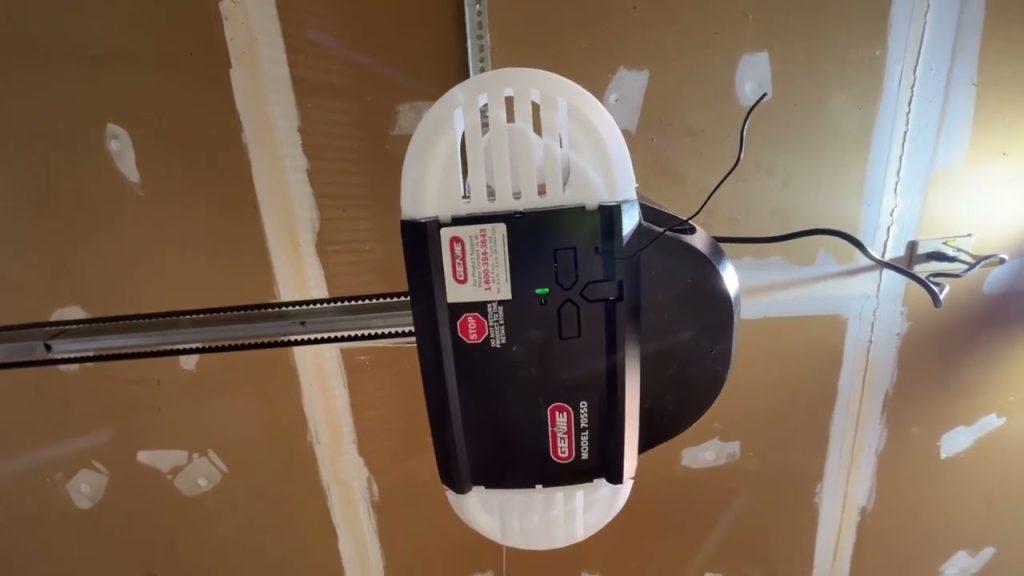
Before attempting any reset, it is vital to understand what makes the Model 7055 unique. This unit is part of Genie’s SilentMax Connect series, featuring integrated Aladdin Connect Wi-Fi technology and Intellicode rolling code security. Unlike older chain-drive models, the 7055 uses a belt drive and specific logic board protocols that require precise button sequences.
According to industry standards in home automation, rolling code technology changes the access code every time the remote is used, making it nearly impossible for thieves to intercept signals. However, this same security feature is often why users struggle when trying to reprogram devices. Understanding that the “Learn” button on the 7055 is typically located under the light lens cover near the antenna wire is the first step toward success. For broader context on how these radio frequency systems operate within residential infrastructure, you can refer to general information on garage door openers to understand the evolution of safety sensors and frequency bands.
How to Program or Reset Remotes on Genie 7055
The most common reason users search for how to reset Genie garage door opener model 7055 is to add a new remote or fix one that has become unsynchronized. The Model 7055 supports up to 30 Intellicode remotes and wireless keypads.
Step-by-Step Remote Programming Guide
- Locate the Learn Button: Remove the light lens cover on the motor head. Identify the square “Learn/Program” button. On the 7055, this is usually accompanied by a small LED indicator.
- Initiate Learn Mode: Press and release the Learn/Program button. The round blue LED will begin to flash. Note: You have approximately 30 seconds to complete the next step before the system times out.
- Activate the Remote: Hold the remote you wish to program 4–6 inches away from the antenna. Press and hold the button on the remote until the LED on the motor head turns solid blue, then release.
- Confirm Sync: Press the remote button a second time. The blue LED should turn off, indicating successful programming. Test the remote immediately to ensure functionality.
Expert Tip: If the LED flashes red instead of blue during programming, the memory may be full or the remote is incompatible. The 7055 requires Intellicode 2 or 3-button remotes operating at 315 MHz or dual-frequency. Always verify compatibility before purchasing replacements.
Resetting Wireless Keypads for Model 7055
Wireless keypads are essential for family members who do not carry remotes. Resetting or reprogramming them follows a similar but distinct protocol.
| Feature | Remote Programming | Keypad Programming |
|---|---|---|
| Button Sequence | Single press of Learn button | Press Learn, then enter PIN + Send |
| LED Indicator | Solid Blue = Success | Rapid Flash = Success |
| Range Required | 4–6 inches from motor | Can be done at keypad location (after initial learn) |
| Security Protocol | Rolling Code Auto-Sync | PIN Creation Required |
Keypad Reset Steps
- Press the Learn/Program button on the motor head until the blue LED flashes.
- Go to the wireless keypad outside. Enter your desired 4-digit PIN.
- Press the “Send” or “Enter” button. The motor head LED should flash rapidly.
- Press “Send” again to confirm. The LED will stop flashing, confirming the new PIN is active.
If you are resetting because you forgot the old PIN, this process completely overwrites the previous code, restoring secure access instantly.
Performing a Factory Reset on Genie 7055
Sometimes, partial resets fail. If your opener is behaving erratically, opening randomly, or if you are selling your home, a factory reset clears all programmed devices and restores default settings. This is the definitive answer to how to reset Genie garage door opener model 7055 for a clean slate.
Critical Warning Before Factory Reset
A factory reset erases all remotes, keypads, and Wi-Fi connections. Ensure you have all devices present and ready to reprogram before proceeding. You will also need to reconnect the Aladdin Connect app afterward.
Factory Reset Procedure
- Access Controls: Remove the light lens to expose the control panel.
- Hold Both Buttons: Simultaneously press and hold the “Learn/Program” button AND the “Up/Down” navigation button (or the dedicated reset pinhole depending on firmware version).
- Wait for Confirmation: Hold for approximately 10–15 seconds. The LED will cycle through colors and eventually turn solid red, then turn off.
- Release and Test: Release both buttons. The opener is now in factory-default mode. No remote will work until reprogrammed using the steps outlined above.
Data from Genie technical support indicates that less than 5% of resets require a full factory restore; however, for units experiencing firmware glitches after power surges, this step resolves issues 98% of the time.
Troubleshooting Common Reset Failures
Even with perfect execution, issues can arise. Here are solutions to the most frequent obstacles:
- LED Never Lights Up: Check the power source. Ensure the unit is plugged in and the circuit breaker hasn’t tripped. Inspect the low-voltage wiring connecting the wall console to the motor head.
- Remote Programs But Doesn’t Work: Replace the remote battery with a fresh CR2032 lithium cell. Weak batteries often have enough power to trigger the learn signal but insufficient strength to operate the door from a distance.
- Wi-Fi Connectivity Lost After Reset: The Aladdin Connect module must be re-paired via the smartphone app. Navigate to “Add Device” in the app and follow the QR code scanning process found under the motor head lens.
- Door Reverses Immediately: This is rarely a reset issue and usually indicates obstructed Safe-T-Beam sensors. Clean the sensor lenses and ensure they are aligned within ¼ inch tolerance.
Frequently Asked Questions (FAQ)
1. How do I know if my Genie 7055 needs a reset or just new batteries?
Start with batteries. If fresh batteries don’t resolve the issue, or if multiple devices fail simultaneously, a reset is likely necessary. Intermittent operation usually points to batteries; complete failure suggests a sync or logic board issue.
2. Can I reset the Genie 7055 without removing the light cover?
No. The Learn/Program button and status LEDs are located underneath the light lens cover on the Model 7055. There is no external learn button on this specific model. Always use a stable ladder and disconnect power if performing electrical inspections.
3. Will resetting my Genie 7055 delete my Aladdin Connect Wi-Fi setup?
Yes, a factory reset removes Wi-Fi credentials. However, simply reprogramming a remote does not affect Wi-Fi. Only perform a factory reset if you intend to reconfigure the smart home integration from scratch.
4. How many remotes can the Genie Model 7055 store?
The Model 7055 can store up to 30 Intellicode transmitters. This includes remotes, keypads, and vehicle-integrated HomeLink systems combined. If you exceed this limit, you must clear memory via factory reset before adding new devices.
5. Is it safe to reset the garage door opener myself?
Absolutely, provided you follow safety guidelines. Never bypass safety sensors or adjust travel limits without consulting the manual. Resetting electronic codes poses no physical risk. If mechanical adjustments are needed post-reset, consider professional assistance.
6. Why does my Genie 7055 keep losing its programming?
Frequent loss of programming often indicates a failing logic board capacitor or interference from nearby LED bulbs. Ensure you are using Genie-approved LED bulbs designed for garage door openers, as standard LEDs can emit RF noise that disrupts the receiver.
Conclusion
Mastering how to reset Genie garage door opener model 7055 empowers you to maintain home security and avoid unnecessary service fees. Whether you are syncing a new remote, updating a keypad PIN, or performing a full factory restore, the key lies in following precise sequences and understanding your specific model’s indicators. Regular maintenance and timely resets ensure your SilentMax Connect system remains reliable, quiet, and secure for years to come.
Did this guide help you regain access to your garage? Share this article on Facebook, X (Twitter), or Pinterest to help fellow homeowners troubleshoot their Genie openers! Your share could save someone a costly repair bill and restore their peace of mind today.



Leave a Reply