Introduction
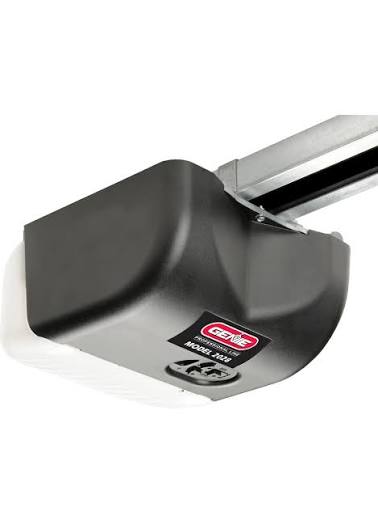
There are few things more frustrating than pressing your garage door remote and watching absolutely nothing happen, especially when you are rushing to leave for work or returning home late at night. If you own this specific unit, understanding how to reset Genie garage door opener model 2028 is the first step toward restoring security and convenience to your daily routine. This comprehensive guide will walk you through every reset scenario with empathy and precision, ensuring you get back on track without unnecessary stress or expensive service calls.
Understanding Why Your Genie 2028 Needs a Reset
Before diving into the technical steps, it is vital to understand why a reset is necessary. The Genie Model 2028 (often associated with the legacy Excelerator or Screw Drive series) utilizes rolling code technology. Over time, signal interference, dead batteries, power surges, or accidental button presses can desynchronize the transmitter from the receiver.
A reset is not just about fixing a broken door; it is a critical security measure. According to industry safety standards, maintaining proper synchronization ensures that safety sensors function correctly, preventing the door from closing on vehicles, pets, or children. When you learn how to reset Genie garage door opener model 2028, you are essentially re-establishing the secure handshake between your remote and the motor unit.
Safety First: Pre-Reset Checklist
Never attempt internal repairs or hard resets without taking precautions. Garage door springs are under extreme tension and can cause severe injury.
- Clear the Area: Ensure no people or objects are in the door’s path.
- Check Power: Verify the unit is plugged in and the circuit breaker is on.
- Inspect Sensors: Make sure the safety reversal sensors at the floor level are aligned and free of debris.
- Read the Manual: Always reference manufacturer guidelines. For broader context on garage door safety mechanisms and history, you can refer to Wikipedia’s Garage Door Opener entry.
How to Reset Genie Garage Door Opener Model 2028 Remotes
The most common reason users search for this topic is remote desynchronization. Follow these precise steps to reprogram your handheld transmitter.
Step-by-Step Remote Programming
- Locate the Learn Button: On the Model 2028, the “Learn” or “Program” button is typically located on the rear panel of the motor head, near the antenna wire. It may be labeled “SET/PRGM.”
- Activate Learn Mode: Press and release the Learn button. The LED indicator will begin flashing red (or amber, depending on the specific revision). You now have 30 seconds to complete the next step.
- Transmit the Signal: Press and hold the button on your remote that you wish to program. Hold it until the motor unit lights flash or you hear a distinct click. This usually takes 2–4 seconds.
- Test the Connection: Press the remote button again. The door should activate. If it does not, repeat the process, ensuring you are within 5 feet of the motor during programming.
Pro Tip: If you have multiple remotes, program them all during the same session to ensure they share the same rolling code seed.
Resetting the Wireless Keypad for Model 2028
External keypads are convenient but prone to weather-related glitches. Here is how to reset Genie garage door opener model 2028 specifically for keypad access.
- Open the keypad cover and locate the “Program” button inside.
- Press the Program button once. The LED will blink.
- Enter your desired 4-digit PIN followed by the “Send” or “Enter” button.
- Within 30 seconds, press the Learn button on the overhead motor unit.
- Return to the keypad and press the “Send” button again. The motor light should flash to confirm acceptance.
- Test by entering your new PIN and pressing Send.
Performing a Factory Reset on Genie 2028
If remotes and keypads fail repeatedly, or if you are moving into a new home and need to erase previous owners’ access, a factory reset is required.
The Hard Reset Procedure
| Step | Action | Expected Result |
|---|---|---|
| 1 | Locate the Learn/Set button on the motor head | N/A |
| 2 | Press and HOLD the button for 10+ seconds | LED turns solid, then goes out |
| 3 | Release the button | All codes erased from memory |
| 4 | Reprogram all devices immediately | System ready for new codes |
Warning: A factory reset deletes all programmed remotes, keypads, and vehicle transmitters. Have all devices present before starting.
Troubleshooting Common Reset Failures
Even when following instructions perfectly, issues can persist. Here are data-backed solutions for stubborn problems.
LED Flash Patterns Matter
Genie openers use diagnostic LEDs. Count the flashes:
- 1 Flash: Safety sensor obstruction or misalignment.
- 2 Flashes: Sensor wiring issue.
- 3 Flashes: Short circuit in wall console or wiring.
- Continuous Red: Motor overload or travel limit error.
Battery Voltage Check
Don’t assume new batteries are good. Use a multimeter to verify voltage. A CR2032 battery should read 3.0V or higher. Anything below 2.8V may transmit a weak signal that the Model 2028 cannot recognize during the learning window.
Antenna Positioning
The hanging antenna wire must be fully extended and not coiled. Signal strength drops by up to 60% if the antenna is tucked inside the housing or touching metal components.
Maintenance Tips to Prevent Future Resets
Prevention is always better than cure. Implement these monthly habits:
- Lubricate Moving Parts: Use silicone-based lubricant on rollers, hinges, and the screw drive rail. Avoid WD-40, which attracts dust.
- Clean Safety Sensors: Wipe lenses with a soft cloth monthly. Dirt buildup causes false obstruction readings.
- Test Balance Manually: Disconnect the opener and lift the door halfway. It should stay in place. If it falls, your springs need professional adjustment—this strains the opener and causes reset failures.
- Surge Protection: Install a dedicated surge protector for your garage door opener. Power fluctuations are the #1 cause of logic board corruption in Genie units.
Frequently Asked Questions (FAQ)
Q1: How do I know if my Genie 2028 needs a reset or a new logic board?
If the unit responds to the wall console but refuses to accept any remote programming after multiple correct attempts, and the Learn LED never illuminates, the logic board may have failed. However, always try a factory reset first. Logic board replacement typically costs $80–$150, while a reset is free.
Q2: Can I reset my Genie 2028 without the original remote?
Yes. You can program a new compatible remote directly using the Learn button on the motor unit. You do not need the old remote to add new ones. However, if you want to remove the old remote’s access without having it, you must perform a full factory reset.
Q3: Why does my Genie 2028 work with the wall button but not the remote after resetting?
This almost always indicates a frequency mismatch or battery issue. The Model 2028 operates on 390 MHz. Ensure your replacement remote is specifically rated for 390 MHz Genie systems. Also, verify the remote battery is fresh and installed with correct polarity.
Q4: How often should I reset my garage door opener?
You should only reset when experiencing functional issues or security concerns (e.g., lost remote, moved homes). There is no scheduled maintenance reset. However, testing your system monthly and replacing batteries annually prevents most reset scenarios.
Q5: Is the Genie 2028 compatible with HomeLink or Car2U?
Many Genie 2028 units are compatible, but older revisions may require an external adapter. Check your vehicle’s compatibility list first. Programming follows the same Learn button procedure, but some vehicles require holding the car’s HomeLink button while pressing the motor’s Learn button simultaneously.
Q6: What if the Learn button doesn’t light up at all?
First, check power at the outlet with a lamp. If power is confirmed but the Learn LED remains dark, the internal capacitor or logic board has likely failed. This requires professional diagnosis. Do not attempt to open the motor housing unless you are qualified, as capacitors can retain dangerous charge even when unplugged.
Conclusion
Mastering how to reset Genie garage door opener model 2028 empowers you to maintain your home’s security and convenience independently. Whether you are reprogramming a single remote, syncing a keypad, or performing a complete factory reset, the steps outlined above provide a safe, methodical path to resolution. Remember that regular maintenance—battery checks, sensor cleaning, and lubrication—dramatically reduces the frequency of resets needed.
Your garage door is often the primary entry point to your home; keeping it reliable is worth the small investment of time. Did this guide solve your problem? Share it with neighbors, friends, or family members who might be struggling with their own Genie opener. Post your success story or remaining questions in the comments below—we love hearing from fellow DIY homeowners! Stay safe, stay secure, and keep those doors opening smoothly. 🏠✨



Leave a Reply