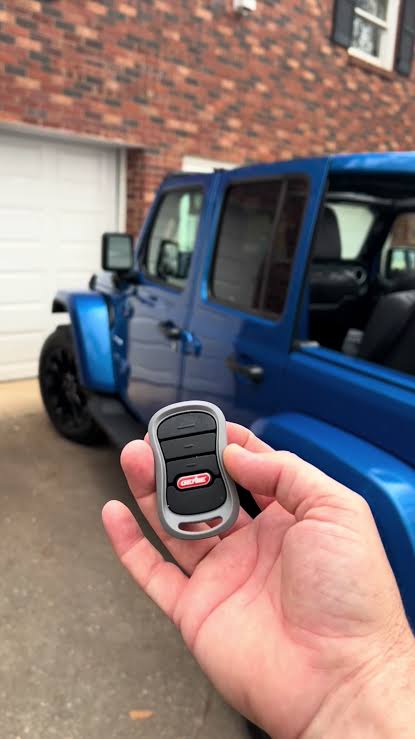
Introduction
There is nothing quite as frustrating as pulling into your driveway after a long off-road adventure or a grueling commute, only to realize you cannot get your garage door to open from inside your vehicle. If you are struggling with syncing your vehicle’s built-in system or installing a new universal remote, understanding how to set up Jeep Wrangler garage door opener functionality is essential for seamless daily convenience. This comprehensive guide will walk you through every step of the process with empathy and precision, ensuring you spend less time troubleshooting and more time enjoying the freedom your Wrangler provides.
Understanding Your Jeep Wrangler’s Garage Door System
Before diving into buttons and remotes, it is vital to identify which system your specific Wrangler model utilizes. Jeep has transitioned through several technologies over the decades, and the setup process varies significantly between them. Generally, Wranglers fall into one of three categories:
- Factory Uconnect/HomeLink: Integrated directly into the overhead console or rearview mirror (standard on most 2018+ JL models and higher trims of the JK).
- Aftermarket Universal Remotes: Clip-on or visor-mounted units installed by previous owners or dealerships.
- Smartphone Integration: Newer Uconnect systems that utilize cloud-based connectivity rather than radio frequency (RF) signals.
According to automotive technology standards, most modern vehicles utilize rolling-code security protocols to prevent signal theft. For a deeper technical understanding of these security frequencies, you can refer to the Wikipedia entry on Garage Door Openers, which details the evolution from dip switches to encrypted rolling codes. Knowing this distinction helps explain why older “fixed code” programming methods no longer work on newer Jeeps.
How Do I Program the Factory Uconnect HomeLink System?
For the majority of current Jeep Wrangler owners, the factory-integrated HomeLink system is the primary method for garage access. This system replaces the need for a separate handheld remote. Follow these precise steps to sync your vehicle:
Step 1: Clear Previous Codes (If Applicable)
If your Wrangler is pre-owned or you have moved to a new home, you must reset the system first.
- Press and hold the two outer HomeLink buttons simultaneously for 10–20 seconds.
- Release when the indicator light begins to flash rapidly. This confirms the memory is wiped.
Step 2: Initiate Pairing Mode
- Turn your ignition to the ON/RUN position (engine does not need to be running, but accessory power must be active).
- Press and hold the desired HomeLink button. The indicator light will begin to flash slowly.
Step 3: Sync with Your Handheld Remote
- Hold your original garage door remote 1–3 inches away from the HomeLink buttons.
- Simultaneously press and hold the button on your handheld remote and the chosen HomeLink button.
- Watch the HomeLink indicator light. It will transition from a slow flash to a rapid flash or solid light. This typically takes 5–30 seconds.
- Release both buttons once the light changes state.
Step 4: Complete Rolling Code Synchronization
Most modern openers (post-1996) require this critical extra step at the garage door motor unit itself.
- Locate the “Learn” or “Smart” button on your garage door opener motor (usually near the antenna wire).
- Press and release the Learn button. You typically have 30 seconds to complete the next action.
- Return to your Jeep and press the programmed HomeLink button three times in succession, holding each press for 2 seconds.
- Test the system. The door should activate reliably.
Expert Tip: If the light flashes rapidly during Step 3 but the door does not respond after Step 4, your opener may use a fixed-code system. In this case, skip Step 4 and test immediately after Step 3.
What If My Jeep Doesn’t Have Factory HomeLink?
Many base-model Wranglers (especially Sport and Sport S trims) lack integrated garage door openers. Fortunately, setting up an aftermarket solution is straightforward and cost-effective.
Choosing the Right Aftermarket Opener
When selecting a universal remote for a Wrangler without factory integration, consider the following comparison:
| Feature | Visor-Mounted Universal | Rearview Mirror Replacement | Smart Wi-Fi Controller |
|---|---|---|---|
| Installation Difficulty | Low (Clip-on) | Medium (Wiring required) | Low (Plug-in module) |
| Aesthetics | Bulky/Visible | OEM Look | Hidden |
| Compatibility | Most RF Openers | Most RF Openers | Specific Brands Only |
| Price Range | $25 – $45 | $80 – $150 | $30 – $60 |
| Best For | Budget/Easy Install | Clean Factory Look | Remote Access via Phone |
Installation Steps for Visor-Mounted Units
- Verify Frequency Compatibility: Check your garage door opener’s manual for its operating frequency (e.g., 315 MHz, 390 MHz). Ensure the universal remote supports this band.
- Mount Securely: Attach the clip to the driver’s side sun visor. Ensure it does not obstruct your forward vision or interfere with airbag deployment zones.
- Program Using Manufacturer Instructions: Aftermarket units vary wildly. Always follow the included manual rather than generic Jeep instructions.
- Test Range: Wranglers have significant metal framing that can sometimes shield RF signals. Test operation from at least 20 feet away to ensure reliable performance.
Troubleshooting Common Setup Issues
Even experienced enthusiasts encounter hiccups. Here are solutions to the most frequent problems when learning how to set up Jeep Wrangler garage door opener systems:
- Light Flashes But Door Won’t Open: This usually indicates a frequency mismatch or a rolling-code synchronization failure. Repeat the “Learn Button” step at the motor unit, ensuring you complete the three presses within the 30-second window.
- Intermittent Operation: Weak batteries in your handheld remote during programming can cause incomplete code transfer. Replace the remote battery before attempting to program again. Also, check if LED bulbs in your garage opener are causing RF interference; some cheap LEDs emit noise that blocks signals.
- HomeLink Buttons Unresponsive: Verify your Jeep’s battery voltage. Low voltage can prevent the module from entering programming mode. Additionally, check fuse #F32 (or equivalent for your model year) in the interior fuse panel.
- Works Outside Garage But Not Inside: Signal reflection or obstruction. Reposition any aftermarket remotes. For factory systems, ensure no metallic window tint or roof rack accessories are blocking the overhead console signal path.
Frequently Asked Questions (FAQ)
Can I program my Jeep Wrangler garage door opener without the original remote?
Yes, but it requires direct access to the garage door opener motor unit. You can manually put the motor into “learn mode” using the button on the unit itself, then press your Jeep’s HomeLink button to sync directly. However, having the original remote makes the process significantly faster and easier.
Why won’t my 2024 Jeep Wrangler pair with my older garage door opener?
Newer Uconnect systems are optimized for rolling-code security. If your garage door opener was manufactured before 1996 and uses fixed dip-switch codes, it may be incompatible. You may need to install a compatibility bridge or upgrade your garage door opener receiver to a modern rolling-code model.
Does the Jeep Wrangler garage door opener work with smart home systems like Alexa or Google Home?
Factory HomeLink systems communicate via RF, not Wi-Fi, so they do not natively integrate with voice assistants. However, you can achieve smart home integration by installing a Wi-Fi-enabled garage door controller (like Chamberlain myQ or Meross) alongside your existing opener, allowing voice control independent of your Jeep’s system.
How many devices can I store in my Jeep’s HomeLink system?
Most Jeep Wrangler HomeLink systems support up to three distinct devices. This allows you to program your primary garage door, a secondary garage or gate, and even outdoor lighting or security systems. Each device occupies one of the three programmable buttons.
Is it safe to leave my garage door opener programmed when selling my Jeep?
No. Always perform a factory reset of the HomeLink system before transferring ownership. Holding the two outer buttons for 20 seconds erases all stored codes, preventing unauthorized access to your home. This is a critical security practice recommended by both Jeep and home safety experts.
Conclusion
Mastering how to set up Jeep Wrangler garage door opener functionality transforms your daily routine from frustrating fumbling to effortless automation. Whether you are syncing a factory Uconnect HomeLink system, installing an aftermarket universal remote, or troubleshooting a stubborn connection, the key lies in identifying your specific system type and following precise, timed procedures. Remember that patience during the rolling-code synchronization step saves hours of future headaches, and always prioritize security by resetting codes when selling your vehicle.
Your Wrangler is built for adventure, and your garage access should be just as reliable as your four-wheel-drive system. Now that you have conquered this setup, you can focus on what truly matters: the road ahead.
Found this guide helpful? Share it with your fellow Jeep enthusiasts on Facebook, Instagram, or your favorite Wrangler forum! Tag a friend who’s still digging for their remote in the cupholder, and help our community enjoy smoother rides and smarter garages. Happy trailing! 🚙💨



Leave a Reply