Introduction
Are you struggling to sync your new garage door with your vehicle? You’re not alone. Many 2022 Toyota 4Runner owners face confusion when trying to integrate their home automation with their car’s built-in system. If you are looking for a clear, reliable answer on how to program 2022 Toyota 4Runner garage door opener, this guide is designed specifically for you. We will walk you through the process safely and efficiently, ensuring you can open your garage with just the push of a button.
The HomeLink system in your 4Runner is a powerful feature that replaces multiple remotes with a single, convenient interface. However, without proper instruction, the pairing process can feel intimidating. Whether you have a standard rolling-code opener or an older fixed-code model, understanding the correct steps is crucial for security and functionality. Let’s dive into the details so you can get back on the road with peace of mind.
Understanding the HomeLink System in Your 4Runner
Before pressing any buttons, it is essential to understand what you are working with. The 2022 Toyota 4Runner comes equipped with HomeLink, a universal transceiver that can learn the signals from most garage door openers, gate operators, and even home lighting systems.
Why Use HomeLink?
- Convenience: No more digging through your glove box for lost remotes.
- Security: Modern HomeLink systems use rolling codes, which change every time you press the button, preventing code theft.
- Space-Saving: Keeps your visor area clean and organized.
According to HomeLink’s official documentation, the system is compatible with over 95% of garage door openers manufactured since 1982. This high compatibility rate means that regardless of your garage door brand—whether it’s LiftMaster, Chamberlain, Genie, or Craftsman—you have a very high chance of successful integration.
Step-by-Step Guide: How To Program 2022 Toyota 4Runner Garage Door Opener
Programming your HomeLink system involves two main phases: clearing old codes (if necessary) and training the system to recognize your specific garage door opener. Follow these steps carefully.
Phase 1: Clearing Previous Codes (If Needed)
If your 4Runner is pre-owned or if you previously programmed a different garage door, you should clear the memory first.
- Turn your ignition to the “ON” position (you do not need to start the engine).
- Locate the three HomeLink buttons on your rearview mirror or overhead console.
- Press and hold the outer two buttons simultaneously.
- Keep holding them for about 20–30 seconds.
- Watch the indicator light. It will start flashing slowly and then rapidly. Once it flashes rapidly, release the buttons.
- The system is now cleared and ready for new programming.
Phase 2: Programming the New Garage Door Opener
This is the core part of learning how to program 2022 Toyota 4Runner garage door opener. Ensure your garage door opener motor unit is accessible (you may need a ladder) and that you have your original handheld remote nearby.
Step 1: Choose Your Button
Decide which of the three HomeLink buttons you want to use for your garage door. For this example, let’s use Button 1.
Step 2: Initiate Training Mode
- With the ignition still ON, press and hold the chosen HomeLink button (Button 1).
- Do not release it yet.
Step 3: Sync with Original Remote
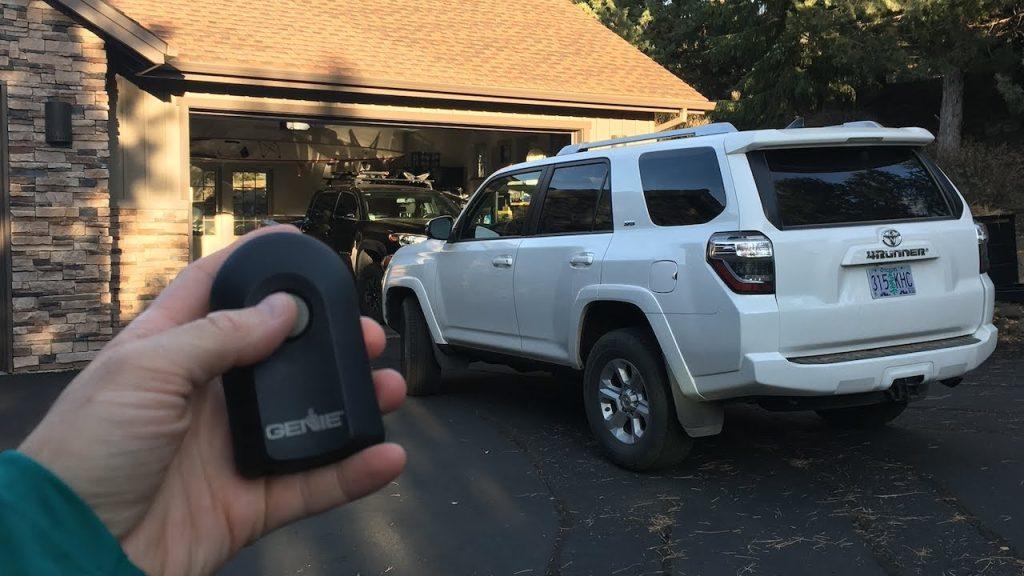
- While continuing to hold the HomeLink button, bring your original garage door remote within 1–3 inches of the HomeLink buttons.
- Press and hold the button on your original remote that operates the garage door.
- Hold both buttons down simultaneously.
- Watch the HomeLink indicator light. It will flash slowly at first, then change to a rapid flash.
- Once the light flashes rapidly, release both buttons. This usually takes about 10–20 seconds.
Step 4: Test the Connection
- Press the programmed HomeLink button (Button 1) firmly.
- Observe your garage door. If it moves, the basic programming is complete.
- If nothing happens, repeat Steps 2 and 3, ensuring the remote is close enough to the mirror.
Dealing with Rolling Code Openers
Most modern garage door openers (manufactured after 1996) use rolling code technology for enhanced security. If your door moved during Step 4 but only once, or if it didn’t move at all despite the rapid flash, you likely have a rolling code opener. You must complete the “Syncing” process at the motor unit.
How to Sync Rolling Codes:
- Locate the “Learn” or “Smart” button on your garage door opener motor unit (usually hanging from the ceiling in your garage). It is often colored yellow, purple, or red.
- Press and release the “Learn” button. The indicator light on the motor unit will typically blink or turn on.
- You have approximately 30 seconds to complete the next step.
- Return to your 4Runner.
- Press and hold the programmed HomeLink button (Button 1) for 2 seconds, then release.
- Repeat this press-and-release cycle three times in total.
- Test the button again. Your garage door should now operate consistently.
Pro Tip: If you cannot find the “Learn” button, consult your garage door opener’s manual. Some older models may require you to dip switches inside the motor unit to match the code manually, though this is rare in 2022 setups.
Troubleshooting Common Issues
Even with careful following, issues can arise. Here are common problems and solutions:
| Issue | Possible Cause | Solution |
|---|---|---|
| Light doesn’t flash rapidly | Remote too far away | Move the handheld remote closer (1–2 inches) to the HomeLink buttons. |
| Door moves once then stops | Rolling code not synced | Perform the “Learn” button sync procedure at the garage motor unit. |
| Buttons unresponsive | Ignition off | Ensure the vehicle is in “ON” mode or the engine is running. |
| Interference from LED bulbs | Signal blockage | Replace LED bulbs in the garage opener with incandescent ones temporarily during programming. |
Expert Insight
According to automotive technicians, signal interference is a leading cause of programming failure. LED light bulbs in garage door openers can emit frequency noise that disrupts the HomeLink signal. If you struggle to program the device, try turning off the garage lights or using the original remote in direct line-of-sight with the mirror.
FAQ Section
1. Can I program multiple garage doors to my 2022 Toyota 4Runner?
Yes, the HomeLink system has three separate buttons. You can program up to three different devices, such as two garage doors and a gate, or a garage door and a home lighting system. Each button is programmed independently using the same steps outlined above.
2. What if I don’t have the original garage door remote?
Programming without the original remote is difficult but sometimes possible. You may need to access the motor unit and use the “Learn” button to put the opener into pairing mode, then press the HomeLink button in the car. However, having the original remote is highly recommended for the initial training phase. If lost, consider contacting the manufacturer for a replacement remote.
3. Does programming HomeLink drain my car battery?
No, the HomeLink system is designed to be energy-efficient. It only draws power when actively transmitting a signal or during the programming process. Leaving the ignition on for the 5–10 minutes required for programming will not significantly impact your battery health.
4. Why is my HomeLink light flashing green vs. amber?
The color and behavior of the light indicate the status. A slow flash usually means it is waiting for a signal. A rapid flash indicates successful training. A solid light often means it is transmitting. Refer to your 4Runner’s owner’s manual for specific light codes, as they can vary slightly by trim level.
5. Is it safe to program HomeLink while driving?
No. Never attempt to program HomeLink while the vehicle is in motion. Always park your 4Runner in a safe location, preferably outside your garage, with the parking brake engaged and the transmission in Park. Safety should always be your top priority.
6. What if my garage door opener is very old (pre-1996)?
Older openers may use fixed codes rather than rolling codes. The programming process is similar, but you might not need to perform the “Learn” button sync at the motor unit. If the door operates immediately after the rapid flash in Step 4, you are done. If not, check if your opener has dip switches that need to be matched manually.
Conclusion
Learning how to program 2022 Toyota 4Runner garage door opener is a straightforward process that enhances your daily convenience and security. By following the steps to clear old codes, train the system with your original remote, and sync rolling codes at the motor unit, you can ensure seamless operation. Remember to troubleshoot potential interference from LED bulbs and always prioritize safety by programming while parked.
Now that your garage door is synced, enjoy the ease of entering your home with just a touch. Did this guide help you? Share this article with fellow Toyota owners on social media who might be struggling with their HomeLink setup. Your share could save someone hours of frustration!



Leave a Reply