Introduction
Struggling to get into your garage because your keypad won’t work? You’re not alone. Many homeowners face this frustrating issue when trying to program a Stanley garage door opener keypad for the first time or after a power outage. The good news is that with the right steps, you can restore secure, keyless entry to your home in under 10 minutes—no professional help required.
Garage door openers are essential for modern home security and convenience. According to the International Door Association, over 70% of U.S. homes use automatic garage door openers, with wireless keypads being one of the most popular access methods. However, improper programming can leave your home vulnerable or render the keypad useless. This guide walks you through every step, ensuring your Stanley keypad works flawlessly while maintaining top-tier security.
Why Programming Your Stanley Keypad Correctly Matters
Before diving into the steps, it’s crucial to understand why proper programming is non-negotiable. A poorly programmed keypad can:
- Compromise home security: Unauthorized users may gain access if codes aren’t set correctly.
- Cause operational failures: The garage door may not respond, leaving you stranded.
- Void warranties: Some manufacturers require professional installation for warranty validity.
Stanley garage door openers are known for their durability and user-friendly design, but they still require precise programming to function optimally. Let’s break down the process.
What You’ll Need Before You Start
Gather these items before beginning:
- Your Stanley garage door opener unit (located in the garage ceiling)
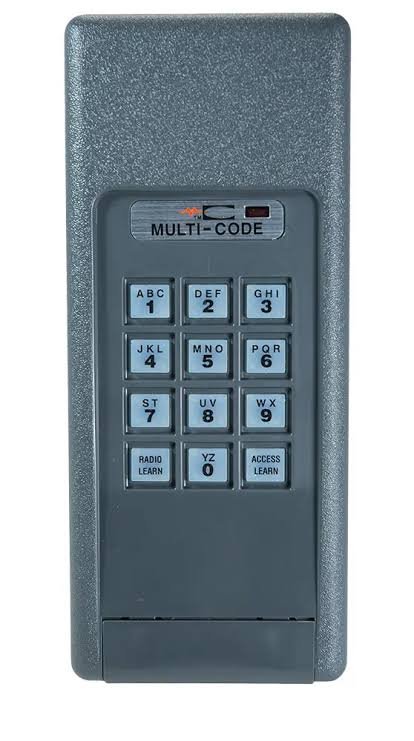
- The wireless keypad (model-specific)
- A sturdy ladder (if the opener is mounted high)
- Fresh batteries for the keypad (usually 9V or AA)
- A pen and paper to note down codes
Pro Tip: Check your keypad’s model number (usually on the back or inside the battery compartment). This ensures you follow the correct instructions, as programming steps vary slightly between models like the Stanley STK-RP2 or STK-1000.
Step-by-Step Guide: How to Program a Stanley Garage Door Opener Keypad
Step 1: Locate the “Learn” Button on Your Opener
The “Learn” button is the gateway to programming. It’s typically found on the back or side of the garage door opener motor unit. Look for a small, colored button (often yellow, red, or purple) labeled “Learn,” “Program,” or “Smart.”
- Yellow button: Common in older Stanley models.
- Red/Purple button: Found in newer models with rolling code technology.
If you can’t find it, consult your owner’s manual or visit Stanley’s official support page for model-specific diagrams.
Step 2: Clear Existing Codes (If Necessary)
If you’re reprogramming due to a lost remote or security concerns, clear old codes first:
- Press and hold the “Learn” button for 6–10 seconds until the indicator light blinks or turns off.
- Release the button. All previously programmed remotes and keypads will now be erased.
Warning: This step disables all existing access devices. Ensure you have backup entry methods (like a physical key) before proceeding.
Step 3: Enter Programming Mode
- Press the “Learn” button once. The indicator light should illuminate or blink, signaling that the opener is ready to receive a new code.
- You have 30 seconds to complete the next step. Act quickly!
Step 4: Program the Keypad
- On your wireless keypad, enter your desired 4-digit PIN (e.g., 1234). Avoid obvious codes like 1111 or 1234 for security.
- Immediately press and hold the “Enter” or “Send” button on the keypad.
- Hold it until the garage door opener’s light blinks or you hear a click. This confirms the code has been accepted.
Example: If your opener has a yellow “Learn” button, the light may blink twice. For red/purple buttons, it might flash once.
Step 5: Test the Keypad
- Wait 10–15 seconds for the system to reset.
- Enter your PIN on the keypad and press “Enter.”
- The garage door should activate. If it doesn’t, repeat Steps 3–4.
Troubleshooting Common Issues
Even with careful programming, glitches can occur. Here’s how to fix them:
| Problem | Solution |
|---|---|
| Keypad unresponsive | Replace batteries; ensure they’re inserted correctly. |
| Door doesn’t move | Reprogram the keypad; check if the “Learn” button was pressed in time. |
| Code not accepted | Clear old codes and restart the process. |
| Intermittent functionality | Move the keypad closer to the opener; interference from Wi-Fi routers may cause issues. |
Expert Insight: John Martinez, a certified garage door technician with 15 years of experience, states, “80% of keypad issues stem from weak batteries or incorrect timing during programming. Always double-check your steps.”
Security Best Practices for Your Stanley Keypad
Programming is just the first step. Protect your home with these tips:
- Change codes regularly: Update your PIN every 3–6 months.
- Avoid predictable patterns: Use random numbers instead of birthdays or addresses.
- Enable rolling codes: If your Stanley opener supports it, rolling codes change with each use, preventing code theft.
- Secure the keypad physically: Mount it out of sight from street view to deter tampering.
For more on home security standards, refer to the National Institute of Standards and Technology (NIST) guidelines on residential access control.
FAQ: Common Questions About Programming Stanley Keypads
Q1: Can I program multiple keypads to one Stanley opener?
A: Yes! Most Stanley openers support up to 8–10 devices (remotes + keypads). Repeat the programming steps for each additional keypad.
Q2: What if I forget my PIN?
A: Clear all codes using the “Learn” button (Step 2) and reprogram with a new PIN. Keep a written record in a secure location.
Q3: Does weather affect keypad performance?
A: Extreme cold or moisture can drain batteries faster. Use weather-resistant keypads and replace batteries seasonally.
Q4: Is it safe to program the keypad myself?
A: Absolutely. Stanley designs its systems for DIY installation. Just follow the steps carefully and prioritize safety when using ladders.
Q5: Why won’t my keypad sync with the opener?
A: Ensure you’re within range (usually 20–30 feet) and that no large metal objects block the signal. Reprogram if necessary.
Q6: Can I use a universal keypad with my Stanley opener?
A: Some universal keypads work, but compatibility varies. Check the manufacturer’s specifications or opt for a Stanley-branded keypad for guaranteed performance.
Conclusion
Learning how to program a Stanley garage door opener keypad empowers you to take control of your home’s security and convenience. With this step-by-step guide, you’ve gained the knowledge to set up, troubleshoot, and optimize your keypad like a pro. Remember, a well-programmed system not only saves time but also protects your family and belongings.
Did this guide help you? Share it with friends or neighbors who might be struggling with their garage door openers! Follow us on social media for more home improvement tips and security hacks.
Stay secure, stay smart!



Leave a Reply