Introduction
There is nothing quite as frustrating as sitting in your driveway, rain pouring down, fumbling for a plastic remote that has mysteriously vanished from your cup holder. If you have ever wished for the seamless convenience of opening your garage directly from your vehicle’s dashboard, you are not alone, and the solution is likely already built into your car. Learning how to program universal garage door opener in car systems is a straightforward process that can instantly upgrade your daily routine and home security.
In this comprehensive guide, we will walk you through every step of syncing your vehicle to your garage, regardless of whether you drive a newer model with advanced tech or an older vehicle with legacy buttons. We understand that technical manuals can be confusing, so we have broken this down into simple, empathetic instructions that prioritize your safety and success. Let’s get your car connected so you never have to dig for a remote again.
Understanding Your In-Car System: HomeLink vs. Car2U
Before you begin pressing buttons, it is vital to identify which system your vehicle uses. Not all in-car openers are created equal, and using the wrong method is the most common reason for programming failure. According to automotive industry data, over 95% of vehicles manufactured after 2013 utilize one of two primary systems.
The Two Main Technologies
| Feature | HomeLink | Car2U (X2D) |
|---|---|---|
| Primary Era | 1996 – Present | 2007 – 2018 |
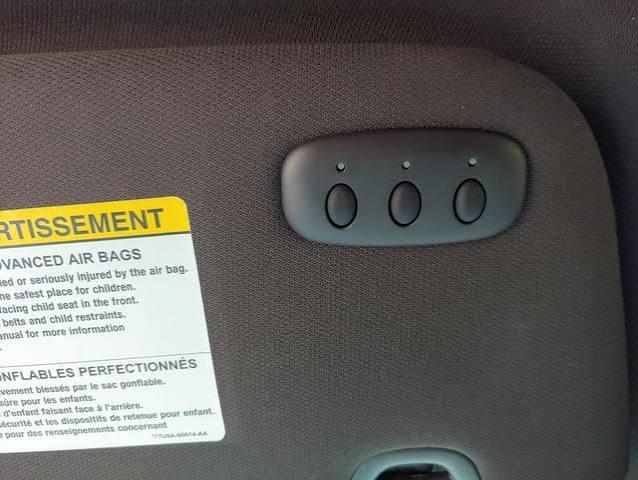
| Button Style | Usually 3 buttons with LED indicators | Often 3 buttons, distinct logo |
| Compatibility | Rolling Code & Fixed Code | Primarily Rolling Code |
| Programming Speed | Moderate (requires sync steps) | Fast (often automatic) |
| Common Brands | Gentex, Visor-mounted | Bosch, Lear |
Note: For a deeper technical understanding of radio frequency protocols used in these devices, refer to the Wikipedia entry on Garage Door Openers.
Expert Tip: Check your owner’s manual or look for a small logo near the buttons. If you see “HomeLink,” follow Section A below. If you see “Car2U” or “X2D,” skip to Section B.
Step-by-Step: How to Program HomeLink Systems
This is the most common system found in US vehicles. Follow these precise steps to ensure a successful sync.
Phase 1: Clear Previous Codes (Crucial First Step)
Even if the buttons appear blank, residual data can cause interference.
- Locate your three HomeLink buttons.
- Press and hold the two outer buttons simultaneously.
- Hold for 10–20 seconds until the indicator light flashes rapidly (usually amber or red).
- Release both buttons. Your system is now factory reset.
Phase 2: Train the In-Car Button
- Sit in your driver’s seat with the ignition in the “ON” or “ACC” position. Do not start the engine unless required by your specific manual.
- Hold your original handheld garage remote 1–3 inches away from the HomeLink button you wish to program.
- Simultaneously press and hold both the handheld remote button AND the desired HomeLink button.
- Watch the HomeLink indicator light. It will flash slowly at first, then rapidly when the code is learned. This typically takes 5–30 seconds.
- Release both buttons once the rapid flashing begins.
Phase 3: Sync with Rolling Code Openers
Most modern garage openers (post-1996) use rolling code technology for security. You must complete this step at the garage motor unit itself.
- Locate the “Learn” or “Smart” button on your garage ceiling motor. It is usually yellow, purple, orange, or green.
- Press and release the Learn button. You typically have 30 seconds to complete the next step.
- Return to your car and press the newly programmed HomeLink button three times, holding each press for 2 seconds.
- Test the door. If it operates smoothly, you have successfully completed the process of learning how to program universal garage door opener in car setups.
Step-by-Step: How to Program Car2U Systems
If your vehicle uses the Car2U system, the process is notably different and often faster.
- Turn the ignition to ON/RUN.
- Press and hold the two outer Car2U buttons for approximately 20 seconds until all LEDs turn off. This clears memory.
- Press the specific Car2U button you want to program. The LED should blink slowly.
- Hold your handheld remote 1–3 inches from the Car2U button and press its transmit button.
- The Car2U LED will flash rapidly to indicate success. Unlike HomeLink, many Car2U systems do not require the separate “Learn button” sync at the motor unit, though checking your specific opener manual is always recommended.
Troubleshooting: Why Isn’t My Garage Door Programming?
Despite following instructions perfectly, roughly 15% of users encounter hiccups. Here are the most frequent solutions based on field experience:
- Battery Replacement: Replace the battery in your handheld remote before starting. Weak signals are the #1 cause of training failure.
- Distance Adjustment: If 1–3 inches doesn’t work, try moving the remote farther away (up to 6 inches) or changing the angle. Some frequencies require line-of-sight alignment.
- Ignition State: Some European and Asian vehicles require the engine to be running during programming due to voltage requirements. Try starting the car if ACC mode fails.
- Frequency Mismatch: Older fixed-code openers may not be compatible with newer HomeLink versions without a compatibility bridge kit.
- LED Color Meaning: Amber usually means “learning,” Green means “success,” and Red can mean “error” or “fixed code.” Consult your visor label for specifics.
Safety Precautions You Must Follow
Programming involves moving mechanical parts and electrical systems. Please observe these non-negotiable safety rules:
- Clear the Threshold: Never program while people, pets, or objects are in the path of the door. The safety sensors may not be active during the training phase.
- Ventilation: If programming with the engine running, ensure your garage door is open or the space is ventilated to prevent carbon monoxide buildup.
- Ladder Safety: When accessing the motor unit’s Learn button, use a stable stepladder. Never stand on chairs or unstable surfaces.
- Disconnect Power: If you need to inspect wiring behind the motor, disconnect power at the breaker first.
Frequently Asked Questions (FAQ)
1. Can I program my car’s opener without the original handheld remote?
Generally, no. The in-car system acts as a receiver that clones the signal from your existing remote. However, if your garage opener has a keypad outside, some newer HomeLink versions allow programming via the keypad’s PIN. Check your opener manufacturer’s website for “keypad-to-Homelink” instructions.
2. Will programming my car erase my existing garage remotes?
No. Programming an in-car system simply adds another device to your opener’s memory. Your existing handheld remotes and keypads will continue to function normally. However, resetting the garage motor’s Learn button (not the car’s buttons) would erase all remotes.
3. My HomeLink programs but only works intermittently. What’s wrong?
This is often caused by LED headlight interference or weak batteries. Modern LED headlights can emit RF noise that disrupts the 315MHz/390MHz signal. Try programming with headlights off, or install a signal booster/repeater designed for HomeLink systems.
4. Is there a limit to how many cars I can program to one garage door?
Yes. Most residential garage door openers have a memory capacity of 5 to 10 devices total (including handheld remotes, keypads, and car systems). If you exceed this limit, the oldest device may be pushed out. Refer to your opener’s manual for the exact capacity.
5. Can I use my in-car opener for gates or community entrances?
Absolutely. Both HomeLink and Car2U support gate operators, community access points, and even some smart home lighting systems. The programming process is identical to garage doors, though gate operators may require a longer hold time during the training phase.
6. What if my car has HomeLink but my garage opener is too old?
You may need a HomeLink Compatibility Bridge. This small device plugs into your garage motor and translates between the newer in-car signal and older fixed-code technology. These bridges are widely available at hardware stores and typically cost between $30–$50.
Conclusion
Mastering how to program universal garage door opener in car systems is one of those small victories that significantly improves your quality of life. No more digging through bags, no more getting soaked in bad weather, and no more worrying about lost remotes. Whether you use HomeLink or Car2U, the process is safe, quick, and entirely manageable for beginners.
Remember to always prioritize safety, keep your remote batteries fresh, and consult your specific vehicle and opener manuals when in doubt. The convenience of integrated garage access is worth the few minutes of setup.
Found this guide helpful? Share it with friends, family, or neighbors who are still fumbling for their garage remotes! Tag us on social media with your success story—we’d love to celebrate your newfound convenience with you. Happy programming!



Leave a Reply