Introduction
Struggling to sync your garage door with your VW Tiguan? You’re not alone. Many Volkswagen owners find themselves frustrated when their garage door opener won’t connect to their vehicle’s built-in system. Learning how to program garage door opener in VW Tiguan doesn’t have to be complicated. This comprehensive guide will walk you through the entire process, whether you drive a 2018 Tiguan or the latest 2026 model. We’ll cover everything from basic setup to troubleshooting common issues, ensuring you can open your garage with just a press of a button.
Understanding Your VW Tiguan’s Garage Door System
Before diving into the programming process, it’s essential to understand what system your Tiguan uses. Most Volkswagen Tiguans come equipped with HomeLink, a universal garage door opener system integrated into the rearview mirror or overhead console.
What is HomeLink?
HomeLink is a wireless control system that allows your vehicle to communicate with various radio-frequency devices, including garage door openers, gate operators, and home lighting systems. According to Wikipedia, HomeLink was first introduced in 1992 and has since become the most widely used universal transmitter in vehicles worldwide.
Which Tiguan Models Have HomeLink?
- 2018-2026 VW Tiguan: Standard on SE, SEL, and R-Line trims
- 2017 and earlier models: Available as an optional feature
- Base S trim: May require aftermarket installation
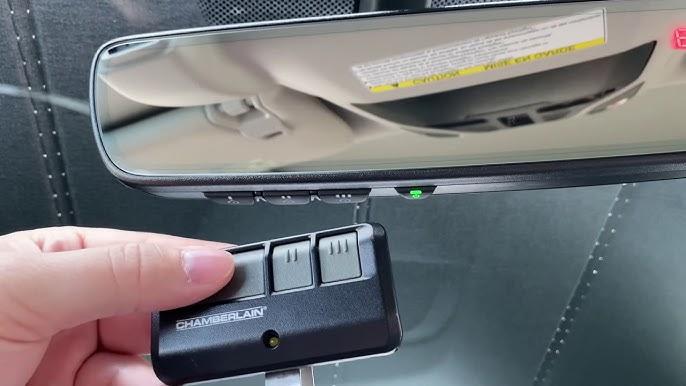
To confirm if your Tiguan has HomeLink, look for three buttons on your rearview mirror or overhead console. These buttons typically have LED indicators that light up during programming.
Step-by-Step Guide: How to Program Garage Door Opener in VW Tiguan
Preparation Before Programming
Before you begin, gather these items:
- Your VW Tiguan parked outside the garage
- A ladder (if needed to reach the garage door motor)
- Your existing garage door remote
- Owner’s manual for reference
Important safety note: Ensure your garage door area is clear of people and objects before testing.
Method 1: Standard Programming Process
Follow these detailed steps to program your garage door opener:
Step 1: Clear Existing Codes
- Turn your ignition to the “ON” position (engine can be off)
- Press and hold the two outer HomeLink buttons simultaneously
- Continue holding for 20 seconds until the LED indicator changes from slow to rapid flashing
- Release both buttons when the LED flashes rapidly
Step 2: Position Your Vehicle
- Park your Tiguan 5-10 feet away from the garage door
- Ensure you have a clear line of sight to the garage door motor
- Keep the engine running or ignition in accessory mode
Step 3: Initiate Programming Mode
- Choose which HomeLink button you want to use (1, 2, or 3)
- Press and hold your chosen HomeLink button
- The LED will start flashing slowly, indicating programming mode
Step 4: Train the Remote
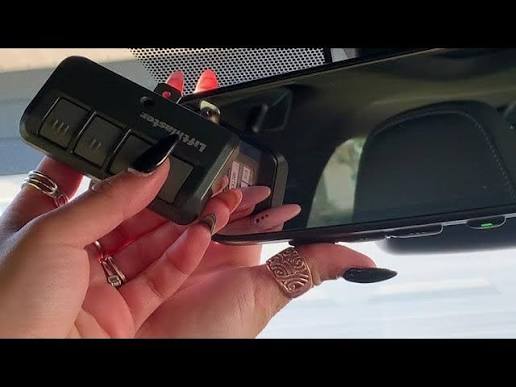
- While still holding the HomeLink button, bring your original garage remote within 1-3 inches of the HomeLink buttons
- Press and hold the button on your garage remote that operates the door
- Hold both buttons until the HomeLink LED flashes rapidly (this may take 10-30 seconds)
- Release both buttons once rapid flashing occurs
Step 5: Test the Connection
- Press the programmed HomeLink button
- Your garage door should activate
- If nothing happens, repeat Steps 3-4
Method 2: Programming Rolling Code Systems
Many modern garage door openers use rolling code technology for enhanced security. If Method 1 doesn’t work, your opener likely uses this system.
Additional Steps for Rolling Code Openers:
- Locate the “Learn” or “Smart” button on your garage door motor unit
- This button is usually colored (yellow, purple, orange, or red)
- It’s located on the back or side of the motor housing
- Complete Steps 1-4 from Method 1 above
- Within 30 seconds of programming, press the “Learn” button on your garage motor
- Return to your Tiguan and press the programmed HomeLink button three times
- Test the operation
Method 3: Direct Programming (No Remote Required)
Some newer garage door openers allow direct programming without using the original remote:
- Clear existing codes (Step 1 from Method 1)
- Press and hold your chosen HomeLink button
- While holding the HomeLink button, press the “Learn” button on your garage motor
- Continue holding the HomeLink button for 2 seconds after pressing the Learn button
- Release and test
Troubleshooting Common Issues
Even with careful following of instructions, you might encounter problems. Here are solutions to the most common issues:
| Problem | Possible Cause | Solution |
|---|---|---|
| LED doesn’t flash | Weak vehicle battery | Start the engine or charge the battery |
| Rapid flashing never occurs | Wrong button combination | Ensure you’re holding the correct buttons |
| Door doesn’t respond | Distance too far | Move closer to the garage door (within 10 feet) |
| Intermittent operation | Signal interference | Reprogram in a different location |
| Only works sometimes | Rolling code sync issue | Repeat the Learn button procedure |
Advanced Troubleshooting Tips
If your garage door reverses immediately after closing: This indicates a safety sensor issue, not a programming problem. Check that:
- Sensors are properly aligned
- Nothing blocks the sensor beam
- Sensor lenses are clean
For multi-car garages: You can program up to three different garage doors using the three HomeLink buttons. Simply repeat the programming process for each door using a different button.
Compatibility issues: If your garage opener is older than 15 years, it might not be compatible with HomeLink. Consider:
- Upgrading your garage door opener
- Installing a HomeLink compatibility bridge
- Using an aftermarket universal remote
Model-Specific Considerations
2018-2020 VW Tiguan
- HomeLink buttons located on the rearview mirror
- May require dealer activation if newly purchased
- Firmware updates available at VW dealerships
2021-2026 VW Tiguan
- Enhanced HomeLink system with faster programming
- Integration with VW Car-Net app possible
- Improved range and reliability
European vs. North American Models
Note that European-spec Tiguans may use different frequencies (433 MHz vs. 315 MHz in North America). Ensure your HomeLink system matches your region’s frequency requirements.
Frequently Asked Questions
Q1: How long does it take to program a garage door opener in a VW Tiguan?
A: The typical programming process takes 5-15 minutes. However, if you encounter issues with rolling code systems or need multiple attempts, it could take up to 30 minutes. Having your garage door remote handy and following the steps precisely will minimize programming time.
Q2: Can I program multiple garage doors to my VW Tiguan?
A: Yes! Your VW Tiguan’s HomeLink system can store up to three different garage door codes. Each of the three buttons can be programmed to a different garage door, gate, or other compatible device. Simply repeat the programming process for each device using a different button.
Q3: Why won’t my garage door opener program to my Tiguan?
A: Several factors could prevent successful programming:
- Your garage opener uses an incompatible frequency
- The battery in your vehicle or garage remote is weak
- You’re too far from the garage door motor
- The opener uses an older technology not supported by HomeLink
- Interference from other electronic devices
Try moving closer to the garage, replacing batteries, or consulting your garage door manufacturer for compatibility information.
Q4: Do I need to reprogram after replacing my garage door opener battery?
A: No, replacing the battery in your garage door opener motor doesn’t require reprogramming. However, if you replace the handheld remote’s battery, you typically don’t need to reprogram either. Reprogramming is only necessary if you:
- Replace the entire garage door opener unit
- Clear the HomeLink memory
- Experience persistent connection issues
Q5: Is it safe to use HomeLink in my VW Tiguan?
A: Yes, HomeLink is completely safe when used properly. The system uses encrypted signals and rolling code technology to prevent unauthorized access. Always ensure your garage door’s safety sensors are functioning correctly, and never leave your vehicle running unattended while testing the system.
Q6: Can I program my VW Tiguan to work with smart garage door openers?
A: Many smart garage door openers (like Chamberlain MyQ, LiftMaster, or Genie) are compatible with HomeLink. However, some may require additional setup through their respective apps. Check your smart opener’s manual for HomeLink compatibility, and consider using the manufacturer’s app for enhanced features like remote monitoring and scheduling.
Conclusion
Learning how to program garage door opener in VW Tiguan is straightforward when you follow the right steps. Whether you’re driving a brand-new 2026 model or an earlier version, the HomeLink system provides convenient, secure access to your garage. Remember to prepare properly, follow the step-by-step instructions carefully, and use our troubleshooting tips if you encounter any issues.
The convenience of opening your garage with a simple button press in your Tiguan is worth the initial setup effort. Once programmed, you’ll enjoy seamless integration between your vehicle and home, making daily routines smoother and more efficient.
Did you find this guide helpful? Share it with fellow VW Tiguan owners on social media! Tag us in your success stories, and let us know if you have any questions in the comments below. Happy driving!
Leave a Reply