Introduction
Struggling to sync your Mazda CX-9 with your garage door? You’re not alone. Many drivers find the process confusing, but learning how to program garage door opener Mazda CX-9 is simpler than you think. Whether you’ve just bought a new home or replaced your garage remote, this guide will walk you through every step clearly and safely. Let’s get your car and garage talking seamlessly.
Understanding the Mazda CX-9 HomeLink System
Before diving into the programming steps, it’s essential to understand what HomeLink is and how it works in your Mazda CX-9.
What Is HomeLink?
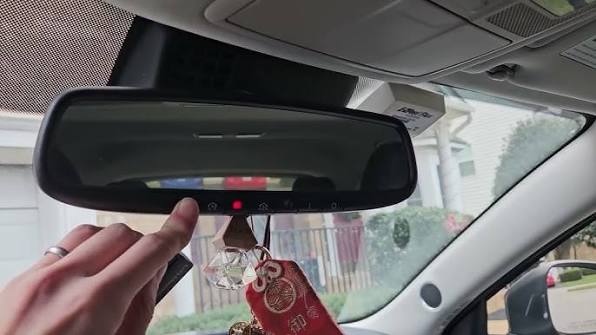
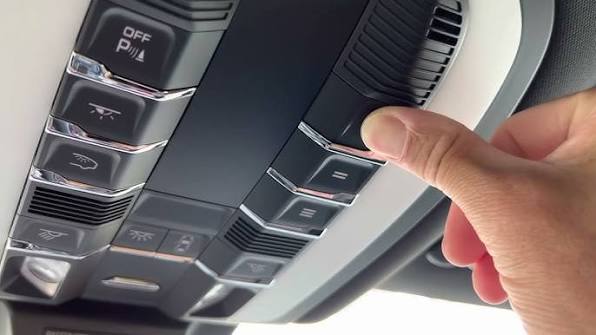
HomeLink is a built-in universal transceiver that allows your vehicle to communicate with garage doors, gate operators, home lighting, and security systems. In the Mazda CX-9, HomeLink buttons are typically located on the rearview mirror or overhead console, depending on the model year.
According to Wikipedia, HomeLink technology has been integrated into millions of vehicles worldwide, offering convenience and enhanced security for drivers.
Which Mazda CX-9 Models Have HomeLink?
Most Mazda CX-9 models from 2016 onward come equipped with HomeLink as standard or optional equipment. To confirm if your vehicle has it:
- Look for three small buttons on your rearview mirror or overhead console.
- Check your owner’s manual under “HomeLink” or “Universal Transceiver.”
- Contact your local Mazda dealership with your VIN for verification.
Step-by-Step Guide: How to Program Garage Door Opener Mazda CX-9
Follow these detailed instructions to successfully program your Mazda CX-9’s HomeLink system with your garage door opener.
Step 1: Prepare Your Garage Door Opener
Before starting, ensure your garage door opener is compatible with HomeLink. Most modern openers manufactured after 1993 use rolling code technology, which is compatible. If you have an older model, you may need a compatibility bridge or repeater.
Tip: Locate the “Learn” or “Smart” button on your garage door motor unit. It’s usually found on the back or side of the unit and may be colored yellow, purple, or red.
Step 2: Clear Existing HomeLink Memory (If Needed)
If your HomeLink buttons were previously programmed, clear them first:
- Press and hold the two outer HomeLink buttons simultaneously.
- Keep holding for about 20 seconds until the indicator light flashes rapidly.
- Release the buttons. The memory is now cleared.
Step 3: Program the HomeLink Button
- Sit in your Mazda CX-9 with the ignition turned to the “ON” position (engine can be off).
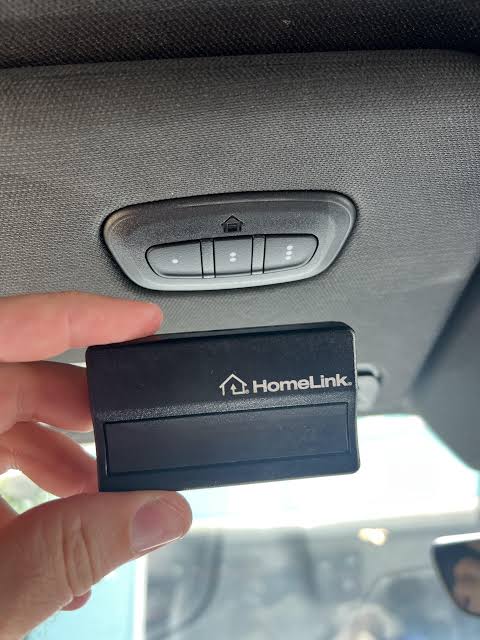
- Hold your original garage door remote 1–3 inches away from the HomeLink buttons.
- Press and hold the desired HomeLink button and the button on your garage remote simultaneously.
- Continue holding both buttons until the HomeLink indicator light changes from slow to rapid flashing (this may take up to 30 seconds).
- Release both buttons.
Step 4: Sync With Your Garage Door Motor
- Within 30 seconds, go to your garage door motor unit.
- Press the “Learn” or “Smart” button once. The indicator light on the motor will blink or turn on.
- Return to your Mazda CX-9 within 30 seconds.
- Press and hold the programmed HomeLink button for 2–3 seconds, then release.
- Repeat this press-and-hold action 2–3 more times.
- Test by pressing the HomeLink button again. Your garage door should activate.
Note: If the door doesn’t respond, repeat Step 4. Some systems require multiple attempts to sync properly.
Troubleshooting Common Issues
Even with careful following, issues can arise. Here’s how to address them:
| Problem | Possible Cause | Solution |
|---|---|---|
| HomeLink light doesn’t flash | Weak remote battery | Replace the battery in your garage remote |
| Garage door doesn’t respond | Incorrect syncing | Repeat Step 4 carefully within the 30-second window |
| Light flashes but door won’t move | Compatibility issue | Check if your opener uses rolling code; consider a compatibility bridge |
| Only one button works | Memory not cleared | Clear all HomeLink memory and reprogram |
Expert Tip
John Mitchell, a certified automotive technician with over 15 years of experience, states: “The most common mistake people make is rushing the syncing process. Patience is key—ensure you’re within the 30-second window when pressing the Learn button on the garage motor.”
Safety Tips When Programming Your HomeLink
- Keep children and pets away from the garage door during testing.
- Ensure the garage area is clear of obstacles before activating the door.
- Never leave your vehicle running in an enclosed garage due to carbon monoxide risks.
- Test the auto-reverse feature of your garage door to ensure it stops if an object is detected.
Benefits of Using HomeLink in Your Mazda CX-9
Programming your garage door opener to your Mazda CX-9 offers several advantages:
- Convenience: No need to carry separate remotes.
- Security: Rolling code technology prevents code theft.
- Versatility: Can control multiple devices like gates, lights, and alarms.
- Resale Value: Adds appeal for future buyers who value smart features.
FAQ Section
Q1: Can I program multiple garage doors to my Mazda CX-9?
Yes, the Mazda CX-9 HomeLink system supports up to three different devices. Simply repeat the programming steps for each additional garage door or device using a different HomeLink button.
Q2: What if my garage door opener is very old?
Older openers (pre-1993) may use fixed codes instead of rolling codes. In this case, you may need a HomeLink compatibility bridge or repeater kit, available from HomeLink’s official website or automotive retailers.
Q3: How do I know if programming was successful?
After completing Step 4, press the programmed HomeLink button. If the garage door activates consistently, the programming was successful. If not, repeat the syncing process.
Q4: Can I reset HomeLink if I sell my car?
Absolutely. To clear all programmed devices, press and hold the two outer HomeLink buttons for 20 seconds until the light flashes rapidly. This ensures your personal data is removed.
Q5: Does programming HomeLink void my warranty?
No, programming HomeLink is a standard feature supported by Mazda and does not affect your vehicle’s warranty. Always refer to your owner’s manual for specific guidelines.
Q6: What should I do if none of the steps work?
Double-check compatibility, replace remote batteries, and ensure you’re following the timing correctly. If issues persist, consult your Mazda dealership or a certified technician for assistance.
Conclusion
Learning how to program garage door opener Mazda CX-9 doesn’t have to be stressful. With this clear, step-by-step guide, you can sync your HomeLink system quickly and safely. Enjoy the convenience of controlling your garage door directly from your vehicle, enhancing both comfort and security.
If you found this guide helpful, share it with fellow Mazda owners on social media! Your friends might thank you for saving them time and frustration.
Disclaimer: Always refer to your Mazda CX-9 owner’s manual for model-specific instructions. This guide is for informational purposes and may vary slightly depending on your vehicle’s year and trim level.
Leave a Reply