How To Program Garage Door Opener On Hyundai Palisade (Step-by-Step)
Have you ever pulled into your driveway, fumbling through bags or juggling kids, only to realize you still need to grab that clunky garage door remote? If you own a Hyundai Palisade, there’s a much smarter way — and figuring out how to program garage door opener on Hyundai Palisade is easier than most owners think. Whether you just bought your Palisade or recently installed a new garage door system, this complete guide will walk you through every step so you can open your garage with the press of a button built right into your vehicle.
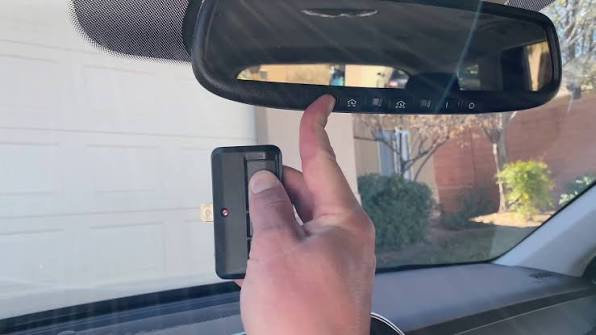
The Hyundai Palisade comes equipped with HomeLink, a universal wireless control system integrated into the overhead console. HomeLink allows you to replace up to three separate handheld remotes — for your garage door, gate, or even home lighting — with buttons conveniently located near your rearview mirror. In this article, we’ll cover everything from initial setup to troubleshooting common issues, ensuring you get seamless access every time you arrive home.
What Is HomeLink and Why Does Your Hyundai Palisade Have It?
Before diving into the programming steps, it helps to understand what you’re working with. HomeLink is an in-vehicle radio frequency (RF) transceiver developed by Gentex Corporation. It’s pre-installed in millions of vehicles across North America, including every trim level of the Hyundai Palisade from 2020 onward.
According to Wikipedia, HomeLink operates using RF signals typically between 288 MHz and 399 MHz, making it compatible with most major garage door opener brands such as Chamberlain, LiftMaster, Genie, Craftsman, and Overhead Door.
Key benefits of using HomeLink in your Palisade:
- Eliminates the need for multiple handheld remotes
- Works with rolling-code and fixed-code garage door systems
- Can control gates, security lights, and other RF devices
- Integrated seamlessly into the vehicle’s overhead console
Before You Start: What You’ll Need
Preparation is half the battle. Gather these items before you begin programming:
| Item | Purpose |
|---|---|
| Your existing garage door remote | Needed during the pairing process |
| Your Hyundai Palisade (ignition ON) | The vehicle must be powered |
| Access to the garage door motor unit | For pressing the “Learn” button |
| A ladder (if needed) | To reach the motor unit safely |
| Patience (5–10 minutes) | Programming takes a few attempts sometimes |
Pro Tip: Make sure your garage door opener uses a frequency compatible with HomeLink. Nearly all openers manufactured after 1995 are compatible. If your opener is older, you may need a compatibility bridge.
Step-by-Step: How To Program Garage Door Opener On Hyundai Palisade
Follow these detailed instructions carefully. The entire process should take no more than 10 minutes.
Step 1: Clear Any Previously Stored Codes
If this is your first time setting up HomeLink, you can skip this step. However, if the buttons have been used before (common with pre-owned vehicles), you’ll want to reset them.
- Press and hold the two outer HomeLink buttons (buttons 1 and 3) simultaneously.
- Hold for approximately 10–20 seconds until the indicator light begins to flash rapidly.
- Release both buttons. All previously stored codes are now erased.
Step 2: Put HomeLink Into Training Mode
- Turn your Hyundai Palisade’s ignition to the ON position (or start the engine).
- Choose which of the three HomeLink buttons you want to program (e.g., Button 1 for your main garage door).
- Press and hold the chosen HomeLink button.
- At the same time, point your existing garage door remote toward the HomeLink buttons (about 1–3 inches away).
- Press and hold the button on your handheld remote.
- Watch the HomeLink indicator light — it will change from a slow blink to a rapid flash.
- Once the rapid flash appears, release both buttons.
Congratulations — your Palisade has learned the signal from your remote!
Step 3: Sync With Rolling-Code Garage Door Openers
Most modern garage door openers use rolling-code technology (also called Security+ or Intellicode) for enhanced security. If your opener was manufactured after 1996, you almost certainly need this additional step.
- Locate the “Learn” or “Smart” button on your garage door motor unit. This is usually found on the back or side panel of the ceiling-mounted unit. The button may be yellow, red, purple, or green depending on the brand.
- Press and release the Learn button. An LED on the motor unit will illuminate or blink, indicating it’s in pairing mode. You typically have 30 seconds to complete the next step.
- Return to your Hyundai Palisade and press the programmed HomeLink button firmly for 2 seconds, then release.
- Repeat this press-and-release cycle up to 3 times until the garage door begins to move.
Important: If the door moves, the programming is successful. If nothing happens after 3 attempts, repeat Step 3 from the beginning.
Step 4: Test Your Setup
- Park your Palisade within 20 feet of the garage door.
- Press the programmed HomeLink button once.
- The garage door should respond by opening or closing.
- Test from different distances (up to 50 feet) to confirm reliable range.
Troubleshooting Common Issues
Even with clear instructions, things don’t always go perfectly the first time. Here are solutions to the most frequent problems:
The Indicator Light Won’t Flash Rapidly
- Ensure you’re holding both the HomeLink button and the remote button long enough (at least 10 seconds).
- Try repositioning the remote closer to the HomeLink buttons — 1 inch away is ideal.
- Replace the battery in your handheld remote; weak batteries cause weak signals.
The Garage Door Doesn’t Respond After Programming
- Confirm whether your opener uses rolling-code technology. If yes, Step 3 is mandatory.
- Check that you pressed the Learn button on the motor unit before pressing the HomeLink button.
- Some openers require you to hold the HomeLink button for a full 2 seconds per press during the rolling-code sync.
HomeLink Works Intermittently
- Reprogram the button following all steps again.
- Check for RF interference from nearby electronics (LED bulbs, Wi-Fi routers).
- Verify that the garage door opener antenna is hanging down and not damaged.
Only One of Three Buttons Works
- Each button must be programmed individually. Repeat Steps 2–3 for each button you wish to use.
- Remember that clearing codes (Step 1) erases all three buttons at once.
Which Garage Door Opener Brands Are Compatible?
One of the biggest questions Palisade owners ask is whether their specific opener will work. Here’s a quick compatibility overview:
| Brand | Compatibility | Notes |
|---|---|---|
| Chamberlain / LiftMaster | ✅ Fully Compatible | Use Security+ 2.0 Learn button |
| Genie | ✅ Fully Compatible | Intellicode models supported |
| Craftsman | ✅ Fully Compatible | Same as Chamberlain (Sears brand) |
| Overhead Door | ✅ Fully Compatible | CodeDodger technology works |
| Linear / Mega Code | ✅ Compatible | May require extra sync cycles |
| Pre-1995 Fixed Code | ⚠️ Partially Compatible | May need a HomeLink compatibility bridge |
FAQ Section
Q1: How many devices can I program into my Hyundai Palisade’s HomeLink?
Your Palisade’s HomeLink system supports up to three devices. These can be any combination of garage doors, gates, security systems, or RF-controlled lighting. Each device occupies one of the three buttons on the overhead console.
Q2: Do I need my original garage door remote to program HomeLink?
Yes, in most cases. The original remote is used during Step 2 to transfer the signal to HomeLink. However, if you’ve lost your remote, some newer garage door openers allow direct pairing by pressing the Learn button on the motor unit and then pressing the HomeLink button within 30 seconds. Check your opener’s manual for details.
Q3: Will programming HomeLink erase my garage door opener’s existing remotes?
No. Programming HomeLink does not affect any other remotes already paired with your garage door opener. The Learn button simply adds a new device to the opener’s memory without removing existing ones. Most openers can store between 5 and 20 remotes simultaneously.
Q4: Why does my HomeLink button work only when I’m very close to the garage?
Reduced range usually indicates one of three issues: a weak battery in the original remote (which affected the quality of the transferred signal), RF interference near the garage, or a damaged antenna on the motor unit. Try reprogramming with a fresh remote battery and ensure the motor unit’s wire antenna is fully extended and hanging vertically.
Q5: Can I program HomeLink to control a community gate or apartment parking barrier?
Absolutely. HomeLink works with virtually any RF-controlled barrier system, including community gates, parking garage arms, and bollards. The programming process is identical to garage door setup. Just make sure you have access to the gate operator’s Learn button or a working handheld transmitter for that system.
Q6: Is HomeLink available on all Hyundai Palisade trims?
Yes. Every Hyundai Palisade from the 2020 model year onward includes HomeLink as standard equipment, regardless of trim level (SE, SEL, Limited, Calligraphy, or XRT). The three-button module is located in the overhead console near the rearview mirror.
Conclusion
Learning how to program garage door opener on Hyundai Palisade is a straightforward process that pays off every single day. In just a few minutes, you can eliminate the hassle of hunting for remotes, enjoy hands-free garage access, and take full advantage of the premium features your Palisade already offers. Whether you’re setting up HomeLink for the first time or reprogramming after moving to a new home, the steps outlined above will get you up and running quickly and confidently.
Remember: the key to success is following each step in order — especially the rolling-code sync, which trips up most first-time users. If you run into trouble, revisit the troubleshooting section or consult your garage door opener’s owner manual for model-specific guidance.
Found this guide helpful? Share it with fellow Palisade owners on Facebook, Twitter/X, or your favorite automotive forum! Helping others discover how easy HomeLink programming can be makes the driving community better for everyone. 🚗✨



Leave a Reply