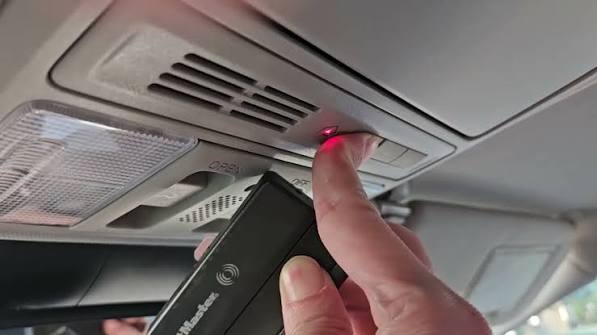
Have you ever pulled into your driveway, pressed the button in your car, and… nothing happened? It is a frustrating experience that many drivers face when their vehicle’s built-in remote fails to communicate with their home system. If you are wondering how to program garage door opener on Honda Odyssey, you are not alone. This guide will walk you through the process clearly and safely, ensuring you can open your garage with the simple push of a button.
Understanding the Honda Odyssey HomeLink System
Before diving into the buttons and codes, it helps to understand what you are working with. Most Honda Odyssey models come equipped with HomeLink, a universal transceiver that replaces your handheld remote controls. It integrates directly into your rearview mirror or overhead console, depending on the model year.
HomeLink is designed to be compatible with most major garage door opener brands, including LiftMaster, Chamberlain, Genie, and Craftsman. However, because every garage door motor has different security protocols, the programming method can vary slightly. The key is patience and following the specific sequence for your setup.
According to general automotive standards, universal remotes like HomeLink use radio frequencies to mimic your original remote. For more technical details on how radio frequency identification works in automotive applications, you can refer to this Wikipedia article on Radio-frequency identification.
Step 1: Prepare Your Garage Door Opener
The most common mistake people make is skipping the preparation phase. You cannot program your Honda Odyssey if your garage door opener isn’t ready to receive a new signal.
Locate the “Learn” Button
Go to your garage door motor unit (the box attached to your ceiling). Look for a small button, usually labeled “Learn,” “Smart,” or “Program.” It is often located near the hanging antenna wire. The color of this button varies by brand:
- Yellow/Purple: Common for LiftMaster and Chamberlain.
- Red/Orange: Common for Genie.
- Green: Older models or specific brands.
Clear Old Codes (If Necessary)
If you have previously tried to program a remote and failed, or if you are replacing an old remote, it is wise to clear the memory. Hold down the “Learn” button on the motor unit for about 10 seconds until the indicator light turns off. This resets the system, ensuring no conflicting signals interfere with your Honda Odyssey.
Step 2: Program the Honda Odyssey HomeLink
Now that your garage door is ready, move to your vehicle. Ensure your Honda Odyssey is parked outside the garage with the engine running or in accessory mode. This ensures the electrical system has enough power to complete the transmission.
The Standard Programming Method
For most non-rolling code systems (older openers), follow these steps:
- Position Yourself: Sit in the driver’s seat with your original handheld garage remote.
- Select a Button: Choose which HomeLink button in your Odyssey you want to use (1, 2, or 3).
- Initiate Learning: Press and hold the chosen HomeLink button and your handheld remote button simultaneously.
- Wait for the Flash: Keep holding both buttons. The HomeLink indicator light will slowly flash, then rapidly flash. This rapid flashing indicates that the signal has been learned.
- Test It: Release both buttons. Press the HomeLink button in your car to see if the garage door activates.
The Rolling Code Method (Newer Openers)
Most modern garage door openers use rolling codes for security. This means the code changes every time you press the button. If your opener has a rolling code system, the standard method above might not work immediately. You will need to complete an extra step at the garage door motor.
- Follow steps 1–4 from the standard method above.
- Go back to your garage door motor unit.
- Press and release the “Learn” button on the motor. The indicator light will usually blink or stay solid.
- Return to your Honda Odyssey within 30 seconds.
- Press and hold the programmed HomeLink button for two seconds, release, and repeat this press-hold-release cycle three times.
- Test the door. It should now respond.
Troubleshooting Common Issues
Even with careful instructions, things don’t always go smoothly. Here are the most common hurdles and how to overcome them.
| Issue | Possible Cause | Solution |
|---|---|---|
| Light flashes slowly but never fast | Signal interference or weak battery | Replace the battery in your handheld remote. Move closer to the garage door. |
| Door moves slightly then stops | Safety sensors blocked | Check the photo-eye sensors at the bottom of your garage tracks. Clean any dirt or cobwebs. |
| HomeLink light stays solid | Programming mode not exited | Press the button again to exit learning mode, or restart the car. |
| No response from motor | Wrong frequency | Ensure your opener is compatible (most are 315 MHz or 390 MHz). |
Why Does My Battery Matter?
It might seem unrelated, but a weak battery in your handheld remote can prevent the Honda Odyssey from learning the signal. The car needs a strong, clear signal to copy the code. Always start with fresh batteries in your original remote before attempting to program your car.
Advanced Tips for Multiple Doors
If you have two garage doors, you can program both into your Honda Odyssey. Simply repeat the process for the second door using a different HomeLink button (e.g., Button 1 for the left door, Button 2 for the right door).
Pro Tip: Label your buttons. Use a small piece of tape or a marker to note which button controls which door until you memorize the layout. This prevents confusion, especially if you have multiple vehicles in the household.
Frequently Asked Questions (FAQ)
1. Can I program my Honda Odyssey without the original remote?
In most cases, no. The HomeLink system needs to “learn” the signal from an existing working remote. However, some newer garage door openers allow you to program directly from the motor unit’s keypad if you have the PIN code. Check your garage door manual for “keypad programming” options.
2. Why does my garage door close immediately after opening?
This is usually a safety feature triggered by misaligned sensors. If the infrared beams between the two sensors at the base of your garage tracks are blocked or misaligned, the door will reverse. Check that the lights on the sensors are solid (not blinking) and that nothing is blocking the path.
3. Is it safe to use HomeLink?
Yes, HomeLink is highly secure, especially with rolling code technology. Rolling codes change the encryption key with every use, making it nearly impossible for thieves to intercept and replicate the signal. It is considered safer than leaving a handheld remote visible in your car.
4. What if my Honda Odyssey HomeLink button doesn’t light up?
If the indicator light does not turn on at all, check your vehicle’s fuse box. There may be a blown fuse related to the accessory power or the mirror assembly. Consult your Honda Odyssey owner’s manual for the specific fuse location.
5. Can I reset HomeLink if I sell my car?
Absolutely. To erase all programmed codes, press and hold the two outer HomeLink buttons (1 and 3) for about 20 seconds until the indicator light flashes. This clears all memory, ensuring your personal data is removed before transferring ownership.
Conclusion
Learning how to program garage door opener on Honda Odyssey is a straightforward process that saves you time and adds convenience to your daily routine. By understanding whether you have a standard or rolling code system and preparing your garage motor correctly, you can avoid common pitfalls.
Remember, patience is key. If it doesn’t work the first time, check your batteries, ensure you are within range, and try the rolling code secondary step. Once synced, you will enjoy the seamless experience of entering your home without fumbling for keys or remotes.
Did this guide help you get your garage door working? Share this article with fellow Honda owners on social media who might be struggling with their HomeLink setup!



Leave a Reply