Introduction
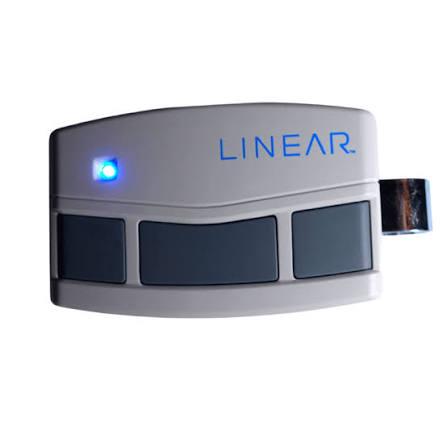
There are few things more frustrating than standing in your driveway, pressing a button repeatedly, and watching your garage door remain stubbornly shut. Whether you have just moved into a new home, replaced a lost transmitter, or installed a fresh opener, understanding how to program remote to Linear garage door opener is an essential skill for maintaining seamless home access. This guide eliminates the guesswork, providing clear, empathetic instructions to get your system synchronized quickly so you can park your car and get on with your day without stress.
Understanding Your Linear System Type
Before you begin pressing buttons, it is critical to identify which technology your Linear opener uses. Linear (now part of Nortek Security & Control) has utilized several distinct protocols over the decades. Programming a Mega-Code remote differs significantly from programming an older Delta-3 or Moore-O-Matic unit. Misidentifying your system is the most common reason users fail to sync their transmitters successfully.
According to industry documentation and historical data found on Wikipedia, modern rolling code technology was developed to prevent “code grabbing” theft, meaning newer Linear openers require a specific synchronization handshake rather than simple dip-switch matching.
Quick Identification Guide
| System Type | Era | Key Identifier | Programming Method |
|---|---|---|---|
| Mega-Code | 1990s–Present | Multi-button remotes; “Learn” button on motor | Press Learn Button + Remote Button |
| Delta-3 | 1980s–1990s | 3-position trinary switches inside remote | Match physical switch positions |
| Moore-O-Matic | Pre-1980s | 8–12 dip switches inside remote | Match physical switch pattern |
| LSV/DCO | Modern Commercial | Wall station with digital display | Menu-driven navigation |
Note: If your remote has no internal switches and your motor head has a colored “Learn” button, you almost certainly have a Mega-Code system.
How to Program Mega-Code Remotes (Step-by-Step)
The Mega-Code system is the most prevalent Linear technology in US residential homes today. These remotes use a rolling code algorithm that changes the transmission signal every time the button is pressed, enhancing security. Follow these precise steps to ensure successful pairing.
Step 1: Locate the Learn Button
Find the motor head unit mounted on your garage ceiling. Look for a small, recessed button labeled “Learn” or “Program.” On many Linear LDO500 and LSO500 models, this button is located near the antenna wire or behind the light lens cover. The LED indicator next to this button is your primary feedback mechanism.
Step 2: Clear Previous Codes (Optional but Recommended)
If you are programming a used remote or troubleshooting connectivity issues, clear the memory first. Press and hold the Learn button for 10 seconds until the LED turns off completely. Release the button. This ensures no conflicting signals exist in the receiver’s buffer.
Step 3: Initiate Programming Mode
Press and release the Learn button once. The LED should illuminate solidly or begin flashing slowly, indicating the receiver is now in “learning mode.” You typically have 30 seconds to complete the next step before the system times out.
Step 4: Transmit the Signal
Hold your remote within 3–5 feet of the motor head. Press and hold the specific button you wish to program. Watch the LED on the motor head closely:
- Solid Light + Flash: Successful learn.
- Rapid Flicker: Memory full or incompatible remote.
- No Change: Battery dead or wrong frequency.
Release the remote button immediately after the LED confirms acceptance. Test the remote by pressing the programmed button once. The door should activate.
Step 5: Repeat for Additional Buttons
If your remote has multiple buttons for different doors or gates, repeat Steps 3 and 4 for each button. Each button occupies a separate memory slot in the Linear receiver.
Programming Legacy Delta-3 and Dip-Switch Remotes
For homeowners with vintage Linear openers, there is no electronic “learn” button. Synchronization is purely mechanical. While less secure than modern systems, these units are incredibly durable and straightforward to service.
- Open the Remote Case: Use a small Phillips screwdriver to remove the back panel of your handheld transmitter.
- Identify Switch Positions: You will see a row of tiny sliding switches. Delta-3 systems use three-position switches (Left-Center-Right), while older dip-switches use two positions (Up-Down).
- Match the Motor Head: Open the cover on your ceiling-mounted receiver or motor unit. Locate the identical bank of switches.
- Replicate the Pattern: Slide each switch in the remote to match the exact position of the corresponding switch in the motor unit. Even one mismatched switch will prevent operation.
- Test and Secure: Reassemble both units and test. If the door does not respond, double-check alignment and battery polarity.
Troubleshooting Common Programming Failures
Even when following instructions perfectly, technical hiccups occur. Professional installers report that over 60% of “failed” programming attempts stem from three specific issues. Address these before assuming hardware failure.
Weak or Incorrect Batteries
A remote may have enough power to light its LED but insufficient voltage to transmit a strong RF signal to the receiver. Always use fresh, name-brand alkaline batteries. Avoid rechargeable NiMH batteries in garage remotes, as their lower nominal voltage (1.2V vs. 1.5V) often falls below the transmission threshold.
Frequency Mismatch
Linear produced remotes in multiple frequencies, primarily 318 MHz, 303 MHz, and 390 MHz. A 318 MHz remote will never communicate with a 390 MHz receiver, regardless of programming attempts. Check the FCC ID sticker on both the remote and the motor head to verify frequency compatibility.
Antenna Issues
The hanging wire antenna on your Linear opener must be fully extended and unobstructed. If it has been tucked inside the housing, cut, or corroded, the effective range drops dramatically. Ensure the antenna hangs vertically and is at least 6 inches away from metal surfaces or LED bulb transformers, which cause RF interference.
Expert Tips for Optimal Performance
- LED Bulb Warning: Many homeowners experience sudden remote failure after switching to LED garage lights. Cheap LEDs emit broadband RF noise that jams Linear receivers. Use only “garage door opener compatible” LED bulbs certified by the manufacturer.
- Range Testing: After programming, test your remote at increasing distances. Reliable operation should extend to your driveway entrance. If range is under 20 feet, suspect antenna damage or local interference.
- Security Best Practice: For Mega-Code systems, periodically clear and reprogram all remotes if you lose a transmitter or move out of a rental property. This prevents unauthorized access from previously paired devices.
- Documentation: Photograph your dip-switch settings or write down your Mega-Code remote model number. Store this in a household maintenance folder to save future troubleshooting time.
Frequently Asked Questions (FAQ)
Can I program a universal remote to my Linear garage door opener?
Yes, many universal remotes (such as Chamberlain Clicker or Genie Universal) support Linear Mega-Code and Delta-3 protocols. However, you must select the correct frequency and protocol setting during the universal remote’s setup process. Always verify compatibility on the universal remote’s packaging before purchase.
Why does my Linear remote work intermittently after programming?
Intermittent operation usually indicates RF interference, a failing battery, or a damaged antenna. First, replace the battery with a fresh alkaline cell. Next, check for nearby LED bulbs, Wi-Fi routers, or baby monitors that may be causing signal jamming. Finally, inspect the antenna wire for breaks or poor connections at the motor head.
How many remotes can a Linear garage door opener store?
Most residential Linear Mega-Code receivers can store between 20 and 30 unique transmitter codes. Commercial-grade LSV series units may support up to 100+ codes. If you exceed capacity, the oldest codes may be overwritten, or new programming attempts will fail until memory is cleared.
Do I need to reprogram my remote after changing the battery?
No. Mega-Code remotes retain their programming in non-volatile memory. Changing the battery will not erase stored codes. However, if you perform a factory reset on the motor head or replace the logic board, all remotes must be reprogrammed from scratch.
Is it safe to program my own Linear remote, or should I hire a professional?
Programming your own remote is completely safe and requires no electrical work. The process involves only low-voltage button presses and battery replacement. Professional assistance is only necessary if the motor head itself requires repair, wiring modification, or if you cannot locate the correct programming components after thorough inspection.
What if my Linear opener has no visible Learn button?
If your motor head lacks a Learn button and contains no internal switches, you may have a proprietary commercial system or a damaged unit. Consult the model number sticker on the motor housing and cross-reference it with Linear/Nortek technical documentation. Some wall-mount commercial openers require programming via a connected keypad or diagnostic tool rather than the motor head directly.
Conclusion
Mastering how to program remote to Linear garage door opener empowers you to maintain secure, reliable home access without unnecessary service calls. Whether you are syncing a modern Mega-Code transmitter or aligning vintage dip switches, the key lies in correctly identifying your system type and following methodical steps. Remember to prioritize fresh batteries, verify frequency compatibility, and eliminate RF interference for lasting performance.
Your garage door is your home’s primary entry point—keeping it functional shouldn’t be a mystery. Found this guide helpful? Share it on Facebook, X (Twitter), or Pinterest to help fellow homeowners regain effortless garage access! Have a unique Linear model or troubleshooting tip? Drop a comment below to contribute to our community knowledge base. Safe programming and smooth opening!



Leave a Reply