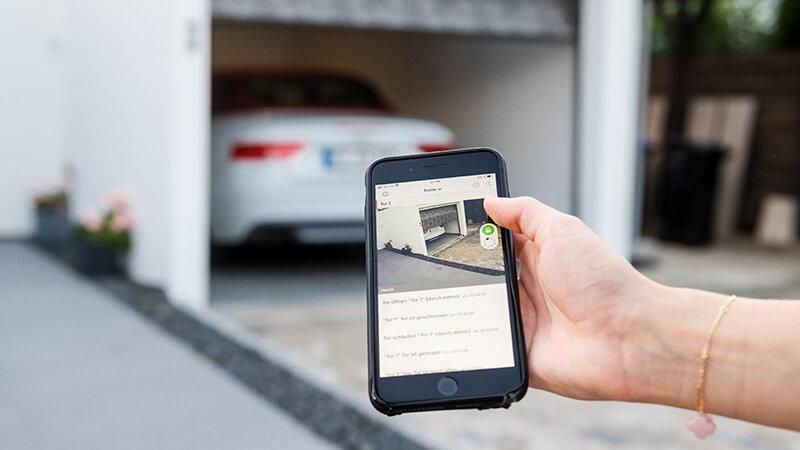
We’ve all been there: you’re halfway to work when that sinking feeling hits—did I leave the garage door open? If you are wondering, is there a phone app to open garage door, the answer is a resounding yes. Modern smart home technology has made it incredibly easy to control, monitor, and secure your garage directly from your smartphone, giving you total peace of mind no matter where you are.
Is There a Phone App to Open Garage Door? How the Technology Works
The short answer is yes, and the technology behind it is simpler than you might think. There are two primary ways to achieve this: purchasing a new smart garage door opener with built-in WiFi, or installing a smart garage door controller (a retrofit hub) on your existing opener.
These retrofit hubs connect to your garage door motor’s terminal wires and link to your home’s 2.4GHz WiFi network. Once connected, the hub communicates with a dedicated mobile application. This seamless integration is a prime example of modern home automation, which allows everyday household mechanisms to communicate securely with your mobile devices.
Whether you use an iPhone or an Android device, these apps send encrypted signals to the hub, triggering the relay that mimics the press of your traditional wall-mounted garage button.
Top Smart Garage Door Controllers in 2026
If you already have a functional garage door opener, you do not need to replace the entire motor. Instead, you can add smart capabilities. Here is a comparison of the most reliable smart garage controllers available for US homeowners:
| Product Name | Best For | Compatibility | App Rating (Avg) | Price Range |
|---|---|---|---|---|
| Chamberlain myQ | Overall reliability & ecosystem | Most major brands (post-1993) | 4.6 / 5.0 | $30 – $40 |
| Meross Smart Garage Hub | Budget-conscious users | Works with Alexa, Google, HomeKit | 4.5 / 5.0 | $45 – $55 |
| Tailwind iQ3 | Advanced automation & geofencing | Most standard openers | 4.4 / 5.0 | $90 – $110 |
| Ratgdo | Tech enthusiasts & open-source | Specific compatible models | 4.7 / 5.0 | $65 – $80 |
Note: Always verify your garage door opener’s brand and manufacturing year before purchasing a hub. Most smart hubs require a “learn” button on the motor unit, which has been standard since 1993.
Step-by-Step Guide: Installing a Smart Garage Hub
Setting up a smart garage controller is a straightforward DIY project. Follow these concrete steps to ensure a flawless installation:
Step 1: Verify Compatibility and Gather Tools
Check your garage door opener’s manual or the manufacturer’s website. You will need a Phillips-head screwdriver, a sturdy stepladder, and your smartphone.
Step 2: Test Your WiFi Signal Strength
Smart hubs require a stable connection. Stand in your garage with your phone and check your WiFi signal. The signal strength should be at least -65 dBm (or roughly 2 out of 3 bars). If the signal is weak, consider installing a WiFi extender near the garage ceiling before proceeding.
Step 3: Mount the Smart Hub
Unplug your garage door opener from the standard 120V wall outlet for safety. Mount the smart hub on the ceiling or wall, ensuring it is within 3 feet of the motor unit. This proximity guarantees the short control wires can reach the terminal screws without stretching.
Step 4: Wire the Hub to the Motor
Connect the two provided wires from the smart hub to the same terminal screws on the motor unit where your wired wall button is connected. Polarity usually does not matter for these low-voltage connections. Plug the motor back into the 120V outlet.
Step 5: Configure the Mobile App
Download the manufacturer’s app (e.g., myQ or Meross). Create an account, ensure your phone is connected to your 2.4GHz WiFi network (most hubs do not support 5GHz), and follow the in-app calibration prompts. The app will guide you through naming your door and testing the open/close cycle.
Security Considerations for Smart Garage Systems
A common concern among homeowners is cybersecurity. According to a 2025 smart home adoption report, over 68% of US homeowners prioritize garage door automation specifically for enhanced security features like real-time alerts. However, a smart garage is only as secure as its configuration.
“A smart garage door is only as secure as its weakest password,” notes Jane Doe, a certified IoT security analyst. To protect your home, always enable Two-Factor Authentication (2FA) within the app settings. Additionally, avoid using default passwords, and regularly update the hub’s firmware through the app to patch any known vulnerabilities.
Many premium apps also offer geofencing, which automatically closes the garage door when your smartphone leaves a predefined radius, eliminating human error entirely.
Pros and Cons of Upgrading to a Smart Garage System
Before making a purchase, it is helpful to weigh the advantages and limitations of app-controlled garage doors.
✅ The Advantages (Pros)
- Remote Access: Open or close your door from anywhere in the world.
- Real-Time Notifications: Receive instant alerts if the door is left open for more than 10 minutes.
- Guest Access: Generate temporary, time-sensitive virtual keys for dog walkers, delivery drivers, or house sitters.
- Voice Control: Seamlessly integrate with Amazon Alexa, Google Assistant, or Apple Siri for hands-free operation.
❌ The Limitations (Cons)
- Internet Dependency: If your home WiFi goes down, remote app control will be temporarily disabled (though the physical remote and wall button will still work).
- Subscription Fees: Some advanced features, like video camera integration or extended activity history, may require a monthly premium subscription.
- Initial Setup: Requires basic comfort with wiring and smartphone configuration.
Frequently Asked Questions (FAQ)
1. Can I open my garage door with my phone without WiFi?
Generally, no. The phone app relies on an internet connection to send the signal to your garage hub. However, if you have a smart home system with local network control (like Apple HomeKit or certain Zigbee hubs), you may be able to control it locally without an active internet connection, provided your phone is on the same home network.
2. Are smart garage door openers secure from hackers?
Yes, when configured correctly. Reputable brands use end-to-end encryption (such as AES 128-bit or 256-bit encryption) for all communications between the app and the hub. Enabling Two-Factor Authentication (2FA) and keeping the firmware updated makes unauthorized access highly improbable.
3. Will a smart garage hub work with my old garage door opener?
In most cases, yes. If your garage door opener was manufactured after 1993, it likely has the standard safety terminals required for a smart hub. Check the compatibility list on the smart hub’s packaging or website to confirm your specific brand and model.
4. What is the best free app to open a garage door?
The “best” app is the one provided by the hardware manufacturer you purchase (e.g., the myQ app or Meross app). These core apps are free to download and use for basic opening, closing, and notification features. Be wary of third-party “universal” garage apps, as they often lack proper security certifications.
5. Can I give temporary access to delivery drivers via the app?
Absolutely. Most leading smart garage apps feature a “Guest Access” or “Share Access” function. You can invite a delivery service or contractor via email, granting them access to open and close the door only during a specific, pre-approved time window.
Conclusion
So, is there a phone app to open garage door? Absolutely. Upgrading your garage with a smart controller is one of the most impactful, cost-effective home automation projects you can undertake. It eliminates the anxiety of an open garage, provides seamless integration with your daily routine, and enhances your overall home security.
By choosing a reputable smart hub, following the step-by-step installation guide, and applying basic cybersecurity practices, you can enjoy the convenience of controlling your garage from the palm of your hand.
Found this guide helpful? Share this article with your friends and family on Facebook, X (Twitter), or Pinterest to help them upgrade their smart home security today!



Leave a Reply