If your MyQ garage door opener has lost connection or you’re switching Wi-Fi networks, you might feel frustrated. Many users struggle to figure out how to change network on MyQ garage door opener without accidentally resetting their device. Don’t worry — with a few simple steps, you can reconnect your opener safely and efficiently.
Why You Need to Change Your MyQ Garage Door Network
Over time, you may need to change your MyQ network for several reasons:
- Upgrading your Wi-Fi router to improve speed and coverage.
- Changing internet providers or network names (SSID).
- Resolving connectivity issues that cause delayed or failed commands.
According to a 2023 survey by Statista, nearly 28% of smart home users experience intermittent connectivity issues with IoT devices, highlighting the importance of proper network management.
Read too: How To Replace Garage Door Roller Like a Pro? Step-by-Step Guide
How To Change Network On MyQ Garage Door Opener: Step-by-Step
Follow these detailed instructions to safely update your MyQ garage door opener’s network.
1. Check Your Current Setup
Before starting, ensure you know:
- Current Wi-Fi name (SSID) and password
- MyQ app is installed on your smartphone
- Garage door opener is powered on and within Wi-Fi range
2. Open the MyQ App
- Launch the MyQ app on your smartphone.
- Sign in using your credentials.
- Navigate to Device Settings > Wi-Fi Settings.
3. Select “Change Wi-Fi Network”
- Tap the device you want to update.
- Select Change Network or Reconnect to Wi-Fi.
4. Follow the On-Screen Instructions
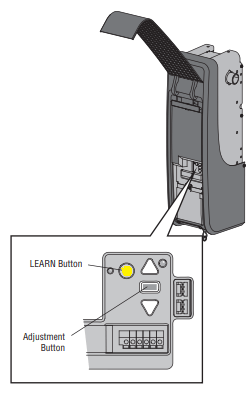
- Press the learn button on your garage door opener (usually located on the motor unit).
- On the app, select your new Wi-Fi network.
- Enter the password carefully — it must match your router exactly.
5. Test the Connection
- Once connected, test by opening and closing your garage door via the app.
- If the device fails to connect, restart your router and try again.
Tip: Keep your smartphone within 10 feet of the garage door opener during setup to ensure a strong signal.
Common Troubleshooting Tips
| Issue | Solution |
|---|---|
| MyQ app can’t detect opener | Ensure Bluetooth/Wi-Fi is enabled, restart the app |
| Garage opener not responding | Power cycle the opener by unplugging for 30 seconds |
| Password rejected | Double-check Wi-Fi credentials; reset network on router if necessary |
| Slow response | Reduce interference by moving router closer to the garage |
For additional technical guidance, visit Wikipedia: Garage Door Opener.
People Also Ask
How do I reset MyQ garage door opener network?
Press the learn button on your motor unit for 6 seconds until the LED blinks. Then reconnect via the MyQ app using your new network credentials.
Can I connect MyQ to a 5GHz network?
No, most MyQ devices only support 2.4GHz Wi-Fi networks. Using 5GHz will prevent successful connection.
What if MyQ app won’t find my opener?
Ensure your phone is on the same Wi-Fi network, within range, and Bluetooth is enabled. Restart the app and your garage door opener if necessary.
Is it safe to change networks frequently?
Yes, but avoid doing it excessively. Frequent resets can temporarily disrupt device automation settings.
Do I need a professional for MyQ network change?
Most users can do it themselves using the app. A professional is only needed if there’s hardware damage or persistent connectivity issues.
Conclusion
Changing your MyQ garage door opener network doesn’t have to be complicated. By following these steps, you can ensure a secure and reliable connection, restore smart control, and avoid downtime. Share this guide with friends or family who own a MyQ garage door opener to help them save time and frustration!



Leave a Reply