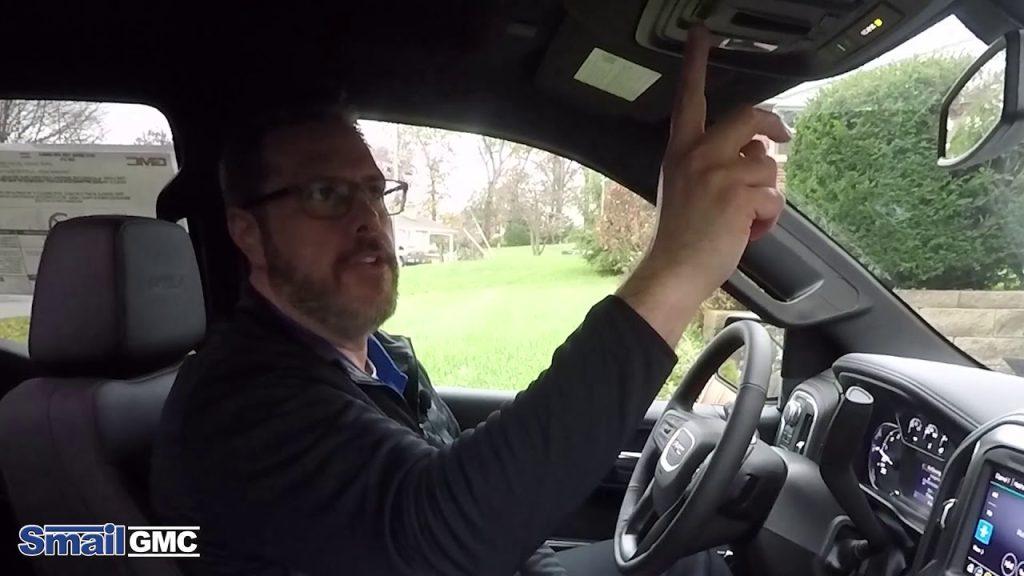
Programming your vehicle’s garage door opener might seem daunting, but it doesn’t have to be. If you’ve recently purchased a 2023 GMC Sierra or simply need to reprogram your existing setup, you’re in the right place. This comprehensive guide will walk you through how to program 2023 GMC Sierra garage door opener systems, whether you’re using the built-in HomeLink system or a universal remote. By the end of this article, you’ll have your garage door responding to your truck’s buttons seamlessly.
Many drivers struggle with this process because different garage door brands require slightly different programming methods. Don’t worry—we’ll cover all the common scenarios and provide clear, actionable steps that work for most situations.
Understanding Your 2023 GMC Sierra’s Garage Door System
Before diving into the programming process, it’s essential to understand what system your 2023 GMC Sierra uses. Most modern GMC vehicles come equipped with either the HomeLink wireless control system or a universal garage door opener integrated into the rearview mirror or overhead console.
The HomeLink system is compatible with approximately 95% of garage door openers manufactured since 1982, according to HomeLink’s official specifications. This high compatibility rate makes it one of the most reliable vehicle-integrated solutions available today.
Identifying Your System Type
Check your 2023 GMC Sierra for these indicators:
- HomeLink System: Look for three buttons labeled “1,” “2,” and “3” on your rearview mirror or overhead console
- Universal Remote: May have a single button or different labeling
- Owner’s Manual: Your specific configuration details are listed in section 3-4 of your manual
If you’re unsure which system you have, consult your owner’s manual or contact your local GMC dealership for clarification.
Step-by-Step Guide: How to Program 2023 GMC Sierra Garage Door Opener
Now let’s get into the actual programming process. Follow these steps carefully for best results.
Preparation Before Programming
Before you begin, gather these items:
- A stable ladder (if needed to reach your garage door opener motor)
- Your 2023 GMC Sierra with the engine running or in accessory mode
- Access to your garage door opener’s “Learn” or “Smart” button
- Approximately 15-20 minutes of uninterrupted time
Important Safety Note: Ensure your garage door area is clear of people, pets, and obstacles before beginning any programming procedure.
Method 1: Programming HomeLink System
Step 1: Clear Existing Codes (If Necessary)
If you’re replacing an old code or starting fresh:
- Press and hold buttons 1 and 3 simultaneously for 20 seconds
- Release when the indicator light begins flashing rapidly
- This clears all previously programmed codes
Step 2: Position Your Vehicle
Park your 2023 GMC Sierra outside your garage, ensuring:
- The vehicle is within 10-15 feet of the garage door opener motor
- You have clear line-of-sight to the opener unit
- The engine is running or in accessory mode
Step 3: Initiate Programming Mode
- Press and hold the desired HomeLink button (1, 2, or 3)
- Continue holding until the indicator light changes from slow to rapid flashing (approximately 20 seconds)
- Release the button
Step 4: Train the Garage Door Opener
- Within 30 seconds, locate the “Learn” or “Smart” button on your garage door opener motor unit
- Press and release this button (the indicator light on the motor will typically blink or turn solid)
- Return to your vehicle within 30 seconds
- Press and hold the same HomeLink button for 2 seconds, then release
- Repeat this press-and-hold cycle 3-4 times
Step 5: Test the Connection
Press the programmed HomeLink button. Your garage door should activate. If it doesn’t respond immediately, repeat Steps 4 and 5 once more.
Method 2: Programming Rolling Code Systems
Some newer garage door openers use rolling code technology for enhanced security. Here’s how to handle these:
- Complete Steps 1-3 from Method 1 above
- When you press the “Learn” button on your garage door opener, you may need to press the HomeLink button in your vehicle three times in quick succession
- Wait for confirmation (usually a light flash or beep from the garage door motor)
- Test the connection
According to Wikipedia’s article on garage door openers, rolling code systems change the access code with each use, providing superior security against code theft.
Method 3: Programming Older Fixed-Code Systems
For older garage door openers (pre-1995):
- Follow Steps 1-3 from Method 1
- Instead of pressing the “Learn” button, you’ll need to match the dip switches
- Locate the dip switches on both your garage door motor and HomeLink system
- Set them to identical positions
- Test the connection
Troubleshooting Common Issues
Even with careful following of instructions, problems can arise. Here are solutions to the most common issues:
| Problem | Possible Cause | Solution |
|---|---|---|
| No response from garage door | Weak signal | Move vehicle closer; ensure batteries are fresh |
| Intermittent operation | Interference | Check for nearby electronic devices; reprogram |
| Light flashes but door doesn’t move | Incorrect programming | Clear codes and restart the process |
| Works sometimes, not others | Rolling code sync issue | Reprogram using rolling code method |
Additional Troubleshooting Tips
Issue: HomeLink indicator light doesn’t flash
- Check if your vehicle is in accessory mode
- Verify the fuse for the HomeLink system is intact
- Consult your dealer if the problem persists
Issue: Garage door reverses after partial opening
- This indicates a safety sensor problem, not a programming issue
- Check that nothing blocks the safety eyes near the floor
- Clean the sensors and realign if necessary
Issue: Multiple attempts fail
- Some garage door brands (particularly Chamberlain, LiftMaster, and Craftsman) require specific procedures
- Visit the manufacturer’s website for brand-specific instructions
- Consider contacting professional installation services
People Also Ask: Common Questions Answered
Can I program multiple garage doors to my 2023 GMC Sierra?
Yes! The HomeLink system in your 2023 GMC Sierra can store up to three different garage door codes. Simply repeat the programming process for each additional door, using buttons 1, 2, and 3 respectively. This is perfect for households with multiple garages or gates.
How long does the programming process take?
Typically, programming takes 5-15 minutes per garage door opener, depending on your familiarity with the process and the type of system you have. First-time users should allow extra time for reading instructions and troubleshooting.
What if my garage door opener doesn’t have a “Learn” button?
Older models without a “Learn” button use dip switches instead. You’ll need to:
- Open both the garage door motor cover and the HomeLink compartment
- Match the switch positions exactly
- Test the connection
If you can’t locate dip switches, consult your garage door opener’s manual or consider upgrading to a newer model with rolling code technology.
Will programming erase my existing codes?
Only if you deliberately clear them. To preserve existing codes while adding a new one, simply choose an unused HomeLink button (1, 2, or 3) and program the new door to that button. To clear all codes, use the clearing procedure outlined in Method 1, Step 1.
Is it safe to program the garage door opener myself?
Yes, programming your garage door opener is completely safe when you follow proper procedures. The main safety considerations are:
- Keeping the garage area clear during testing
- Ensuring the door’s safety sensors function properly
- Not attempting electrical repairs on the garage door motor itself
If you’re uncomfortable with any step, professional installation services are widely available and typically charge $50-$100 for programming assistance.
Can weather affect the HomeLink system’s performance?
Extreme temperatures can occasionally impact signal strength, though this is rare. The HomeLink system operates on radio frequencies that generally penetrate weather conditions well. If you experience seasonal issues, try repositioning your vehicle or reprogramming during moderate weather conditions.
Maximizing Your HomeLink Experience
Once you’ve successfully programmed your 2023 GMC Sierra garage door opener, consider these tips for optimal performance:
Regular Maintenance: Test your programmed buttons monthly to ensure they remain functional. Replace your vehicle’s battery if you notice weakened signal strength.
Security Updates: If you suspect someone has copied your garage door code, clear all HomeLink settings and reprogram with fresh codes. Rolling code systems automatically update with each use, providing ongoing security.
Multiple Vehicle Households: If family members have different vehicles, each can be programmed independently. There’s no limit to how many vehicles can control the same garage door.
Conclusion
Learning how to program 2023 GMC Sierra garage door opener systems doesn’t have to be complicated. With the right preparation and clear instructions, you can have your garage door responding to your truck’s controls in under 15 minutes. Whether you’re using the HomeLink system or a universal remote, the key is patience and attention to detail.
Remember to identify your system type first, follow the appropriate method for your garage door opener, and troubleshoot systematically if issues arise. The convenience of opening your garage door directly from your 2023 GMC Sierra is well worth the initial setup effort.
Did this guide help you successfully program your garage door opener? Share your experience on social media and help other GMC Sierra owners master this useful feature! Tag us with your success story, and don’t forget to bookmark this page for future reference.
Have questions we didn’t cover? Drop them in the comments below, and we’ll respond with personalized assistance.



Leave a Reply