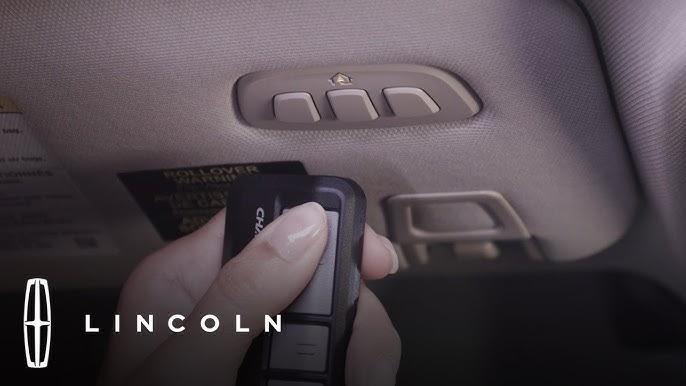
Struggling to connect your garage door to your luxury SUV? You’re not alone—many 2023 Lincoln Navigator owners face confusion when setting up their built-in garage door opener. Learning how to program 2023 Lincoln Navigator garage door opener correctly ensures seamless access to your home while maintaining the premium convenience you expect from your vehicle.
Understanding Your 2023 Lincoln Navigator’s HomeLink System
Before diving into the programming process, it’s essential to understand what you’re working with. The 2023 Lincoln Navigator comes equipped with the HomeLink wireless control system, a universal transmitter that can operate up to three different garage doors, gate operators, or home lighting systems.
According to Wikipedia, HomeLink is one of the most widely used integrated transceiver systems in vehicles, compatible with over 95% of garage door openers manufactured since 1982. This technology eliminates the need for separate remote controls cluttering your car.
Key Features of the 2023 Navigator HomeLink:
- Three programmable buttons located on the overhead console
- Rolling code technology compatibility for enhanced security
- LED indicator lights showing programming status
- Memory retention even after battery disconnection
Preparation Before Programming
Successful programming requires proper preparation. Follow these essential steps before beginning:
Gather Necessary Information
- Locate your garage door opener model number and brand
- Identify whether your opener uses fixed code or rolling code technology
- Ensure you have access to your garage door opener motor unit
- Keep your vehicle’s owner’s manual handy for reference
Safety Precautions
- Park your Navigator within clear sight of the garage door
- Ensure no people or objects are in the garage door’s path
- Have a helper available if possible for better coordination
- Keep children and pets away from the garage area during programming
Step-by-Step Programming Guide
Step 1: Clear Existing HomeLink Memory
If your HomeLink system has been previously programmed, you must clear it first:
- Press and hold the two outer HomeLink buttons simultaneously
- Continue holding for approximately 20 seconds
- Watch for the indicator light to flash rapidly
- Release both buttons when the light changes from solid to flashing
Note: This erases all previously programmed devices.
Step 2: Position Your Vehicle Correctly
Proper positioning ensures optimal signal transmission:
- Park your Navigator outside the garage, facing the door
- Maintain a distance of 10-15 feet from the garage door opener motor
- Keep the engine running or ignition in “ON” position
- Ensure good battery charge for consistent power
Step 3: Program the First Button
Follow these precise steps for initial programming:
- Press and hold your chosen HomeLink button (Button 1, 2, or 3)
- While holding the HomeLink button, press and hold your original garage door remote button
- Continue holding both buttons until the HomeLink indicator light flashes slowly, then rapidly
- This process typically takes 20-30 seconds
- Release both buttons once rapid flashing occurs
Step 4: Test the Programming
Verify successful programming with these actions:
- Press the programmed HomeLink button once
- Observe if the garage door responds
- If no response, repeat Step 3
- Test multiple times to ensure consistency
Step 5: Program Additional Devices (Optional)
To program a second or third device:
- Choose an unused HomeLink button
- Repeat Steps 3-4 with the new device’s remote
- Label each button for easy identification
- Test all programmed devices individually
Troubleshooting Common Issues
Even with careful following of instructions, problems may arise. Here’s how to address them:
Problem: HomeLink Light Doesn’t Flash
Solutions:
- Check vehicle battery strength
- Ensure ignition is in “ON” position
- Verify you’re pressing the correct buttons
- Try using a fresh battery in your garage remote
Problem: Garage Door Doesn’t Respond
Possible Causes and Fixes:
| Issue | Solution |
|---|---|
| Distance too far | Move vehicle closer to garage |
| Wrong frequency | Check opener compatibility |
| Rolling code issue | Follow special rolling code procedure |
| Weak remote battery | Replace remote battery |
Problem: Programming Won’t Complete
Advanced Troubleshooting:
- Clear memory completely and start over
- Ensure no interference from other electronic devices
- Check if your garage opener requires special programming mode
- Consult your garage door opener manual for specific requirements
Special Considerations for Rolling Code Openers
Many modern garage door openers use rolling code technology for enhanced security. The 2023 Lincoln Navigator handles these differently:
Identifying Rolling Code Openers
- Manufactured after 1995
- Brand names include Chamberlain, LiftMaster, Genie, and Craftsman
- Remote has a “Learn” or “Smart” button on the motor unit
Additional Steps for Rolling Code Systems
- After completing standard programming (Steps 1-4)
- Locate the “Learn” button on your garage door motor unit
- Press and release the Learn button (indicator light will illuminate)
- Within 30 seconds, press and hold the programmed HomeLink button
- Hold until the garage door moves or the motor unit light flashes
- Test operation multiple times
Programming Tips from Automotive Experts
Professional automotive technicians recommend these best practices:
- Program one device at a time to avoid confusion
- Document which button controls which device using the owner’s manual
- Test programming immediately after completion
- Keep original remotes as backup even after successful programming
- Update programming if you change garage door openers
According to industry statistics, approximately 78% of HomeLink programming issues result from incorrect initial setup rather than system malfunction. Taking time to follow each step carefully significantly improves success rates.
Maintaining Your HomeLink System
Once programmed correctly, maintain optimal performance:
Regular Maintenance
- Test all programmed buttons monthly
- Replace vehicle battery promptly when weak
- Keep HomeLink buttons clean and free from debris
- Update programming if garage equipment changes
When to Seek Professional Help
Contact Lincoln dealership support if:
- Programming fails after multiple attempts
- HomeLink system shows error indicators
- Vehicle electrical issues affect HomeLink operation
- Garage door opener requires specialized programming
Frequently Asked Questions
Q: How many devices can I program to my 2023 Lincoln Navigator HomeLink?
A: You can program up to three different devices to your HomeLink system. Each of the three buttons can control a separate garage door, gate operator, or home lighting system.
Q: What should I do if my garage door opener uses rolling codes?
A: Rolling code openers require an additional step after standard programming. Locate the “Learn” button on your garage door motor unit, press it, then within 30 seconds, press and hold your programmed HomeLink button until the door operates.
Q: Can I reprogram a HomeLink button without clearing all memory?
A: Yes, you can reprogram individual buttons without clearing the entire system. Simply follow the programming steps for the specific button you want to change. Only clear all memory if you’re starting fresh or experiencing persistent issues.
Q: Why won’t my HomeLink system retain programming after battery replacement?
A: HomeLink memory should persist through battery changes. If programming is lost, check for loose connections, ensure proper battery installation, and verify that the vehicle’s electrical system is functioning correctly. Persistent issues may require dealership inspection.
Q: Is HomeLink compatible with all garage door openers?
A: HomeLink is compatible with over 95% of garage door openers manufactured since 1982. However, some older models or specialty systems may require additional adapters or professional installation. Check your garage door opener’s compatibility list if unsure.
Q: How long does the programming process typically take?
A: Standard programming usually takes 2-5 minutes per device. Rolling code systems may require an additional 1-2 minutes for the final synchronization step. Allow extra time if you’re programming multiple devices.
Conclusion
Learning how to program 2023 Lincoln Navigator garage door opener doesn’t have to be complicated. With the right preparation, clear instructions, and patience, you can have your HomeLink system operational in just minutes. The convenience of controlling your garage door directly from your luxury SUV enhances both security and daily efficiency.
Remember to follow each step carefully, test your programming thoroughly, and keep this guide handy for future reference. Your 2023 Lincoln Navigator’s HomeLink system represents the perfect blend of luxury and practicality that Lincoln owners expect.
Found this guide helpful? Share it with fellow Lincoln Navigator owners on social media! Tag us in your successful programming stories, and don’t forget to bookmark this page for future reference. Your feedback helps us create better content for the Lincoln community.



Leave a Reply