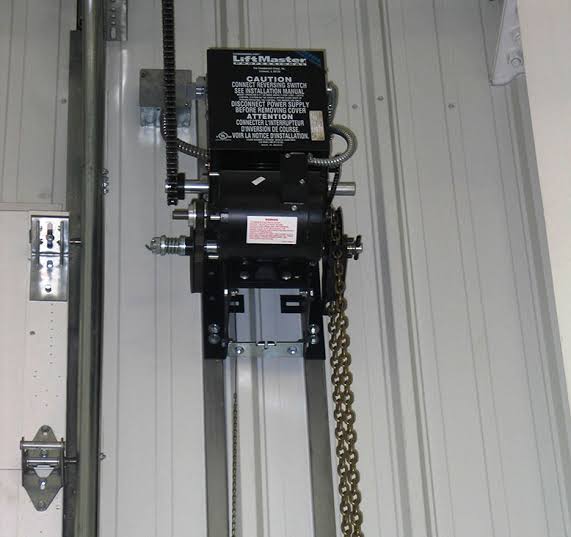
Is your business stuck because the new remote won’t open the garage? Or perhaps you’ve recently replaced an old unit and need to sync multiple employee remotes? Learning how to program a Liftmaster commercial garage door opener is essential for maintaining security and operational efficiency in any commercial facility. This guide will walk you through the exact steps to get your system up and running smoothly, ensuring authorized access while keeping intruders out.
Why Proper Programming Matters for Commercial Security
Commercial garage doors are high-traffic entry points that require robust security measures. Unlike residential units, commercial openers often manage access for dozens of employees, delivery vehicles, and service providers. A poorly programmed system can lead to unauthorized access, safety hazards, or operational delays.
According to industry standards, proper programming ensures that only authorized remotes and keypads can trigger the door mechanism. This is particularly critical for businesses storing valuable inventory or equipment. By following the correct programming procedures, you not only enhance security but also extend the lifespan of your opener by reducing unnecessary strain from conflicting signals.
Identifying Your Liftmaster Commercial Model
Before diving into the programming process, it’s crucial to identify your specific Liftmaster model. Commercial openers differ significantly from residential ones in terms of frequency, coding technology, and button configurations. Common commercial series include the Liftmaster Elite Access, Model 8500W, and various Jackshaft operators.
Check the label on the motor unit or the back of your existing remote. You’ll typically find:
- Model Number: Usually starts with “LM” or a specific numeric code.
- Frequency: Most modern Liftmasters use 315 MHz or 390 MHz.
- Security Type: Look for terms like “Security+ 2.0” or “Rolling Code.”
If you’re unsure, consult the Liftmaster official support page or refer to the user manual. Using the wrong programming method for your model can result in failed synchronization or even lock out all existing remotes.
Step-by-Step Guide: How to Program a Liftmaster Commercial Garage Door Opener
Programming a commercial opener generally involves syncing the remote control with the motor unit’s receiver. Below is the standard procedure for most Liftmaster commercial units equipped with a “Learn” button.
Step 1: Locate the Learn Button
On most commercial Liftmaster openers, the Learn button is located on the back or side of the motor unit. It is typically colored purple, yellow, or red, depending on the manufacturing year and security type. For newer models with Security+ 2.0, it is often purple.
Step 2: Clear Existing Codes (Optional but Recommended)
If you are setting up a new system or suspect unauthorized remotes are active, clear the memory first.
- Press and hold the Learn button for approximately 6–10 seconds.
- Release when the indicator light turns off.
- This erases all previously programmed remotes and keypads. Note: You will need to reprogram all devices afterward.
Step 3: Program the Remote Control
- Press the Learn button once briefly. The indicator light will illuminate or blink, signaling that the unit is in programming mode. You have about 30 seconds to complete the next step.
- On your remote control, press and hold the button you wish to program.
- Hold it until the motor unit’s lights flash or you hear two clicks. This confirms the code has been accepted.
- Test the remote by pressing the button again. The door should activate.
Step 4: Programming a Wireless Keypad
For commercial settings, wireless keypads are common for visitor or temporary access.
- Press the Learn button on the motor unit.
- Within 30 seconds, enter your desired 4-digit PIN on the keypad.
- Press the Enter or Send button on the keypad.
- The motor unit light will flash to confirm. Test the PIN to ensure it operates the door.
Troubleshooting Common Programming Issues
Even with careful steps, issues can arise. Here are solutions to frequent problems:
| Issue | Possible Cause | Solution |
|---|---|---|
| Remote not syncing | Weak battery or wrong frequency | Replace remote batteries; verify remote matches opener frequency (315/390 MHz). |
| Light blinks but no action | Interference from LED bulbs | Replace nearby LED bulbs with incandescent ones or use shielded LEDs, as they can block signals. |
| Keypad PIN rejected | Incorrect entry timing | Ensure you enter the PIN within 30 seconds of pressing the Learn button. |
| Door reverses immediately | Safety sensor misalignment | Check that the safety eyes at the bottom of the door are aligned and clean. |
Advanced Features: MyQ and Smart Integration
Many modern Liftmaster commercial openers support MyQ technology, allowing you to monitor and control your garage door via smartphone. To enable this:
- Download the MyQ app on your iOS or Android device.
- Create an account and follow the in-app instructions to add your device.
- Ensure your opener has a compatible MyQ gateway or built-in Wi-Fi module.
- Once connected, you can grant temporary access to vendors, receive alerts when the door opens, and integrate with other smart building systems.
This feature is particularly valuable for facility managers who need to oversee multiple locations remotely. It adds a layer of convenience without compromising security, as each user requires individual authentication.
Safety Precautions During Programming
When working with commercial garage door openers, safety is paramount. These units operate heavy doors that can cause serious injury if malfunctioning.
- Keep hands clear: Never place hands near moving parts during testing.
- Test safety sensors: After programming, always verify that the door reverses when an object blocks the safety eyes.
- Secure the area: Ensure no employees or vehicles are in the door’s path during programming tests.
- Professional help: If the door behaves erratically after programming, contact a certified Liftmaster technician. Commercial springs and cables are under high tension and should only be handled by professionals.
FAQ Section
Q1: Can I program a universal remote to my Liftmaster commercial opener?
Yes, but it must be compatible with Liftmaster’s frequency and security protocol. Look for remotes labeled as compatible with Security+ 2.0. Follow the same Learn button procedure, but note that some older commercial models may not accept third-party remotes.
Q2: How many remotes can I program to one commercial opener?
Most Liftmaster commercial openers can store between 20 to 50 remote codes, depending on the model. Check your specific manual for the exact capacity. If you reach the limit, you must clear old codes before adding new ones.
Q3: What do I do if I lost my only remote?
If you have no working remotes, you cannot enter programming mode via the remote. You must use the wall-mounted control panel or the Learn button on the motor unit directly. If you cannot access the motor unit, you may need a locksmith or technician to reset the system.
Q4: Does programming erase all existing remotes?
Only if you hold the Learn button for 6–10 seconds to clear the memory. A brief press allows you to add new remotes without deleting existing ones. Always clarify your intent before pressing the button.
Q5: Why does my remote work intermittently?
Intermittent issues are often due to signal interference from nearby electronics, LED lighting, or weak batteries. Try replacing the batteries first. If the problem persists, check for sources of radio frequency interference in the vicinity.
Conclusion
Mastering how to program a Liftmaster commercial garage door opener empowers you to maintain secure, efficient access for your business. By following the steps outlined above, you can sync remotes, keypads, and smart devices with confidence. Remember to prioritize safety, verify compatibility, and leverage advanced features like MyQ for enhanced control.
Did you find this guide helpful? Share it with your facility management team or on LinkedIn to help others streamline their commercial garage door operations. If you have further questions, drop them in the comments below!



Leave a Reply