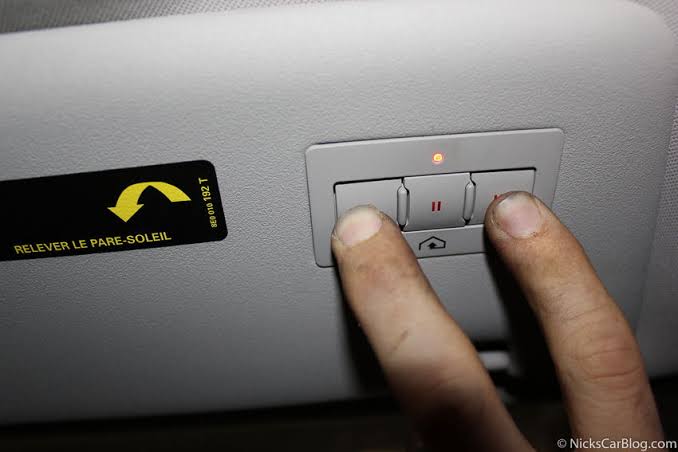
Have you ever pulled into your driveway, pressed the button on your car’s ceiling, and realized your garage door refuses to open? It is a frustrating experience, especially when you do not have the original handheld remote handy. Many Audi owners face this issue when trying to sync their vehicle’s built-in HomeLink system with their garage door opener. If you are wondering how to program Audi garage door opener without remote, you are in the right place. This guide will walk you through the process clearly and safely, ensuring you regain control of your garage access without needing extra equipment.
Understanding the Audi HomeLink System
Before diving into the programming steps, it is essential to understand what you are working with. Most modern Audi vehicles come equipped with HomeLink, a universal transceiver that can replace up to three handheld remotes for devices like garage doors, gate operators, and home lighting systems.
HomeLink works by learning the radio frequency signal from your existing garage door opener. However, security protocols have evolved. Older openers use fixed codes, while newer models use rolling codes for enhanced security. This distinction is crucial because programming methods differ slightly between the two.
According to Wikipedia, HomeLink is a brand of in-vehicle radio transmitter that allows users to operate devices such as garage door openers, gate operators, and home lighting systems. This integration offers convenience but requires precise setup to ensure secure communication between your Audi and your garage.
Why You Might Not Have a Remote
There are several reasons why you might need to program your Audi without the original remote:
- The remote is lost or damaged.
- The battery in the remote is dead, and you cannot replace it immediately.
- You recently moved into a new home and do not have the previous owner’s remote.
- You prefer using only the car’s integrated system for a cleaner dashboard experience.
Regardless of the reason, the solution remains similar, though some steps may require accessing the motor unit directly.
Step-by-Step Guide: How to Program Audi Garage Door Opener Without Remote
Programming your Audi’s HomeLink system without a remote requires a bit more effort than the standard method, but it is entirely feasible. Follow these detailed steps to ensure success.
Step 1: Prepare Your Vehicle and Garage
Ensure your Audi is parked outside the garage with the engine running. This ensures the electrical system is active. Clear the area around the garage door opener motor unit (usually mounted on the ceiling) so you can access it safely. You may need a sturdy ladder.
Step 2: Locate the “Learn” Button on Your Garage Opener
Climb the ladder and locate the motor unit of your garage door opener. Look for a small button labeled “Learn,” “Smart,” or “Program.” It is often colored yellow, purple, or red, depending on the manufacturer (e.g., LiftMaster, Chamberlain, Genie).
- Note: Pressing this button will erase all previously programmed remotes. Ensure no other household members are trying to use their remotes during this process.
Step 3: Initiate HomeLink Training Mode in Your Audi
- Sit in your Audi and turn the ignition to the “On” position.
- Locate the HomeLink buttons on your rearview mirror or overhead console.
- Press and hold the two outer HomeLink buttons simultaneously for about 10–20 seconds until the indicator light begins to flash rapidly. This indicates that the system is in training mode.
- Release the buttons.
Step 4: Sync the Signals
Since you do not have a remote, you will need to simulate the signal transmission directly from the motor unit.
- Within 30 seconds of initiating training mode in your Audi, press and release the “Learn” button on your garage door opener motor unit. The indicator light on the motor should blink or stay solid, indicating it is ready to receive a new code.
- Return to your Audi quickly.
- Press and hold the desired HomeLink button you wish to program. Hold it for 2–3 seconds, then release. Repeat this press-and-release cycle every 2 seconds until the garage door moves.
- Tip: You may need to stand close to the garage door opener motor for the signal to be strong enough during this initial sync.
Step 5: Test the Connection
Once the garage door moves, press the HomeLink button again to see if it opens and closes consistently. If it works, you have successfully programmed your Audi garage door opener without a remote.
Troubleshooting Common Issues
Even with careful following, issues can arise. Here is a comparison of common problems and their solutions.
| Problem | Possible Cause | Solution |
|---|---|---|
| Door does not move | Signal too weak | Stand closer to the motor unit; ensure no interference from LED lights. |
| Light flashes but door stays still | Rolling code mismatch | You may need to complete an additional “sync” step at the motor unit. |
| HomeLink light stops flashing | Timeout error | Restart the training mode in the Audi and try again within the 30-second window. |
| Interference from other devices | Frequency conflict | Turn off nearby wireless devices temporarily during programming. |
Dealing with Rolling Code Openers
If your garage door uses rolling codes (common in units manufactured after 1996), you might need an extra step. After the door moves in Step 4, press the “Learn” button on the motor unit again briefly. Then, press the HomeLink button in your Audi twice. This confirms the rolling code sequence and ensures future operations are secure.
Expert Tips for Successful Programming
- Check the Battery: Even though you are not using the remote, ensure your Audi’s battery is strong. A weak car battery can cause intermittent signals.
- Clear Old Codes: If you previously programmed a different garage door, clear the HomeLink memory first by holding the two outer buttons until the light changes from slow to rapid flashing.
- Consult Your Manual: Audi models vary (A3, A4, Q5, Q7, etc.). Always refer to your specific vehicle’s owner manual for button locations and nuances.
- Safety First: Never attempt to climb onto the garage door tracks or touch moving parts. Use a stable ladder and have someone spot you if possible.
FAQ Section
1. Can I program my Audi HomeLink if I completely lost my remote?
Yes, you can. By accessing the “Learn” button on the garage door opener motor unit, you can sync the Audi directly without needing the handheld remote. However, you must have physical access to the motor unit.
2. Why does my HomeLink work intermittently?
Intermittent operation is often due to weak signal strength or interference. Try reprogramming the button while standing closer to the garage door opener. Also, check if LED bulbs in your garage are causing radio frequency interference; switching to incandescent bulbs may help.
3. How many devices can I program to my Audi HomeLink?
Most Audi HomeLink systems can store up to three different devices. You can mix garage doors, gate operators, and even home lighting systems. Each button corresponds to one device.
4. What if my garage door opener does not have a “Learn” button?
Older garage door openers (pre-1996) may not have a learn button. In this case, you will likely need a compatible remote to clone the signal. If you do not have one, consider upgrading your garage door opener to a newer model with rolling code security and a learn button.
5. Is it safe to program HomeLink without a remote?
Yes, it is safe as long as you follow the manufacturer’s instructions. The process involves standard radio frequency syncing and does not compromise the security of your garage door, especially if you complete the rolling code confirmation step.
6. Does this method work for all Audi models?
The general process is similar across most Audi models equipped with HomeLink, including the A4, A6, Q5, and Q7. However, button locations and menu interfaces may vary. Always consult your specific owner’s manual for model-specific guidance.
Conclusion
Learning how to program Audi garage door opener without remote is a valuable skill that saves time and money. By understanding your HomeLink system and following the steps outlined above, you can easily sync your vehicle with your garage door opener. Remember to access the motor unit’s “Learn” button, initiate training mode in your Audi, and test the connection thoroughly.
If you found this guide helpful, please share it with fellow Audi owners on social media. Helping others solve common tech issues builds a stronger community of informed drivers. Drive safely and enjoy the convenience of seamless garage access!



Leave a Reply