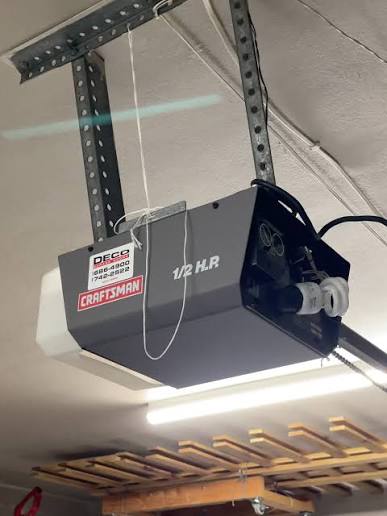
Is your Craftsman garage door remote suddenly stop working? Or perhaps you’ve just installed a new 1/2 HP Craftsman garage door opener and need to sync your remotes and keypad? You’re not alone. Thousands of homeowners face this issue every year, often feeling frustrated when their garage door won’t respond to commands. Learning how to program Craftsman 1/2 HP garage door opener correctly can save you time, money, and the hassle of calling a professional technician.
In this comprehensive guide, we’ll walk you through the exact steps to program your Craftsman 1/2 HP garage door opener, whether you’re setting up a new system or reprogramming existing remotes. We’ll also cover troubleshooting tips, safety precautions, and answers to frequently asked questions to ensure your garage door operates smoothly and securely.
Understanding Your Craftsman 1/2 HP Garage Door Opener
Before diving into the programming process, it’s essential to understand what makes the Craftsman 1/2 HP model unique. The 1/2 horsepower motor is one of the most popular choices for residential garages because it provides sufficient power for standard single-car and double-car garage doors while maintaining energy efficiency.
Craftsman garage door openers typically use rolling code technology, which changes the access code each time you use the remote. This feature enhances security by preventing code theft or unauthorized access. According to the International Door Association, modern garage door openers like Craftsman models comply with federal safety standards that require automatic reversal mechanisms and secure coding systems.
Your Craftsman 1/2 HP opener may come with:
- One or more remote controls
- A wireless keypad (optional)
- A wall-mounted control panel
- Safety sensors near the floor
Knowing your specific model number is crucial because programming steps can vary slightly between different Craftsman generations. You can find the model number on a label located on the motor unit, usually on the back or side panel.
Step-by-Step Guide: How to Program Craftsman 1/2 HP Garage Door Opener
Programming your Craftsman garage door opener involves syncing your remote control or keypad with the motor unit. Follow these detailed steps carefully to ensure successful programming.
Step 1: Locate the Learn Button
The first step is finding the Learn button on your Craftsman garage door opener motor unit. This button is typically:
- Located on the back or side of the motor housing
- Colored yellow, purple, red, or green (depending on the model year)
- Small and may require a pen or paperclip to press
Note: If you cannot locate the Learn button, consult your owner’s manual or look for a small LED light near the antenna wire—this usually indicates the programming area.
Step 2: Clear Existing Codes (If Necessary)
If you’re reprogramming due to lost remotes or security concerns, clear all previously programmed codes first:
- Press and hold the Learn button for approximately 6–10 seconds
- Wait until the indicator light turns off or blinks rapidly
- Release the button
This action erases all stored remote and keypad codes, requiring you to reprogram each device from scratch.
Step 3: Program Your Remote Control
Now, let’s sync your remote with the opener:
- Press the Learn button once briefly—the indicator light should turn on or start blinking
- Within 30 seconds, press and hold the button on your remote that you want to program
- Keep holding until the opener’s lights flash or you hear a click sound
- Test the remote by pressing the programmed button
If the garage door responds, congratulations! Your remote is successfully programmed. If not, repeat the process, ensuring you complete step 2 within the 30-second window.
Step 4: Program a Wireless Keypad (Optional)
If you have a Craftsman wireless keypad, follow these steps:
- Press the Learn button on the motor unit
- Within 30 seconds, enter your desired 4-digit PIN on the keypad
- Press the “Enter” or arrow button on the keypad
- The opener’s light should flash, confirming successful programming
Test the keypad by entering your PIN and pressing Enter. The door should activate.
Step 5: Program Multiple Remotes
You can program up to 8 remotes on most Craftsman 1/2 HP models. Simply repeat Step 3 for each additional remote. Make sure to label each remote if multiple family members use them to avoid confusion.
Common Programming Issues and Troubleshooting Tips
Even with careful following of instructions, you might encounter problems. Here are common issues and their solutions:
| Problem | Possible Cause | Solution |
|---|---|---|
| Remote doesn’t respond | Dead batteries | Replace remote batteries with fresh ones |
| Learn button light doesn’t turn on | Power issue | Check if opener is plugged in and circuit breaker is on |
| Code won’t save | Timing error | Ensure you press remote button within 30 seconds |
| Door reverses immediately | Sensor misalignment | Adjust safety sensors so they face each other directly |
| Intermittent operation | Signal interference | Move electronics away from opener; check for nearby Wi-Fi routers |
Pro Tip: If your remote works intermittently, try repositioning the antenna wire on the motor unit. Extend it fully and point it downward for better signal reception.
Safety Precautions When Programming Your Garage Door Opener
Safety should always be your top priority when working with garage door openers. Follow these essential guidelines:
- Never attempt programming while the door is moving. Wait until the door is fully closed or open.
- Keep children and pets away from the garage door during programming and testing.
- Test the auto-reverse feature monthly by placing a small object (like a roll of paper towels) in the door’s path. The door should reverse upon contact.
- Ensure safety sensors are aligned properly. Misaligned sensors can cause the door to malfunction or fail to close.
- Disconnect power before performing any maintenance on the motor unit itself.
According to the Consumer Product Safety Commission, garage door-related injuries send thousands of people to emergency rooms annually. Proper programming and regular maintenance significantly reduce these risks.
Maintaining Your Craftsman Garage Door Opener
Once you’ve successfully programmed your Craftsman 1/2 HP garage door opener, regular maintenance will ensure long-term reliability:
- Lubricate moving parts every six months using silicone-based lubricant
- Tighten hardware such as bolts and brackets quarterly
- Clean safety sensors with a soft cloth to remove dust and debris
- Test balance by disconnecting the opener and manually lifting the door—it should stay in place when halfway open
- Replace remote batteries annually or when response becomes sluggish
FAQ Section
Q1: How do I know if my Craftsman garage door opener uses rolling code technology?
Most Craftsman openers manufactured after 1993 use rolling code technology. Check your owner’s manual or look for a label on the motor unit mentioning “Security+” or “Rolling Code.” If unsure, assume it uses rolling code and follow the programming steps accordingly.
Q2: Can I program a universal remote to work with my Craftsman opener?
Yes, many universal remotes are compatible with Craftsman openers. However, you must ensure the universal remote supports rolling code technology. Follow the universal remote’s instructions, which typically involve pressing the Learn button on the Craftsman unit and then programming the universal remote simultaneously.
Q3: What should I do if I lose all my remotes?
If you’ve lost all remotes, you’ll need to purchase replacement Craftsman remotes or compatible universal remotes. First, clear all existing codes by holding the Learn button for 10 seconds. Then, program your new remotes following Step 3 in this guide. For added security, consider changing your wireless keypad PIN as well.
Q4: Why does my garage door opener work sometimes but not others?
Intermittent operation usually indicates one of three issues: weak remote batteries, signal interference from nearby electronics, or a loose antenna wire. Start by replacing the batteries, then check for interference sources like Wi-Fi routers or cordless phones. Finally, ensure the antenna wire is fully extended and hanging freely.
Q5: How many remotes can I program to one Craftsman 1/2 HP opener?
Most Craftsman 1/2 HP garage door openers can store codes for up to 8 remotes and 1 wireless keypad. If you need more than 8 remotes, consider purchasing a keypad for additional users or upgrading to a newer model with higher capacity.
Q6: Is it necessary to hire a professional to program my garage door opener?
No, programming a Craftsman garage door opener is a straightforward DIY task that takes less than 15 minutes. However, if you experience persistent issues after following the steps above, or if you’re uncomfortable working with electrical components, contacting a certified technician is recommended.
Conclusion
Learning how to program Craftsman 1/2 HP garage door opener empowers you to take control of your home’s security and convenience. By following the step-by-step instructions in this guide, you can successfully sync remotes, set up keypads, and troubleshoot common issues without professional assistance.
Remember to prioritize safety, perform regular maintenance, and keep your owner’s manual handy for model-specific details. With proper programming and care, your Craftsman garage door opener will provide reliable service for years to come.
Did you find this guide helpful? Share it with friends and family who might be struggling with their garage door openers! Leave a comment below if you have additional questions or success stories to share.



Leave a Reply