Introduction
There are few things more frustrating than pulling into your driveway in the rain, only to realize you cannot get your new vehicle’s integrated transmitter to sync with your home system. If you are searching for how to program Mercedes GLC 300 garage door opener functionality, you are likely dealing with this exact inconvenience right now. Fortunately, the Mercedes-Benz HomeLink® system is designed for user-friendly integration, and with the correct sequence, you can have your overhead console operating your gate or garage in under ten minutes. This guide will walk you through the process safely and effectively, ensuring you regain seamless access to your home without needing a dealership visit.
Understanding the Mercedes-Benz HomeLink® System
Before diving into the buttons, it is vital to understand what you are actually programming. The Mercedes GLC 300 does not use a traditional “garage door opener” hardware unit inside the car; instead, it utilizes the HomeLink® Universal Transceiver. This is an integrated wireless control system built directly into the vehicle’s overhead console or rearview mirror assembly.
According to technical documentation referenced on Wikipedia, HomeLink is compatible with nearly all major garage door opener brands, including LiftMaster, Chamberlain, Genie, and Craftsman. It operates by learning the radio frequency (RF) signal from your existing handheld remote and replicating it via the vehicle’s antenna.
Why Compatibility Matters
Not all openers program identically. Modern Mercedes vehicles utilize two distinct protocols:
- Fixed Code: Older openers (pre-1996) that use DIP switches.
- Rolling Code: Newer security systems that change the transmission code every time the button is pressed to prevent hacking.
Identifying which type you have saves significant time during the how to program Mercedes GLC 300 garage door opener process. Most GLC 300 owners will be dealing with Rolling Code systems due to the vehicle’s modern manufacturing date.
Pre-Programming Safety and Preparation Checklist
Safety and preparation are paramount when working with automated mechanical doors. Before attempting synchronization, complete these checks:
- Clear the Area: Ensure no people, pets, or objects are in the path of the garage door. The door will move unexpectedly during testing.
- Locate Your Handheld Remote: You must have the original manufacturer remote for the initial training phase. The car cannot learn directly from the motor unit alone (unless using specific direct-wire methods not applicable to standard RF programming).
- Check Battery Health: Weak batteries in your handheld remote are the #1 cause of programming failure. Replace them before starting.
- Ignition Status: For the Mercedes GLC 300, the ignition must be in the “ON” position (engine running or accessory mode active) for the HomeLink module to receive power and accept programming commands.
- Park Outside: Always perform the initial programming steps outside the garage to avoid accidental activation while the vehicle is partially inside.
Expert Tip: If you have previously attempted to program the buttons and failed, perform a factory reset on the HomeLink system first. Hold the two outer buttons for 20 seconds until the indicator light flashes rapidly. This clears corrupted memory slots.
Step-by-Step: How To Program Mercedes GLC 300 Garage Door Opener
Follow this precise sequence for Rolling Code openers, which covers 95% of GLC 300 applications.
Phase 1: Training the Vehicle
- Turn the GLC 300 ignition to ON.
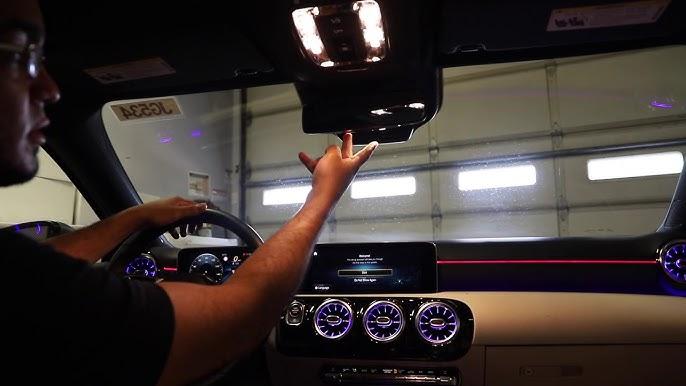
- Locate the three HomeLink buttons on your overhead console. Choose the button you wish to assign.
- Hold your handheld remote 1–3 inches away from the HomeLink button.
- Simultaneously press and hold both the chosen HomeLink button AND your handheld remote button.
- Watch the HomeLink indicator light above the buttons. It will flash slowly at first, then transition to a rapid flash.
- Release both buttons once the rapid flashing begins. This indicates the vehicle has successfully learned the RF signal.
Phase 2: Synchronizing the Motor Unit (Rolling Code Only)
The vehicle now knows the signal, but the garage door motor needs to recognize the car as an authorized device.
- Locate the “Learn” or “Smart” button on your garage door opener motor unit (usually on the back or side panel near the antenna wire). Colors vary: yellow, purple, orange, red, or green.
- Press and release the Learn button. You typically have 30 seconds to complete the next step before the motor exits learning mode.
- Return to your GLC 300 immediately.
- Press and hold the programmed HomeLink button for 2 seconds, then release. Repeat this press-hold-release cycle up to three times.
- Test the button. The door should activate.
Troubleshooting Table: Common Programming Failures
| Symptom | Probable Cause | Solution |
|---|---|---|
| Light never flashes rapidly | Dead remote battery or wrong distance | Replace battery; adjust remote distance (1-3 inches optimal) |
| Light flashes rapidly but door won’t open | Rolling code sync incomplete | Re-do Phase 2 within 30-second window; ensure Learn button was pressed |
| Works intermittently | Signal interference or weak car battery | Check vehicle battery health; reprogram in different location |
| Indicator stays solid, no response | Memory slot corrupted | Reset HomeLink (hold outer buttons 20 sec) and restart |
| Programs but opens neighbor’s door | Frequency overlap (rare) | Clear memory and reprogram; consult dealer for firmware update |
Advanced Considerations for GLC 300 Owners
Canadian and European Models
If your GLC 300 was originally sold outside the United States, the HomeLink frequency may differ. Canadian models sometimes operate on different bands due to regulatory requirements. Verify your vehicle’s market specification if programming fails repeatedly despite following correct procedures.
Smart Garage Integration
Many GLC 300 owners now use Wi-Fi-enabled smart openers like MyQ or Tailwind. These systems often require a bridge device rather than direct HomeLink programming. In such cases, you may need to purchase a HomeLink-to-WiFi bridge or use the manufacturer’s app-based solution instead of RF programming. Check your smart opener’s documentation before attempting traditional programming.
Firmware Updates
Mercedes periodically releases MBUX and telematics updates that can improve HomeLink compatibility. If your GLC 300 is several years old and struggles with newer opener models, schedule a service visit to check for available software updates. Dealerships can flash the HomeLink module firmware in under 30 minutes.
Frequently Asked Questions (FAQ)
Q1: Can I program my Mercedes GLC 300 garage door opener without the original remote?
Generally, no. The HomeLink system requires the original handheld transmitter to clone the RF signal during Phase 1. However, some newer LiftMaster/Chamberlain units with “Direct Wire” or WiFi bridge capabilities offer alternative pairing methods. Check your opener’s manual for remote-free programming options, or contact the opener manufacturer directly.
Q2: How many devices can the GLC 300 HomeLink system store?
The Mercedes GLC 300 HomeLink system supports three programmable buttons, meaning you can store up to three separate devices. This could include your primary garage door, a secondary garage/gate, and home lighting or security systems. Each button operates independently.
Q3: Why does my programmed button work for a week then stop functioning?
This typically indicates a rolling code desynchronization. Power outages, motor unit resets, or interference can cause the security codes to fall out of sync. Simply repeat Phase 2 (the Learn button synchronization) without reprogramming the vehicle itself. Also verify your vehicle’s 12V battery health, as low voltage can corrupt HomeLink memory.
Q4: Is it safe to program the garage door opener myself, or should I go to the dealer?
It is completely safe to program HomeLink yourself. The process involves only button presses and poses no risk to your vehicle’s electronics or warranty. Dealership programming services typically charge $75–$150 for a task that takes under 10 minutes. Reserve dealer visits for persistent failures after multiple correct attempts, which may indicate a hardware fault requiring diagnosis.
Q5: Will programming HomeLink drain my GLC 300 battery?
No. HomeLink draws negligible power when idle and only activates briefly during transmission. However, always ensure your ignition is ON during programming to prevent any parasitic draw concerns. If you experience battery issues unrelated to programming, have your electrical system inspected separately.
Q6: Can I use HomeLink for community gates or apartment parking garages?
Yes, but with caveats. Community gates often use commercial-grade transmitters with different frequencies or encryption. Some HOA-managed systems intentionally block universal transmitters for security reasons. Contact your property management first to confirm HomeLink compatibility before attempting programming.
Conclusion
Mastering how to program Mercedes GLC 300 garage door opener functionality transforms daily convenience and eliminates the frustration of fumbling for remotes. By understanding the distinction between fixed and rolling code systems, preparing properly, and following the two-phase programming sequence precisely, virtually every GLC 300 owner can achieve reliable synchronization in under fifteen minutes. Remember that patience during the 30-second Learn button window is critical, and fresh remote batteries solve more problems than any other single factor.
Your Mercedes was engineered for seamless integration, and HomeLink is one of its most practical luxury features. Don’t let a simple programming hurdle diminish your ownership experience.
Found this guide helpful? Share it with fellow Mercedes owners on Facebook, X (Twitter), or your favorite automotive forum! Helping another driver avoid dealership fees is the best kind of community support. Safe driving and smooth entries ahead! 🚗🏠



Leave a Reply