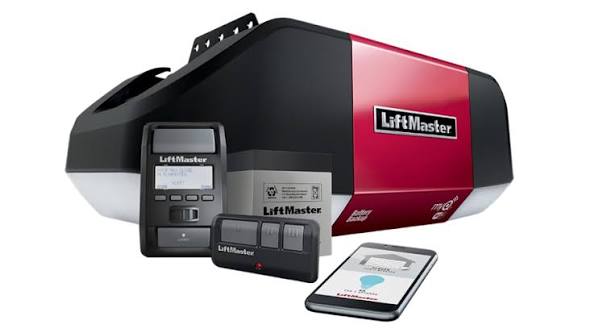
Introduction
Have you ever stood in your driveway, holding a Genie remote, only to realize it refuses to communicate with your new Liftmaster garage door opener? It is a frustrating scenario that many homeowners face when upgrading their garage hardware or moving into a new home with mismatched equipment. You might be searching for how to program Genie garage door opener to Liftmaster directly, hoping for a simple button-press solution.
The short answer is that these two brands use different proprietary radio frequencies and encryption protocols, making direct compatibility impossible. However, do not worry. There is a reliable, cost-effective workaround that allows you to control your Liftmaster door with a handheld remote that looks and feels like your old Genie unit. In this guide, we will walk you through the exact steps to bridge this gap, ensuring you regain convenient access to your garage without needing a technician.
Why You Cannot Directly Program a Genie Remote to a Liftmaster
Before we dive into the solution, it is crucial to understand why your current Genie remote does not work. This knowledge helps prevent wasted time and ensures you choose the right replacement hardware.
The Frequency Mismatch
Garage door openers operate on specific radio frequencies. Historically, Genie and Liftmaster (owned by Chamberlain Group) have used different standards:
- Genie: Often uses 390 MHz or Intellicode rolling codes.
- Liftmaster: Typically uses 315 MHz, 390 MHz, or Security+ 2.0 rolling codes.
Even if the frequencies match numerically, the encryption algorithms differ. Liftmaster’s Security+ technology is designed specifically to reject signals from non-Chamberlain/Liftmaster devices to prevent hacking. Therefore, there is no “learn button” sequence that will force a genuine Genie remote to pair with a Liftmaster motor head.
The Risk of Forced Compatibility
Attempting to hack or modify the internal circuitry of a Genie remote to match Liftmaster’s protocol is not recommended. It voids warranties, poses safety risks, and often results in intermittent operation. Instead, the industry-standard solution is to use a universal compatible remote.
The Solution: Using a Universal Remote Compatible with Liftmaster
Since you cannot program the actual Genie hardware to the Liftmaster system, the best approach is to purchase a universal remote that is explicitly listed as compatible with Liftmaster. Many of these remotes are designed to mimic the form factor of popular Genie models, providing the familiarity you want with the functionality you need.
Step-by-Step Guide to Programming a Universal Remote
Follow these precise steps to program a universal remote (such as the Liftmaster 377LM or a compatible third-party universal remote) to your Liftmaster opener.
Step 1: Identify Your Liftmaster Model
Locate the model number on your garage door opener motor unit. It is usually found on the back panel or near the light lens. Common series include:
- Security+
- Security+ 2.0
- MyQ
Knowing this helps you select the correct universal remote. Most modern universal remotes support all three, but checking the packaging is essential.
Step 2: Clear Old Codes (Optional but Recommended)
If your opener has reached its limit of programmed remotes (usually 8–10), you may need to clear old codes.
- Locate the “Learn” button on the motor unit. It is usually yellow, purple, or red.
- Press and hold the Learn button for 6–10 seconds until the indicator light turns off.
- Release the button. All previously programmed remotes and keypads are now erased.
Step 3: Initiate Programming Mode
- Press the “Learn” button on the motor unit once briefly.
- The indicator light will turn on or blink, indicating the opener is ready to receive a new signal. You typically have 30 seconds to complete the next step.
Step 4: Send the Signal from the New Remote
- Take your new universal remote.
- Press and hold the button you wish to program (e.g., Button 1).
- Hold it for 2–3 seconds, then release.
- Watch the motor unit. If successful, the lights on the opener will flash, or you will hear two clicks.
Step 5: Test the Connection
Stand outside your garage and press the programmed button. The door should activate immediately. If it does not, repeat Steps 3 and 4, ensuring you are within range (at least 10 feet away during programming).
Pro Tip: If you are using a multi-button universal remote, you can program each button to a different door if you have multiple openers. Simply repeat the process for each button, pressing the Learn button on the respective motor unit each time.
Comparison: Genuine Genie vs. Universal Liftmaster-Compatible Remote
To help you make an informed decision, here is a breakdown of why switching to a compatible universal remote is better than trying to force a Genie remote to work.
| Feature | Genuine Genie Remote | Universal Remote (Liftmaster Compatible) |
|---|---|---|
| Compatibility | Works only with Genie openers | Works with Liftmaster, Chamberlain, Craftsman |
| Encryption | Intellicode | Security+ / Security+ 2.0 |
| Ease of Setup | N/A (Cannot pair) | Simple 30-second learn process |
| Cost | $20–$40 | $15–$30 |
| Reliability | High (with Genie) | High (with Liftmaster) |
| Form Factor | Familiar Genie design | Often mimics Genie or standard shapes |
As shown above, the universal remote offers the same reliability and ease of use without the compatibility headaches. For more detailed technical specifications on radio frequency standards, you can refer to Wikipedia’s page on Garage Door Openers, which provides a historical overview of how these technologies evolved.
Troubleshooting Common Programming Issues
Even with the right hardware, issues can arise. Here are solutions to the most common problems users face when programming remotes to Liftmaster openers.
1. The Light Does Not Flash After Pressing Learn
If the indicator light on the motor unit does not respond when you press the Learn button, check the following:
- Power Supply: Ensure the opener is plugged in and the circuit breaker has not tripped.
- Lock Mode: Some Liftmaster models have a “Lock” feature that disables remote programming. Check your wall console to ensure the lock icon is not active.
2. The Remote Pairs But Does Not Open the Door
This often indicates a signal interference issue or a weak battery.
- Replace Batteries: Use fresh alkaline batteries. Weak batteries can send a signal strong enough to pair but too weak to operate the motor consistently.
- Check Antenna: Ensure the hanging wire antenna on the motor unit is not tucked inside the housing or damaged. It should hang vertically for optimal reception.
3. Intermittent Operation
If the door works sometimes but not others, you may have nearby interference.
- LED Bulbs: Some LED light bulbs in the garage emit electromagnetic interference that blocks garage door signals. Try turning off the garage lights and testing the remote. If it works, replace the bulbs with “garage door compatible” LEDs.
FAQ Section
Q1: Can I reprogram my old Genie remote to work with Liftmaster?
A: No. Due to different encryption protocols and radio frequencies, a genuine Genie remote cannot be reprogrammed to communicate with a Liftmaster opener. You must use a remote specifically designed for Liftmaster/Chamberlain systems.
Q2: What is the best universal remote for Liftmaster openers?
A: The Liftmaster 377LM is a highly rated 3-button universal remote that works with almost all Liftmaster models made after 1993. Third-party options like the Chamberlain KLIK1U are also excellent choices and often more affordable.
Q3: How many remotes can I program to one Liftmaster opener?
A: Most Liftmaster openers can store up to 8 to 10 unique remote codes. If you reach this limit, you must clear all codes and reprogram them, or replace an existing remote’s code by overwriting it.
Q4: Does the color of the “Learn” button matter?
A: Yes. The color indicates the type of security technology:
- Yellow/Purple: Security+ (older models).
- Red/Orange: Security+ 2.0 (newer models).
- Green: Legacy fixed-code models (very old). Ensure your universal remote supports the specific technology indicated by your Learn button color.
Q5: Can I use a smartphone app instead of a remote?
A: Yes. If your Liftmaster opener is MyQ-enabled, you can use the MyQ App to open and close your door from anywhere. This eliminates the need for physical remotes entirely, though having a backup remote is still recommended for power outages or internet failures.
Q6: Is it safe to buy cheap universal remotes online?
A: While many cheap remotes work, they may lack the rolling code encryption that protects against hacking. For security reasons, it is best to buy remotes from reputable brands like Liftmaster, Chamberlain, or well-reviewed third-party manufacturers that explicitly state they support Security+ 2.0.
Conclusion
Learning how to program Genie garage door opener to Liftmaster systems reveals an important truth: direct compatibility is not possible due to proprietary security technologies. However, this is not a dead end. By switching to a high-quality universal remote compatible with Liftmaster, you can achieve the same convenience and reliability you enjoyed with your Genie system.
Remember to identify your opener’s model, follow the 30-second programming window carefully, and troubleshoot any interference issues. With the right universal remote, you will have seamless access to your garage in minutes.
Did you find this guide helpful? Share this article with friends or family who might be struggling with mismatched garage door openers. Let’s help everyone get back into their garages with ease!



Leave a Reply