Introduction
Are you staring at a new Chamberlain remote control, wondering if it will work with your existing Genie garage door opener? You are not alone. Many homeowners face confusion when mixing brands, fearing that their old opener won’t recognize the new device. The good news is that how to program Genie garage door opener with Chamberlain accessories is often simpler than you think, provided you know the right frequency and protocol.
In this guide, we will walk you through the exact steps to sync these devices, troubleshoot common errors, and ensure your garage remains secure. Whether you have lost your original remote or simply want a spare, this tutorial will save you time and money by avoiding unnecessary service calls.
Understanding Compatibility: Can Chamberlain Remotes Work with Genie?
Before diving into the programming buttons, it is crucial to understand the technology behind your garage door opener. Not all remotes are universal, but many modern ones are designed to be multi-brand compatible.
The Frequency Factor
Most residential garage door openers in the United States operate on one of two frequencies: 315 MHz or 390 MHz.
- Genie Openers: Typically use 315 MHz (older models) or 390 MHz (newer Intellicode models).
- Chamberlain Remotes: Often support both frequencies, but you must verify the specific model number.
If your Chamberlain remote is labeled as “Universal” or “Multi-Code,” it has a high probability of working with your Genie system. However, if you are trying to pair a proprietary Chamberlain opener unit to a Genie remote, the process is different and often requires a compatible receiver kit. For this guide, we focus on programming a Chamberlain Remote Control to a Genie Opener Motor Unit, which is the most common user scenario.
Expert Tip: Always check the label on the back of your Chamberlain remote. If it lists “Genie” or “Intellicode” in the compatibility chart, you are good to go.
Step-by-Step Guide: How To Program Genie Garage Door Opener With Chamberlain Remote
Programming a remote involves teaching the opener’s logic board to recognize the unique digital code sent by the remote. Here is the precise method for most Genie Intellicode systems (Series I and II).
Step 1: Locate the Learn Button on Your Genie Opener
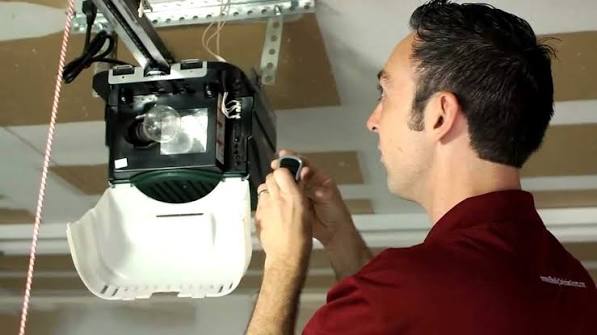
First, ensure your garage door is closed for safety. Look at the motor unit hanging from your ceiling. You need to find the “Learn” or “Program” button.
- On most Genie models, this button is located on the back or side of the motor head.
- It is usually colored purple, red, or orange.
- Next to the button, there should be an LED indicator light.
Step 2: Clear Old Codes (Optional but Recommended)
If you are having trouble pairing, or if you suspect security issues, clear the memory first.
- Press and hold the Learn button for about 10 seconds.
- Wait until the LED indicator light turns off.
- Release the button. This erases all previously programmed remotes and keypads. You will need to reprogram all your devices after this step.
Step 3: Initiate Programming Mode
- Press the Learn button once quickly. Do not hold it down.
- The LED indicator light will turn on (or start blinking, depending on the model). This means the opener is now listening for a signal.
- You typically have 30 seconds to complete the next step before the mode times out.
Step 4: Send the Signal from the Chamberlain Remote
- Take your Chamberlain remote.
- Press and hold the button you wish to program (e.g., Button 1).
- Hold it for 2–3 seconds, then release.
- Watch the LED light on the Genie motor unit. It should blink or flash to confirm it received the code.
Step 5: Test the Connection
Press the button on your Chamberlain remote again. The garage door should activate (open or close). If it does, congratulations! You have successfully learned how to program Genie garage door opener with Chamberlain controls.
| Action | Expected Result | Troubleshooting |
|---|---|---|
| Press Learn Button | LED lights up/blinks | If no light, check power supply. |
| Press Remote Button | LED flashes/changes state | Try holding longer (up to 5 secs). |
| Test Remote | Door moves | If no movement, repeat Steps 3-4. |
Troubleshooting Common Pairing Issues
Even with the correct steps, technology can be finicky. Here are the most common reasons why your Chamberlain remote might not pair with your Genie opener.
1. Frequency Mismatch
As mentioned earlier, if your Genie opener is an older model using 315 MHz and your Chamberlain remote is fixed at 390 MHz, they will never communicate.
- Solution: Purchase a universal remote that explicitly supports dual-frequency switching or matches your opener’s specific MHz rating.
2. Interference from LED Bulbs
Recent studies have shown that certain LED light bulbs installed in garage door opener fixtures can emit radio frequency interference that blocks remote signals.
- Solution: Temporarily unscrew the light bulb from the opener unit and try programming again. If it works, replace the bulb with a “Garage Door Opener Compatible” LED or an incandescent bulb.
3. Weak Remote Battery
A low battery may send a signal strong enough to wake the opener but too weak to complete the handshake protocol.
- Solution: Replace the battery in your Chamberlain remote with a fresh CR2032 or AA battery (check your model’s requirement) before attempting to program.
4. Lock Feature Activated
Some Genie openers have a “Lock” feature that disables remote controls for security during vacations.
- Solution: Check your wall console. If the lock icon is lit, disable it by pressing the lock button for 3 seconds, then retry programming.
Security Best Practices for Your Garage
Programming your remote is just the first step. Ensuring your garage remains secure requires ongoing vigilance. According to cybersecurity experts, garage door openers are increasingly targeted by “roll-jamming” attacks, where thieves intercept and replay codes.
To mitigate this risk:
- Use Rolling Code Technology: Ensure both your Genie opener and Chamberlain remote use rolling codes (Intellicode for Genie, Security+ for Chamberlain). This changes the code every time you press the button, making it nearly impossible to clone.
- Regularly Update Firmware: If you have a smart Genie opener connected to Wi-Fi, keep its firmware updated via the manufacturer’s app.
- Limit Access: Only program remotes for trusted family members. Avoid giving universal codes to neighbors or service providers; instead, use a temporary PIN on a keypad if available.
For more detailed technical specifications on radio frequency standards, you can refer to Wikipedia’s page on Garage Door Openers, which provides a comprehensive overview of the evolution of security protocols in residential access systems.
FAQ Section
Q1: Can I program a Chamberlain MyQ smart hub to a Genie opener?
A: Yes, but it depends on the Genie model. Older Genie openers without a dedicated MyQ compatibility kit may require an external relay switch to interface with the Chamberlain MyQ hub. Newer Genie models with built-in Wi-Fi often have direct integration options via third-party apps like Alexa or Google Home, rather than direct MyQ pairing.
Q2: Why does my Chamberlain remote work sometimes but not others?
A: This is often due to range limitations or interference. Ensure you are within 20–30 feet of the opener when testing. Also, check for nearby sources of interference, such as large metal objects, other wireless devices, or the aforementioned LED bulbs.
Q3: How do I know if my Genie opener uses Intellicode?
A: Look at the motor unit. If it has a purple or red learn button and was manufactured after 1997, it likely uses Intellicode (rolling code). Older models with dip switches (tiny rows of switches inside the remote and motor) use fixed codes and are less secure.
Q4: Can I program multiple Chamberlain remotes to one Genie opener?
A: Absolutely. Most Genie openers can store between 7 to 20 different remote codes. Simply repeat the programming steps (Steps 3 and 4 above) for each additional remote you wish to add.
Q5: What should I do if the Learn button light doesn’t turn on?
A: If the light fails to illuminate, the opener may not be receiving power, or the logic board could be faulty. Check the circuit breaker and ensure the unit is plugged in. If power is confirmed, the internal capacitor or board may need professional replacement.
Conclusion
Learning how to program Genie garage door opener with Chamberlain remotes empowers you to take control of your home’s accessibility without relying on expensive technicians. By verifying frequency compatibility, following the precise learn-button sequence, and troubleshooting interference, you can ensure a smooth and secure pairing process.
Remember, a well-programmed garage door is not just about convenience; it’s a critical component of your home’s security infrastructure. Keep your remotes updated, use rolling code technology, and stay vigilant against interference.
Did this guide help you get your garage door working again? Share this article with friends or family who might be struggling with mixed-brand garage devices, and let us know in the comments if you encountered any unique challenges!



Leave a Reply