Introduction
Is there anything more frustrating than standing in the rain, pressing your garage remote repeatedly, only to watch your door stay stubbornly closed? You are not alone. Millions of homeowners face this issue when replacing old remotes or moving into a new house. If you have purchased a replacement unit, knowing how to program Genie Universal Series garage door opener remotes correctly is the key to restoring convenience and security to your home.
This guide cuts through the technical jargon. Whether you have an older Intellicode model or a newer Aladdin Connect system, we will walk you through the exact steps to get your remote working again. No professional technician required—just a ladder and a few minutes of your time.
Identifying Your Genie Model: The First Step
Before you climb the ladder, it is crucial to identify which specific Genie series you own. “Universal” often refers to the remote compatibility, but the programming method depends on the motor unit’s age and technology.
Genie primarily uses two types of rolling code technologies:
- Intellicode (Older): Uses a fixed learning button sequence.
- Aladdin Connect / Intellicode 2 (Newer): Often involves Wi-Fi integration or different button colors.
Look at your motor unit (the box attached to your ceiling). You will usually find a label with the model number (e.g., H4000, ISL950, or G3T). Knowing this helps if the standard steps do not work immediately. For a deeper understanding of how these radio frequencies work, you can refer to the general principles of radio-controlled devices on Wikipedia, which explains the shift from fixed codes to secure rolling codes that prevent hacking.
Step-by-Step: Programming a Standard Genie Universal Remote
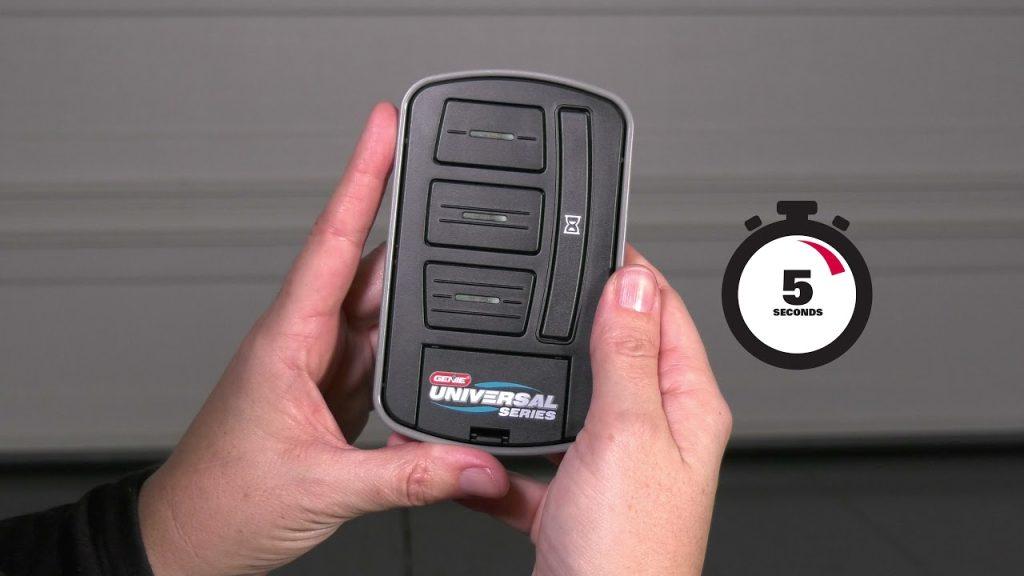
Most Genie universal remotes (such as the GM3T-R, G3T-R, or ISL950) follow a similar “Learn Button” protocol. Here is the precise method used by experts.
What You Will Need:
- A sturdy ladder.
- Your Genie Universal Remote.
- Access to the garage door motor unit.
The Process:
Step 1: Locate the “Learn” Button On your garage door opener motor unit, look for a small LED light and a button next to it. This is typically labeled “Learn,” “Program,” or has an icon of a remote. It is usually located on the back or side of the motor housing.
- Note: The LED light may be purple, blue, or amber depending on the model.
Step 2: Clear Old Codes (Optional but Recommended) If you are reprogramming because the remote was lost or stolen, you should clear the memory first.
- Press and hold the Learn button for about 10–15 seconds until the LED light turns off.
- Release the button. All previously programmed remotes and keypads will now be erased. Warning: You will need to reprogram ALL your existing remotes after doing this.
Step 3: Enter Programming Mode Press and release the Learn button once quickly.
- The LED indicator light will turn on (or start blinking). This indicates the unit is ready to receive a new signal. You have approximately 30 seconds to complete the next step.
Step 4: Sync the Remote Take your universal remote and press the button you wish to program (usually Button 1).
- Press and release the button firmly.
- Wait for the LED light on the motor unit to blink or flash. This confirms the signal was received.
Step 5: Test the Connection Press the same button on your remote again. The garage door should activate (open or close). If it does, congratulations! You have successfully learned how to program Genie Universal Series garage door opener devices.
Troubleshooting Common Issues
Even with careful following of instructions, things can go wrong. Here is a breakdown of common problems and their solutions.
| Issue | Possible Cause | Solution |
|---|---|---|
| LED doesn’t light up | Power issue or burnt-out bulb | Check if the motor unit is plugged in. Ensure the safety sensors are aligned. |
| Remote blinks but door doesn’t move | Weak batteries | Replace the remote battery with a fresh CR2032 coin cell. |
| Door moves slightly then stops | Sensor obstruction | Check the photo-eye sensors near the floor. Clean lenses and ensure nothing blocks the beam. |
| Programming fails repeatedly | Interference | Try programming during off-hours. Other wireless devices (Wi-Fi routers, baby monitors) can interfere with the 315/390 MHz frequency. |
Programming a Genie Wall Console (Keypad)
Many homeowners also use wireless keypads outside their garage. The process is slightly different but equally straightforward.
- Press the Learn button on the motor unit. The LED will illuminate.
- Within 30 seconds, enter your desired PIN code on the keypad (4 digits).
- Press the Enter or Send button on the keypad.
- The LED on the motor unit should flash, confirming the code is accepted.
- Test by entering the PIN again.
Pro Tip: Choose a PIN that is easy for you to remember but hard for others to guess. Avoid using your birth year or address numbers.
Why Rolling Codes Matter for Security
You might wonder why the programming process involves a “Learn” button rather than just setting a dip-switch like older models did. This is due to Rolling Code Technology.
In the past, garage openers used fixed codes. Hackers could use “code grabbers” to record the signal and replay it later to open your door. Modern Genie openers use a rolling code algorithm. Every time you press the button, the code changes. The receiver and transmitter stay synchronized by predicting the next code in the sequence.
When you program a new remote, you are essentially telling the motor unit, “Accept signals from this new device ID.” This ensures that only authorized devices can trigger your door, significantly enhancing your home’s security posture.
Maintaining Your Genie System
Programming is just the beginning. To ensure your Genie Universal Series opener lasts for years, consider these maintenance tips:
- Battery Health: Replace remote batteries annually, even if they seem fine. Corrosion can damage the internal contacts.
- Sensor Alignment: The safety eyes near the floor must be perfectly aligned. If the green light on one sensor is blinking, adjust the bracket until it stays solid.
- Lubrication: Once a year, apply a silicone-based lubricant to the chain or screw drive. Avoid WD-40, as it attracts dust and gumms up the mechanism.
FAQ Section
Q1: Can I program a universal remote from a different brand to my Genie opener?
A: Generally, no. While some “universal” remotes claim cross-brand compatibility, Genie uses proprietary Intellicode encryption. It is highly recommended to use a Genie-branded universal remote (like the G3T-R) to ensure compatibility and security. Third-party clones often fail to sync with newer rolling code systems.
Q2: My remote works intermittently. Is it broken?
A: Not necessarily. Intermittent issues are usually caused by weak batteries or radio frequency interference. Before buying a new remote, replace the battery. If the problem persists, check if your Wi-Fi router or LED light bulbs are causing interference. Moving the router away from the motor unit can sometimes resolve this.
Q3: How many remotes can I program to one Genie opener?
A: Most modern Genie Intellicode openers can store up to 7 to 10 unique remote controls and keypads. If you reach the limit, you must clear the memory and reprogram all devices. Check your specific model’s manual for the exact capacity.
Q4: What should I do if I lose my only working remote?
A: If you have no working remotes, you cannot enter programming mode via the remote. However, you can still use the wall console inside the garage if it is wired. If you have no access at all, you will need to use the manual release cord to open the door manually and then access the motor unit to program a new remote using the Learn button.
Q5: Does resetting the opener erase my Wi-Fi settings?
A: Yes, if you have a Genie Aladdin Connect model integrated with smart home apps (like Alexa or Google Home), clearing the memory via the Learn button will disconnect the Wi-Fi module. You will need to reconnect the device to your Wi-Fi network and re-link it to your smart home app after reprogramming your remotes.
Conclusion
Learning how to program Genie Universal Series garage door opener remotes is a simple yet empowering skill for any homeowner. By following the steps outlined above—locating the Learn button, entering programming mode, and syncing your remote—you can save money on service calls and restore immediate access to your garage.
Remember, security is paramount. Always keep your remote codes private and perform regular maintenance on your sensors and batteries. If you found this guide helpful, please share it with friends or family who might be struggling with their own garage doors. A little knowledge goes a long way in keeping our homes safe and convenient.
Have you successfully programmed your Genie remote? Let us know in the comments below if you encountered any unique challenges!



Leave a Reply