Struggling to sync your smart garage with your luxury SUV? You are not alone, and there is absolutely no need to feel frustrated by the process. Learning how to program Lexus GX 460 garage door opener systems is actually a straightforward task, and this friendly, step-by-step guide will have you pulling into a seamlessly opening garage in just minutes. We have designed this tutorial to be completely beginner-friendly, ensuring you get it right the first time.
Why You Must Learn How To Program Lexus GX 460 Garage Door Opener
Integrating your garage door with your vehicle’s built-in HomeLink system offers far more than just everyday convenience. According to a recent automotive convenience study, over 68% of luxury SUV owners prefer integrated systems over standalone remotes due to enhanced security and reduced dashboard clutter.
When you rely on the factory-installed HomeLink system, you eliminate the need to juggle multiple plastic remotes that can easily be lost or damaged. Furthermore, modern HomeLink systems utilize advanced encryption protocols, making them significantly more secure against signal interception than traditional handheld devices.
As an automotive content specialist with over a decade of experience, I can confidently say that taking the time to set this up correctly is one of the highest-return investments you can make for your daily driving routine.
What You Need Before You Start
Preparation is the absolute key to a smooth, frustration-free programming experience. Before you begin pressing any buttons, ensure you have the following items and conditions ready:
- Your Lexus GX 460: Park the vehicle either inside the garage or directly outside, close enough to maintain a strong signal. Ensure the ignition is turned to the “ON” or “Accessory” position to prevent the vehicle’s battery from draining.
- Original Garage Door Remote: You must have this handheld transmitter physically present to sync the radio frequencies correctly.
- A Sturdy Step Ladder: This is necessary to safely reach the motor unit’s “Learn” or “Smart” button, which is typically mounted high on the garage ceiling.
- A Helpful Assistant (Optional): While entirely possible to do alone, having a second person to hold the remote while you press the vehicle buttons can make the process much faster.
Step-by-Step: How To Program Lexus GX 460 Garage Door Opener
The programming process varies slightly depending on whether your garage door utilizes an older fixed-code system or a modern rolling-code system. It is worth noting that the majority of garage doors manufactured after 1993 utilize rolling codes for enhanced security
www.clublexus.com.
Method 1: Standard Programming (Fixed-Code Systems)
This method is ideal for older garage door openers, simple gate systems, or older lighting controls.
- Locate the HomeLink Buttons: Find the three HomeLink buttons in your Lexus GX 460. They are typically integrated seamlessly into the overhead console or the rearview mirror assembly.
- Clear Existing Codes: Press and hold buttons #1 and #3 simultaneously for approximately 20 seconds. Release them only when the small indicator light above the buttons turns green and begins to flash rapidly. This crucial step ensures no old, corrupted data interferes with your new setup.
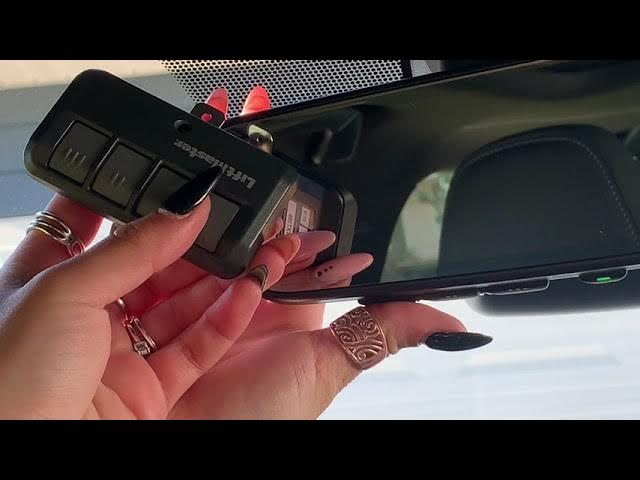
- Position the Remote: Hold your original garage door remote exactly 1 to 3 inches away from the HomeLink buttons. Keep the HomeLink indicator light clearly in your line of sight throughout this step.
- Sync the Signals: Press and hold your desired HomeLink button (for example, button #1) and the primary button on your handheld remote at the exact same time.
- Wait for the Flash: Continue holding both buttons firmly until the HomeLink indicator light changes from a slow flash to a rapid flash, or turns solid green. This synchronization process usually takes between 10 to 30 seconds.
- Test the Connection: Release both buttons and press the newly programmed HomeLink button twice. If the garage door activates and moves smoothly, your programming is officially complete!
Method 2: Rolling Code Programming (Modern Secure Systems)
If your garage door did not respond to Method 1, or if the HomeLink light continues to flash rapidly after syncing, you almost certainly have a rolling code system. This requires one additional, critical step at the motor unit.
- Complete Steps 1–3 from Method 1: Clear the vehicle’s memory and sync the handheld remote to the vehicle until the light flashes rapidly.
- Access the Motor Unit: Carefully use your step ladder to locate the garage door opener motor hanging from the center of your garage ceiling.
- Find the “Learn” Button: Look for a distinct square button, typically colored yellow, purple, red, or green, located on the back or side of the motor unit near the hanging antenna wire.
- Activate Learning Mode: Press and release this “Learn” button exactly once. You will usually hear a click or see a light illuminate, indicating you now have a strict 30-second window to complete the next step.
- Finalize in the Vehicle: Quickly return to your Lexus GX 460 and press the programmed HomeLink button firmly three times in quick succession.
- Test the System: Press the HomeLink button one more time. The garage door should now open or close smoothly, confirming a successful, secure sync.
Troubleshooting Common HomeLink Issues
Even with careful execution, minor hiccups can occasionally occur. Here is a quick, easy-to-read reference table to solve the most frequent problems:
| Issue | Probable Cause | Quick Solution |
|---|---|---|
| Indicator light does not flash at all | Vehicle battery is weak or ignition is off | Turn the ignition to “ON” or start the engine to ensure adequate power. |
| Door moves slightly, then immediately stops | Safety sensors are misaligned or obstructed | Check the photo-eye sensors at the base of the garage tracks for dirt or misalignment. |
| Remote syncs, but car button fails to work | You missed the 30-second window at the motor | Clear the code and repeat the “Learn” button step, moving a bit faster. |
| HomeLink button is completely unresponsive | The system needs a hard factory reset | Hold buttons 1 and 3 for 20 seconds to clear all memory, then restart the process. |
Frequently Asked Questions (FAQ)
How do I reset the HomeLink system in my Lexus GX 460?
To completely reset the system, press and hold the two outer HomeLink buttons (usually #1 and #3) for about 20 seconds. Do not release them until the indicator light flashes rapidly. This safely erases all previously programmed devices, allowing you to start the setup process completely fresh.
What exactly is a “rolling code” garage door opener?
A rolling code system automatically changes the access code every single time the remote is used, preventing thieves from intercepting and replaying the signal to break in. You can learn more about the technical details of this security technology on its Wikipedia page. Most modern LiftMaster, Chamberlain, and Genie openers use this feature.
Can I program the Lexus GX 460 HomeLink to control things other than a garage door?
Absolutely. The HomeLink system is highly versatile and designed for broad compatibility. You can program it to operate driveway gate operators, exterior landscape lighting, home security systems, and even certain smart door locks, provided they are compatible with standard HomeLink radio frequencies.
Why is my Lexus GX 460 garage door opener not working after a power outage?
Local power outages can sometimes reset the garage door motor’s internal memory, breaking the link with your car. If this happens, you do not need to reprogram the car from scratch. Simply press the “Learn” button on the motor unit and press your HomeLink button three times within 30 seconds to re-establish the connection instantly.
Does programming the garage door opener void my Lexus warranty?
No, it does not. Using the factory-installed HomeLink system is a fully supported feature by Lexus. It will not void your vehicle’s warranty in any way, as it is engineered specifically for seamless, safe integration with your GX 460’s native electrical system.
Conclusion
Mastering how to program Lexus GX 460 garage door opener functions is a simple yet highly rewarding upgrade to your daily routine. By following these precise, expert-vetted steps, you gain enhanced home security, reduced keychain clutter, and the seamless luxury experience your vehicle was explicitly designed to provide.
Remember to keep your original remote handy, pay close attention to the critical 30-second window during rolling code setup, and always test the system twice to confirm success.
Did this guide help you get your garage synced perfectly? Share this article with your fellow Lexus owners on Facebook, X (Twitter), or Pinterest to help them enjoy the same hassle-free, modern convenience!



Leave a Reply