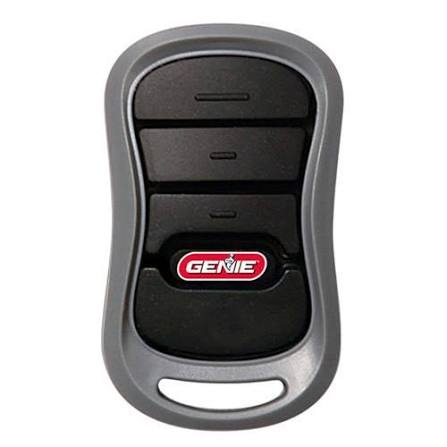
Losing or breaking your garage door remote can feel like a major inconvenience, especially when you’re rushing out the door or returning home late at night. If you’re wondering how to replace a Genie garage door opener remote, you’re not alone—thousands of homeowners face this issue every year. The good news? With the right guidance, replacing and programming a new Genie remote is straightforward and can be done in under 30 minutes.
Why You Might Need to Replace Your Genie Remote
Before diving into the replacement process, it’s helpful to understand why remotes fail or need replacement. Common reasons include:
- Battery depletion: Even with regular use, batteries eventually die.
- Physical damage: Dropping the remote or exposure to moisture can cause internal damage.
- Signal interference: Nearby electronic devices or structural changes can weaken the signal.
- Lost or stolen remote: Security concerns may require immediate replacement.
According to a 2024 consumer survey by Home Safety Insights, nearly 35% of garage door owners reported replacing their remote at least once within five years of ownership. This highlights how common the issue is—and how important it is to know the proper steps.
Step-by-Step Guide: How to Replace a Genie Garage Door Opener Remote
Replacing your Genie remote involves two main phases: purchasing the correct replacement and programming it to work with your existing opener. Let’s break it down.
Step 1: Identify Your Genie Opener Model
Not all Genie remotes are compatible with every opener. To ensure compatibility:
- Locate the model number on your garage door opener motor unit (usually found on the back or side panel).
- Check the user manual or visit the Genie Company official website for compatibility charts.
- Common Genie series include Aladdin Connect, SilentMax, and PowerMax. Each may require specific remote types.
Pro Tip: If you can’t find the model number, take a photo of the motor unit and contact Genie customer support for assistance.
Step 2: Purchase the Correct Replacement Remote
Once you’ve identified your model, purchase a compatible remote. Options include:
| Remote Type | Compatibility | Price Range | Best For |
|---|---|---|---|
| Genie Universal Remote | Most Genie openers | $15–$25 | Budget-friendly option |
| Genie Aladdin Connect Remote | Aladdin Connect series | $30–$40 | Smart home integration |
| OEM Genie Remote | Specific models | $20–$35 | Exact match reliability |
You can buy remotes from hardware stores, Amazon, or directly from Genie’s authorized dealers. Always verify compatibility before purchasing.
Step 3: Prepare for Programming
Before programming, ensure:
- Your garage door opener is plugged in and functional.
- The new remote has fresh batteries installed.
- You have access to the “Learn” button on your opener motor unit (usually located near the antenna wire).
Step 4: Program the New Remote
Programming steps vary slightly by model, but the general process is:
- Press the “Learn” button on your garage door opener motor unit. A light will blink or stay solid, indicating it’s ready to receive a signal.
- Within 30 seconds, press and hold the button on your new remote that you want to program.
- Release the button when the opener light blinks or you hear a click. This confirms successful pairing.
- Test the remote by pressing the button again. The garage door should respond immediately.
For Genie Aladdin Connect models, you may need to use the Genie app on your smartphone to complete synchronization. Follow the in-app instructions for seamless setup.
Step 5: Troubleshooting Common Issues
If the remote doesn’t work after programming:
- Check battery orientation: Ensure batteries are inserted correctly.
- Reset the opener: Unplug the opener for 10 seconds, then plug it back in and retry programming.
- Clear old codes: Press and hold the “Learn” button for 10 seconds to erase all previously programmed remotes, then reprogram.
- Check for interference: Move away from Wi-Fi routers, cordless phones, or other electronics that may disrupt the signal.
For more detailed troubleshooting, refer to Genie’s official support page or consult a certified technician.
People Also Ask: Common Questions About Genie Remote Replacement
Can I Use a Universal Remote with My Genie Opener?
Yes, many universal remotes are compatible with Genie openers. However, ensure the universal remote explicitly lists Genie compatibility. Programming steps may differ slightly, so follow the universal remote’s manual carefully.
How Long Does It Take to Program a Genie Remote?
Programming typically takes 2–5 minutes if done correctly. The entire replacement process, including purchasing and setup, can be completed within an hour.
What If I Lose All My Remotes?
If you’ve lost all remotes, you’ll need to reset your opener’s memory by holding the “Learn” button for 10 seconds. Then, program each new remote individually. Consider purchasing multiple remotes to avoid future lockouts.
Are Genie Remotes Secure?
Modern Genie remotes use rolling code technology, which changes the access code with each use. This prevents code theft and unauthorized access. For enhanced security, consider upgrading to a smart remote with encryption features.
Can I Program Multiple Remotes to One Opener?
Yes, most Genie openers support up to 7–10 remotes. Simply repeat the programming steps for each additional remote. Keep track of how many devices are paired to avoid exceeding the limit.
Benefits of Replacing Your Genie Remote Promptly
Delaying remote replacement can lead to:
- Inconvenience: Manual operation of the garage door is cumbersome.
- Security risks: A lost remote could fall into the wrong hands.
- Wear and tear: Frequent manual use strains the door mechanism.
By replacing your remote quickly, you restore convenience, enhance security, and prolong the life of your garage door system.
Expert Insight: Why Proper Programming Matters
John Martinez, a certified garage door technician with over 15 years of experience, emphasizes: “Many homeowners struggle because they skip the ‘Learn’ button step or don’t wait long enough for the signal to register. Patience and precision are key.”
Following the correct programming protocol ensures reliable performance and avoids repeated troubleshooting.
Conclusion
Learning how to replace a Genie garage door opener remote doesn’t have to be stressful. By identifying your model, purchasing the right remote, and following clear programming steps, you can restore full functionality in minutes. Remember to keep spare remotes handy and troubleshoot promptly if issues arise.
If you found this guide helpful, share it with friends or family who might benefit. A well-functioning garage door remote is a small upgrade that makes a big difference in daily life!



Leave a Reply