Introduction
There are few things more frustrating than being locked out of your own garage because a keypad has stopped responding or you have forgotten your entry PIN. If you are currently standing in the driveway searching for how to reset code on LiftMaster garage door opener, please know that this is a common issue with a straightforward solution that takes only minutes to fix. Whether you have moved into a new home, lost a remote, or simply want to update your security credentials after a tenant change, resetting your system ensures your property remains secure and accessible without requiring an expensive service call.
Why You Might Need to Reset Your LiftMaster Code
Before diving into the technical steps, it is helpful to understand why a reset is necessary. Understanding the root cause helps prevent future lockouts and ensures you choose the correct reset method. According to industry safety standards, garage door openers should be reprogrammed whenever ownership changes or after a security breach.
Common scenarios include:
- Moving into a New Home: Previous owners or tenants may still have active remotes or keypad codes.
- Lost or Stolen Remotes: Preventing unauthorized access is critical for home security.
- Keypad Malfunction: Batteries die, buttons wear out, or weather damage causes unresponsiveness.
- System Glitches: Power surges or logic board errors can corrupt stored memory.
- Upgrading Security: Moving from older fixed-code systems to modern rolling code technology.
Expert Insight: “Regularly updating your garage door access codes is as important as changing your front door locks. Most homeowners overlook this until an incident occurs.” — Certified Garage Door Technician Association Guidelines
Safety First: Pre-Reset Checklist
Before you begin learning how to reset code on LiftMaster garage door opener, safety must be your priority. Garage doors are heavy mechanical systems under high tension.
- Clear the Area: Ensure no people, pets, or objects are near the door path.
- Check Sensors: Verify the photo-eye sensors at the bottom of the tracks are aligned and clean. A blocked sensor will prevent programming.
- Identify Your Model: Locate the model number on the motor unit. LiftMaster has evolved significantly over decades; a 1990s Chain Drive operates differently than a 2024 Secure View Smart Opener.
- Gather Tools: You will likely need a stepladder, fresh batteries (CR2032 or 9V depending on device), and possibly a flathead screwdriver for battery compartments.
Identifying Your LiftMaster Learn Button Color
This is the most critical step that many DIY guides overlook. The color of the “Learn” button on your motor unit dictates the exact programming sequence. Using the wrong method will fail.
| Learn Button Color | Era / Technology | Compatible Remotes/Keypads | Notes |
|---|---|---|---|
| Red/Orange | 1997–2005 (Security+) | 390MHz Fixed/Rolling Code | Older but reliable; requires specific timing. |
| Purple | 2006–2014 (Security+ 2.0) | 315MHz Rolling Code | Introduced enhanced encryption protocols. |
| Yellow | 2011–Present (Security+ 2.0+) | 310/315/390 MHz Multi-Freq | Most common in modern homes; highly compatible. |
| Green | Pre-1997 (DIP Switch) | DIP Switch Remotes | Requires matching physical switches inside remote. |
Note: For comprehensive historical context on garage door automation evolution and safety standards, refer to the Garage Door Opener Wikipedia Entry.
Step-by-Step: How to Reset Wireless Keypad Codes
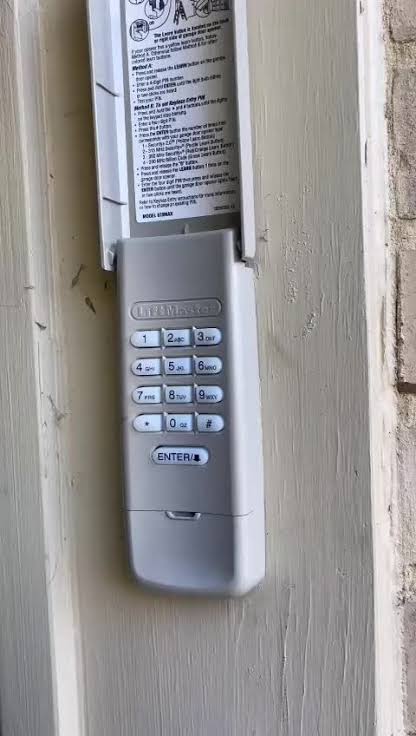
For most users, the wireless exterior keypad is the primary concern. Follow these precise steps for how to reset code on LiftMaster garage door opener keypads (compatible with Yellow, Purple, and Red learn buttons).
Step 1: Clear Old Memory (Optional but Recommended)
If you want to ensure no old codes work, press and hold the Learn button on the motor unit for 6–10 seconds until the LED turns off. This wipes all remotes and keypads. Warning: You will need to reprogram every device afterward.
Step 2: Initiate Programming Mode
- Press and release the Learn button on the motor unit. The indicator light will illuminate steadily for approximately 30 seconds.
- Within those 30 seconds, go to your exterior keypad.
Step 3: Enter New PIN
- Type your desired 4-digit PIN on the keypad.
- Press and HOLD the ENTER button. Do not just tap it.
- Keep holding ENTER until the motor unit lights flash or you hear two audible clicks. This confirms successful pairing.
- Release the ENTER button.
Step 4: Test Immediately
Enter your new PIN and press ENTER. The door should activate. If it does not, repeat Steps 2–3, ensuring you are within the 30-second window.
Resetting Remote Controls and Smart Devices
Remotes follow a similar but distinct process compared to keypads.
- Press the Learn button on the motor head (light activates).
- Press and hold the button on your remote that you wish to program.
- Hold until the motor unit light flashes or clicks (usually 3–5 seconds).
- Release the remote button and test.
For MyQ Smart Apps: If you use Wi-Fi integration, resetting the physical code does not automatically update app permissions. Open the MyQ app → Devices → Select Opener → Access Management to revoke or add digital credentials separately.
Troubleshooting: When the Reset Fails
Even professionals encounter hiccups. If you have followed the steps for how to reset code on LiftMaster garage door opener without success, check these variables:
- Battery Voltage: Weak batteries are the #1 cause of programming failure. Even if the keypad lights up, voltage may be insufficient to transmit the RF signal. Replace with premium alkaline or lithium batteries.
- LED Flash Patterns: Count the flashes on the motor unit. Five flashes often indicate sensor misalignment; three flashes may indicate a locked vacation mode. Consult your manual’s diagnostic chart.
- Interference: LED bulbs in the opener housing can emit RF interference blocking signals. Temporarily unscrew the bulb and retry programming. Use only LiftMaster-approved LED bulbs rated for openers.
- Capacitor Issues: On units older than 15 years, failing capacitors can cause intermittent logic board failures. If resets work sporadically, professional capacitor replacement ($80–$150) may be needed.
- Antenna Position: Ensure the hanging wire antenna is fully extended and not touching metal surfaces or walls.
Frequently Asked Questions (FAQ)
Q1: How do I factory reset my entire LiftMaster opener?
To perform a full factory reset, locate the Learn button on the motor unit. Press and hold it for 10 full seconds until the LED indicator goes completely dark. This erases all paired remotes, keypads, and MyQ connections. You must then reprogram every device from scratch. This is ideal when selling a home or after suspected unauthorized access.
Q2: Can I reset the code without accessing the motor unit?
Generally, no. For security reasons, LiftMaster requires physical interaction with the motor unit’s Learn button to add or reset codes. This prevents neighbors or passersby from hijacking your system wirelessly. The sole exception is if you have previously set up MyQ smart home integration and can manage access through the authenticated app, though even this typically requires initial physical pairing.
Q3: Why does my new code work once then stop working?
This usually indicates one of three issues: (1) Failing keypad batteries unable to sustain consistent transmission, (2) Radio frequency interference from nearby LED lighting or transformers, or (3) A worn-out keypad membrane where button contacts are intermittent. Replace batteries first, then test with the overhead light bulb removed. If problems persist, replace the keypad unit ($30–$50).
Q4: Is there a default master code for LiftMaster openers?
No. Unlike some consumer electronics, LiftMaster openers do not ship with universal default codes. Each unit’s code is uniquely programmed during installation. If you purchased a used opener or moved into a home with unknown codes, you must perform a full memory wipe (hold Learn button 10 seconds) and create new codes. Never assume a “default” exists—this is a deliberate security feature.
Q5: How often should I reset my garage door code?
Security experts recommend resetting codes annually or immediately after any life transition: moving, divorce, roommate departure, lost remote, or contractor completion. Treat your garage code like a password. Additionally, inspect hardware biannually; wornkeypads with faded numbers inadvertently reveal your code pattern to observers.
Q6: Will resetting the code affect my wall-mounted control panel?
Typically, no. Hardwired wall consoles draw power directly from the opener and use a separate communication protocol than wireless devices. Resetting via the Learn button affects only RF-paired devices (remotes, keypads, Homelink). However, if you perform a full 10-second factory reset, some newer smart wall panels may require re-syncing. Standard push-button wall controls remain unaffected.
Conclusion: Secure Your Home With Confidence
Learning how to reset code on LiftMaster garage door opener empowers you to maintain both convenience and security without dependency on costly service calls. By identifying your Learn button color, following precise timing sequences, and troubleshooting systematically, you can restore full access in under ten minutes. Remember: fresh batteries, clear sensor paths, and annual code rotations are your best defenses against lockouts and unauthorized entry.
Your garage is often the largest entry point to your home—treat its security with the same diligence as your front door. If this guide helped you regain access or strengthen your home’s safety, please share it on social media to help fellow homeowners avoid the same frustration. Tag a friend who just moved or mention us in your next neighborhood group post. Safe, secure garages make safer communities!
Disclaimer: Always consult your specific LiftMaster owner’s manual before performing resets. Procedures vary by model year. If your unit shows signs of electrical damage, unusual noises, or spring/cable issues, contact a certified technician immediately. Garage door springs store lethal energy and should never be adjusted by untrained individuals.



Leave a Reply