Introduction
There are few things more frustrating than standing in your driveway, pressing your remote repeatedly, only to realize your garage door opener has stopped responding. Whether you have moved into a new home, lost a remote, or simply want to update your security credentials, knowing how to reset code on garage door opener Genie systems is an essential homeowner skill. This guide provides clear, empathetic, and manufacturer-aligned instructions to help you regain secure access to your garage without unnecessary stress or expensive service calls.
Understanding Genie Intellicode Technology
Before diving into the reset process, it is vital to understand what makes Genie openers unique. Unlike older fixed-code systems that used DIP switches, modern Genie openers utilize Intellicode® rolling code technology. This security feature changes the access code every time the remote is used, preventing code grabbing and unauthorized entry.
According to industry standards documented on Wikipedia, rolling code technology became the industry standard in the mid-1990s to address security vulnerabilities in fixed-code transmitters. When you reset a Genie opener, you are not just changing a static number; you are re-synchronizing the encrypted handshake between your transmitter and the receiver motor head.
Expert Note: Always verify your model number before starting. Genie has produced dozens of variations over the last three decades. The location of the “Learn” button and the color of its LED indicator (usually red, green, or purple) dictate the specific programming sequence required.
Safety First: Pre-Reset Checklist
Garage doors are heavy mechanical systems. Before attempting any programming or reset procedures, complete this safety audit:
- Clear the Area: Ensure no people, pets, or objects are in the path of the door.
- Check Balance: Manually lift the door halfway. It should stay in place. If it falls or rises, call a professional; programming will not fix a spring issue.
- Battery Check: Replace remote batteries before resetting. Weak batteries cause 60% of perceived “programming failures.”
- Power Source: Ensure the opener is plugged in and the circuit breaker is on.
- Ladder Safety: Use a stable stepladder when accessing the motor unit. Never stand on boxes or chairs.
How To Reset Code On Garage Door Opener Genie: Step-by-Step
This section covers the universal method for most Genie Intellicode units manufactured after 1995. While minor variations exist, this workflow applies to the majority of residential models.
Step 1: Locate the Learn Button
Find the square or circular “Learn” button on the motor head. It is typically located under the light lens cover or near the antenna wire. The LED next to it indicates the system status.
Step 2: Clear Existing Codes (Factory Reset)
If you are moving into a new home or suspect unauthorized access, perform a full wipe first.
- Press and hold the Learn button for approximately 10 seconds.
- Watch the LED indicator. It will turn on, then go off completely.
- Release the button once the light goes out.
- Result: All previously programmed remotes and keypads are now erased from memory.
Step 3: Program the Primary Remote
Now that the memory is clear, sync your primary transmitter.
- Press the Learn button once briefly. The LED will illuminate solid or begin blinking (depending on model).
- Within 30 seconds, press and hold the button on your remote you wish to program.
- Hold until the motor unit lights flash or you hear a click. This confirms signal reception.
- Release the remote button.
- Press the same remote button two more times slowly. This completes the rolling code synchronization cycle.
- Test the remote. The door should activate smoothly.
Step 4: Program Additional Remotes and Keypads
Repeat Step 3 for each additional device. Most Genie units support up to 7 Intellicode remotes plus one wireless keypad.
| Device Type | Max Capacity | Programming Notes |
|---|---|---|
| Standard Remote | 7 Devices | Requires double-tap confirmation |
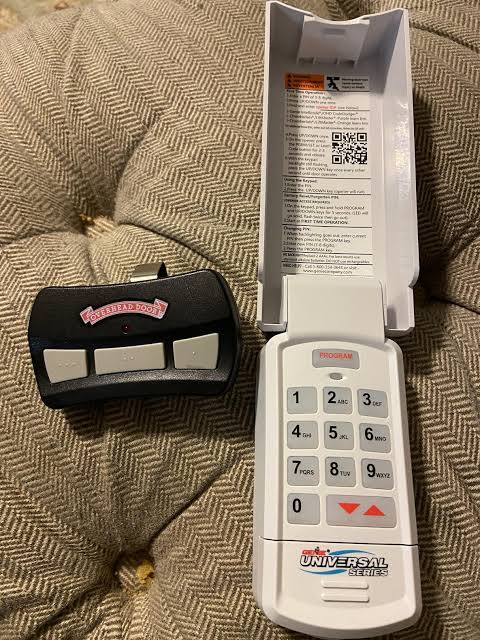
| Wireless Keypad | 1 Unit | Enter PIN + Program button sequence |
| Car Visor Clip | 3 Buttons | Treat each button as separate device |
| Smart Adapter | 1 Unit | Uses Wi-Fi bridge, separate app setup |
Troubleshooting Common Reset Issues
Even with perfect execution, technology can be temperamental. Here are solutions to frequent problems encountered when learning how to reset code on garage door opener Genie systems.
Remote Programs But Door Doesn’t Move
- Cause: Travel limits need recalibration after reset.
- Fix: Run the travel limit setup procedure found in your manual. The opener needs to relearn where “open” and “closed” positions are.
LED Flashes Red During Programming
- Cause: Memory full or incompatible remote frequency.
- Fix: Verify your remote matches your opener’s frequency (315 MHz vs. 390 MHz). If memory is full despite clearing, the logic board may require professional diagnosis.
Keypad Accepts Code But Light Blinks
- Cause: Low battery or poor signal range.
- Fix: Replace keypad batteries with fresh alkaline cells. Reposition keypad away from metal surfaces that block RF signals.
Intermittent Operation After Reset
- Cause: Radio frequency interference from nearby devices.
- Fix: Identify potential sources like LED bulbs, transformers, or neighbor’s equipment. Genie recommends using only approved LED bulbs designed for garage door openers to prevent RF noise.
Maintaining Your Genie System Post-Reset
Resetting your code is just the beginning of responsible ownership. Implement these maintenance practices to ensure long-term reliability:
- Annual Battery Rotation: Change remote and keypad batteries every 12 months, regardless of performance.
- Quarterly Safety Sensor Test: Place a 2×4 board in the door’s path. The door must reverse upon contact. Adjust sensors if it fails.
- Biannual Lubrication: Apply white lithium grease to rollers, hinges, and springs. Avoid WD-40, which attracts dust.
- Code Rotation Schedule: Reset codes annually or immediately after tenant changes, lost remotes, or break-in attempts.
Frequently Asked Questions (FAQ)
Q1: How often should I reset my Genie garage door code?
For optimal security, reset your codes at least once per year. Additionally, always perform a factory reset when moving into a new property, after losing a remote, or following a separation/divorce to revoke previous access permissions.
Q2: Can I reset a Genie opener without the original remote?
Yes. The Learn button on the motor unit allows you to clear all memory and program entirely new remotes. You do not need the original transmitter to perform a factory reset or add new devices. Purchase compatible Genie Intellicode replacements at hardware stores or online retailers.
Q3: Why does my Genie opener have a purple Learn button?
Purple Learn buttons typically indicate Series II electronics manufactured between 1995–2011. These units use different timing sequences than newer Series III (red/green button) models. Consult your specific model’s manual, as holding times and confirmation flashes differ slightly between generations.
Q4: Will resetting the code affect my smart home integration?
Generally, no. Smart adapters like Aladdin Connect operate independently via Wi-Fi and maintain their own authentication tokens. However, if you perform a full factory reset, some legacy integrations may require re-pairing. Check your smart hub app after resetting to confirm connectivity remains intact.
Q5: What happens if I press the Learn button too long?
Holding the Learn button beyond 10–15 seconds triggers a factory reset, erasing all stored codes. This is intentional safety design. Simply reprogram your devices using the steps outlined above. There is no permanent damage from extended presses; the system is designed to recover gracefully.
Q6: My Genie opener doesn’t have a visible Learn button. What now?
Older Genie models (pre-1995) use DIP switch programming instead of rolling code learn buttons. Look for a bank of 8–12 tiny sliding switches inside both the remote and motor unit. Match the switch positions exactly. Consider upgrading to a modern Intellicode system for significantly improved security and convenience.
Conclusion
Mastering how to reset code on garage door opener Genie systems empowers you to maintain both security and convenience in your daily life. By following the step-by-step procedures outlined above, you can confidently manage access credentials, troubleshoot common issues, and extend the lifespan of your equipment. Remember that regular code rotation and preventive maintenance are far less costly than emergency repairs or security breaches.
Your garage is often the primary entry point to your home—treat its security with the attention it deserves. If this guide helped you restore access or improve your understanding of Genie technology, please share it on social media to help fellow homeowners navigate their garage door challenges. Tag friends who recently moved homes or mentioned garage troubles; your share might save them hours of frustration and hundreds of dollars in service fees. Stay safe, stay secure, and keep those doors opening smoothly!



Leave a Reply