Introduction
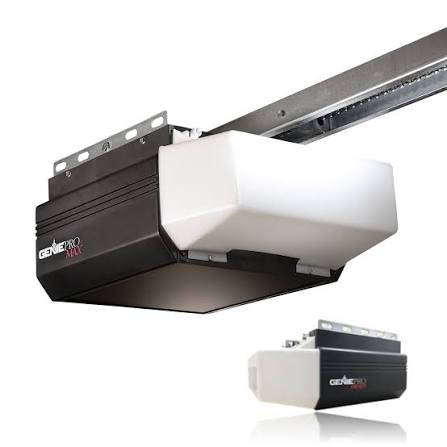
There are few things more frustrating than standing in your driveway, clicking your remote repeatedly while your Genie Pro Max garage door opener refuses to respond. Whether you have lost a remote, experienced a power surge, or simply need to clear old codes for security, knowing how to reset Genie Pro Max garage door opener systems is an essential homeowner skill. This comprehensive guide walks you through every reset scenario with safe, manufacturer-aligned steps so you can restore full functionality without unnecessary service calls.
Why Would You Need to Reset Your Genie Pro Max?
Before diving into the technical steps, it helps to understand why a reset is necessary. Resets are not just for fixing broken units; they are critical for security and system integrity.
- Lost or Stolen Remotes: If a remote goes missing, resetting clears its code from the opener’s memory, preventing unauthorized entry.
- Power Surges or Outages: Electrical fluctuations can corrupt the logic board’s memory, causing erratic behavior.
- Moving Into a New Home: Previous owners may still have active remotes or keypad codes.
- Adding New Accessories: Sometimes the system must be cleared before syncing new Intellicode remotes or wireless keypads.
- System Glitches: Unresponsive buttons or partial opening/closing often indicate corrupted programming.
According to industry data, nearly 30% of garage door opener service calls are resolved simply by reprogramming or resetting the unit rather than replacing hardware. Understanding this process saves both time and money.
Safety First: Critical Precautions Before Resetting
Garage door openers involve high-tension springs and electrical components. Always prioritize safety.
- Disconnect Power (For Hard Resets): If performing a factory reset involving the motor head, unplug the unit or turn off the circuit breaker.
- Keep Hands Clear: Never place fingers near moving parts, rollers, or spring assemblies during testing.
- Use a Stable Ladder: When accessing the motor unit mounted on the ceiling, ensure your ladder is rated for the height and placed on level ground.
- Check Photo-Eye Sensors: Ensure safety sensors are aligned and clean before testing operation post-reset.
⚠️ Warning: Do not attempt to adjust torsion springs yourself. Spring replacement requires specialized tools and training. Refer to Wikipedia’s Garage Door Opener page for foundational safety context regarding automatic door mechanisms.
How to Reset Genie Pro Max Remote Controls
The most common query regarding how to reset Genie Pro Max garage door opener systems involves remote reprogramming. The Genie Pro Max uses Intellicode rolling-code technology, meaning each press generates a new encrypted signal.
Step-by-Step Remote Reset & Reprogramming
- Locate the Learn Button: On the Genie Pro Max motor head, find the square “Learn” button (usually black or purple) near the antenna wire. The LED indicator next to it should be off initially.
- Clear Old Codes (Optional but Recommended): Press and hold the Learn button for approximately 10 seconds until the LED turns red, then releases. This erases all previously programmed remotes and keypads. Note: Skip this step if you only want to add a new remote without deleting existing ones.
- Initiate Programming Mode: Briefly press and release the Learn button. The LED will illuminate steady blue (or blink, depending on firmware version). You now have 30 seconds to program.
- Program the Remote: Within the 30-second window, press the desired button on your Intellicode remote three times slowly. Hold the third press until the opener lights flash or the motor jogs slightly.
- Test Operation: Press the remote button once. The door should activate. If not, repeat steps 3–4, ensuring you are within 5 feet of the motor during programming.
Troubleshooting Remote Issues
| Symptom | Likely Cause | Solution |
|---|---|---|
| LED flashes but door doesn’t move | Weak battery or out of range | Replace CR2032 battery; reprogram within 3 ft |
| Works intermittently | Signal interference | Relocate LED bulbs; check for nearby RF devices |
| No LED response at learn button | Logic board fault | Verify power; inspect wiring harness connections |
| Door reverses immediately | Sensor misalignment | Clean lenses; realign photo-eyes to solid green |
How to Reset Genie Pro Max Wireless Keypad
Wireless keypads require separate programming from remotes. Follow these precise steps:
- Enter Programming Mode on Motor: Press and release the Learn button on the motor head (LED illuminates).
- Activate Keypad: On the exterior keypad, enter your desired 4-digit PIN followed by the “Send” or “Enter” button.
- Confirm Sync: Press the same PIN + Send button a second time within 30 seconds. The opener light should flash twice, confirming acceptance.
- Final Test: Wait 5 seconds, then enter your PIN + Send. The door should operate.
Pro Tip: Choose a PIN that avoids sequential numbers (e.g., 1234) or birth years to enhance security against brute-force guessing.
Factory Reset: Restoring Genie Pro Max to Default Settings
A full factory reset is the nuclear option for how to reset Genie Pro Max garage door opener units when standard reprogramming fails. This wipes all user data, including travel limits, force settings, and accessory codes.
When to Perform a Factory Reset
- Persistent malfunction after multiple reprogramming attempts
- Corrupted travel limit calibration (door stops mid-cycle)
- Unknown previous owner configurations
- Firmware update failures
Execution Steps
- Power Down: Unplug the opener or switch off the dedicated breaker for 60 seconds.
- Hold Learn + Limit Buttons: While restoring power, simultaneously press and hold the “Learn” button AND the “Up Limit” button (location varies by model year; consult your manual’s diagram).
- Wait for Confirmation: Continue holding both buttons for 15–20 seconds until the LED cycles through colors (typically blue → red → off). Release buttons.
- Reconfigure From Scratch: All settings are now erased. You must reprogram remotes, keypads, AND recalibrate travel limits using the Up/Down limit adjustment screws or digital menu (model-dependent).
- Safety Sensor Verification: Test auto-reverse function by placing a 2×4 board under the closing door. It must reverse upon contact.
💡 Expert Insight: After a factory reset, allow the opener to complete two full open-close cycles before regular use. This allows the system to relearn optimal force and travel parameters, reducing wear on mechanical components.
Post-Reset Maintenance Checklist
Resetting solves immediate issues, but longevity requires proactive care. Integrate these tasks quarterly:
- Lubricate Moving Parts: Apply white lithium grease to rollers, hinges, and track (never WD-40).
- Inspect Cables & Springs: Look for fraying, rust, or gaps in torsion springs. Call a professional if defects appear.
- Test Safety Reversal: Monthly verification ensures compliance with federal safety standards.
- Update Firmware (If Applicable): Newer Genie Pro Max models support OTA updates via the Aladdin Connect app. Check for patches addressing known bugs.
- Battery Replacement Schedule: Mark your calendar to replace remote/keypad batteries every 18 months proactively.
Frequently Asked Questions (FAQ)
Q1: How do I know if my Genie Pro Max needs a reset versus a repair?
If the unit powers on, lights function, and safety sensors show solid indicators, but remotes/keypads fail consistently, a reset is likely sufficient. However, if the motor hums without movement, makes grinding noises, or shows error codes (e.g., flashing red LEDs in specific patterns), mechanical or electrical repair is needed. Consult your owner’s manual’s diagnostic chart before assuming a reset will fix hardware failures.
Q2: Can I reset my Genie Pro Max without the original remote?
Yes. The Learn button on the motor head allows programming of any compatible Intellicode remote or keypad without the original device. However, if you lack all controls and cannot access the motor head safely, contact a certified Genie dealer. They can provide temporary programming tools or verify compatibility of replacement accessories.
Q3: Will resetting erase my Aladdin Connect smart home integration?
A standard remote/keypad reset does not affect Wi-Fi connectivity. However, a full factory reset will disconnect the opener from your Aladdin Connect account. After a factory reset, you must re-add the device in the app using the QR code on the motor housing and re-establish any smart home routines (Alexa, Google Home, etc.).
Q4: How often should I reset my garage door opener for security?
Security experts recommend resetting and reprogramming all access devices annually, or immediately after any of these events: losing a remote, ending a rental agreement, hiring/dismissing household staff, or experiencing a break-in attempt. Annual resets mitigate risks from cloned signals or compromised codes circulating in secondary markets.
Q5: My Genie Pro Max resets itself randomly—what’s wrong?
Spontaneous resets typically indicate voltage instability, a failing capacitor, or moisture intrusion in the logic board. Check your home’s electrical panel for tripped breakers or shared circuits with high-draw appliances. If power is stable, the control board may require replacement. Document the frequency and conditions of random resets; this data helps technicians diagnose intermittent faults accurately.
Q6: Are aftermarket remotes safe to use after resetting?
Only use FCC-certified Intellicode-compatible remotes. Cheap universal clones may lack proper encryption, creating security vulnerabilities and potential interference with neighbors’ openers. Genuine Genie or verified third-party Intellicode remotes maintain rolling-code security protocols. Verify compatibility using the model number printed inside your existing remote’s battery compartment.
Conclusion: Regain Control With Confidence
Mastering how to reset Genie Pro Max garage door opener systems empowers you to maintain security, resolve glitches independently, and extend your equipment’s lifespan. Whether you’re reprogramming a single remote after a battery change or executing a full factory reset following a power event, the steps outlined above prioritize safety and precision. Remember: consistent maintenance paired with informed troubleshooting prevents minor issues from becoming costly emergencies.
Found this guide helpful? Share it with fellow homeowners on Facebook, Nextdoor, or Pinterest! A quick share could save someone hours of frustration—and keep their garage secure. Have additional Genie Pro Max tips? Drop them in the comments below to help our community thrive. Safe lifting! 🏠🔧



Leave a Reply