There is nothing more frustrating than pulling into your driveway after a long day, only to realize your car’s remote isn’t syncing with your house. If you are wondering exactly how to reset Lexus Rx 350 garage door opener functions, you are in the right place. Let’s get your HomeLink system back to working perfectly in just a few minutes!
How To Reset Lexus Rx 350 Garage Door Opener: Step-by-Step Guide
Modern luxury SUVs are designed to make your life easier, and the built-in universal transmitter is a perfect example. However, when you move to a new house, replace your overhead door motor, or buy a used vehicle, you need to wipe the old memory and start fresh.
Before we dive into the exact steps, let’s cover what you need. Proper preparation ensures the process takes less than five minutes.
What You Need Before Starting
- Your Lexus RX 350: The ignition must be in the “ON” position (engine running or accessory mode).
- A Clear Workspace: Park outside the garage to prevent accidental door movements.
- Your Original Garage Door Remote: Required for the initial “handshake” sync.
- A Step Ladder: To reach the overhead motor’s “Learn” button if you have a rolling-code system.
Step 1: Clearing Previous HomeLink Codes
To successfully program a new frequency, you must first erase any old data stored in your vehicle’s memory.
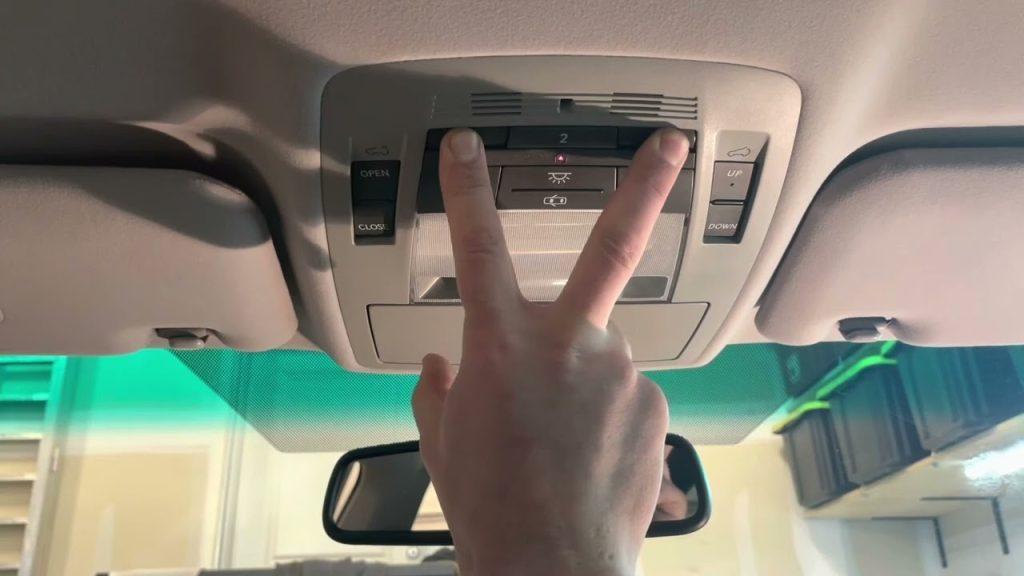
- Locate the HomeLink buttons (usually on the lower overhead console or rearview mirror).
- Press and hold the two outer buttons (Button 1 and Button 3) simultaneously.
- Keep holding them for exactly 20 seconds.
- Watch the indicator lights. They will transition from a slow blink to a rapid flash.
- Release both buttons once the rapid flash begins. Your system is now wiped clean.
Step 2: Programming the HomeLink System
Now that the memory is clear, it is time to teach your Lexus the frequency of your house.
- Hold your original handheld remote 2 to 5 inches away from the HomeLink buttons.
- Press and hold the button on your handheld remote that operates the door.
- Simultaneously press and hold the specific HomeLink button you wish to program.
- Hold both until the HomeLink LED changes from a slow blink to a solid or rapid light (usually takes 10–15 seconds).
- Release both buttons and test the newly programmed button.
Step 3: Syncing with Rolling Code Systems
Most garage door openers manufactured in the US after 1996 use rolling-code technology for enhanced security. If your door does not open after Step 2, follow this crucial sub-step.
- Locate the “Learn” Button: Grab your step ladder and find the colored “Learn” or “Smart” button on your overhead motor unit (typically yellow, purple, red, or orange).
- Press the Motor Button: Press and release the “Learn” button. You will have 30 seconds to complete the next step.
- Return to Your Lexus: Quickly get back into your vehicle and press the programmed HomeLink button three times (hold for 2 seconds, release, repeat).
- This finalizes the secure handshake between the car and the motor.
Why Reset Your Lexus Garage Door Opener?
Understanding why a reset is necessary can help you troubleshoot future issues. According to automotive electronics experts, the most common reasons for a reset include:
- Moving to a New Home: Your old codes will not match the new property’s frequencies.
- Security Breaches: If your car was broken into or your old remote was stolen, wiping the HomeLink prevents unauthorized access.
- Signal Interference: Sometimes, local radio frequencies cause “ghosting,” requiring a hard reset to clear the cache.
- System Glitches: Like any computer module, the HomeLink receiver occasionally freezes and needs a reboot.
“The most common mistake owners make is not holding the buttons long enough during the clearing phase. Precision timing is key to a successful sync.” — Sarah Jenkins, Certified Automotive Electronics Technician.
Pros vs Cons: DIY Reset vs. Dealership Service
Should you do it yourself or head to the service center? Here is a quick comparison to help you decide.
| Feature | DIY HomeLink Reset | Dealership Programming |
|---|---|---|
| Cost | Free | $50 – $125+ |
| Time Required | 5 to 10 Minutes | 1 to 2 Hours (with wait time) |
| Convenience | Do it from your driveway | Requires scheduling an appointment |
| Success Rate | 95% (If steps are followed) | 100% (Handled by certified techs) |
| Best For | Tech-comfortable owners | Older vehicles with complex wiring faults |
Common Troubleshooting Tips
Integrated garage door systems, widely known as the HomeLink Wireless Controls, are standard in most modern luxury SUVs. However, they are not immune to quirks.
- Weak Batteries: If your original handheld remote has weak batteries, it won’t transmit a strong enough signal for the Lexus to “learn.” Replace the batteries before starting.
- LED Blinking Fast Continuously: This usually means the memory was not cleared properly. Repeat Step 1 and ensure you hold the buttons for a full 20 seconds.
- Door Reverses After Closing: This is a safety sensor issue on the physical garage door unit, not a HomeLink issue. Check the infrared beams near the floor tracks.
Frequently Asked Questions (FAQ)
Can I program my Lexus RX 350 HomeLink without the original remote?
Generally, no. You need the original handheld remote to transmit the unique frequency to your vehicle. However, if your overhead motor has a “Learn” button, you can sometimes bypass this by pressing the motor’s learn button and immediately pressing your desired HomeLink button in the car repeatedly until it syncs.
Will disconnecting the car battery reset my HomeLink?
No. The HomeLink module uses non-volatile memory (EEPROM). Disconnecting your Lexus RX 350 battery will reset your clock and radio presets, but your programmed universal transmitter codes will remain safely stored.
How many devices can I program in my Lexus RX 350?
Most Lexus RX models feature a 3-button HomeLink system, meaning you can program up to three different devices. This could be three separate garage doors, a combination of a garage door and a driveway gate, or even outdoor smart lighting.
Why is the HomeLink indicator light solid but the door won’t open?
A solid light means the frequency is successfully learned, but the secure handshake failed. This confirms you have a rolling-code opener and you must complete Step 3 (pressing the “Learn” button on the motor) to finalize the connection.
Does resetting the HomeLink delete my car’s other settings?
Absolutely not. The HomeLink system operates on an isolated microcontroller. Wiping your garage door codes will not affect your navigation, Bluetooth pairings, or seat memory positions.
Final Thoughts
Mastering how to reset Lexus Rx 350 garage door opener settings is an essential skill for any vehicle owner. It saves you time, keeps your home secure, and eliminates the hassle of fumbling with a handheld remote every time you pull into the driveway. By following the clearing, programming, and rolling-code steps outlined above, you can ensure a seamless connection between your car and your home.
Found this guide helpful? Don’t keep this knowledge to yourself! Share this article on your favorite social media platforms like Facebook, X (Twitter), or Pinterest to help fellow Lexus owners conquer their HomeLink syncing struggles. Safe driving!



Leave a Reply