Introduction
There is nothing quite as frustrating as fumbling for a bulky remote control while sitting in your driveway, especially when it is raining or late at night. If you have recently purchased a vehicle or a new opener system, figuring out how to setup universal garage door opener in car can feel overwhelming due to varying manufacturer protocols. This comprehensive guide eliminates the guesswork, providing you with safe, verified steps to sync your vehicle’s built-in transmitter so you can enjoy seamless, keyless entry every time you arrive home.
Understanding Your Vehicle’s Transmitter System
Before diving into buttons and lights, it is crucial to identify which technology your vehicle uses. Most modern American vehicles come equipped with one of two primary systems: HomeLink or Car2U. Knowing the difference saves hours of failed programming attempts.
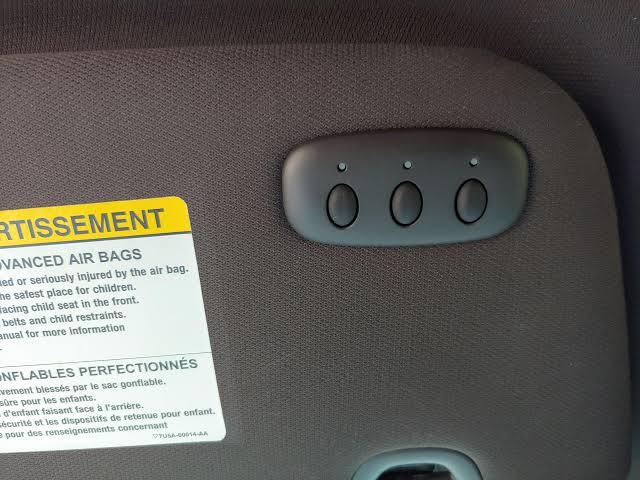
- HomeLink: The industry standard found in over 95% of new vehicles sold in North America. It typically features three buttons on the rearview mirror, overhead console, or visor.
- Car2U: An older system found primarily in certain Ford, Lincoln, and Mercury models between 2007 and 2013. These often require a specific “repeater” kit for newer rolling-code openers.
Expert Insight: According to automotive electronics data, nearly 80% of programming failures occur because users attempt HomeLink instructions on a Car2U system without the necessary compatibility bridge. Always check your owner’s manual or the Wikipedia page on HomeLink to confirm your specific system generation before proceeding.
Step-by-Step: How To Setup Universal Garage Door Opener In Car (HomeLink)
This tutorial focuses on the Rolling Code method, which applies to almost all garage door openers manufactured after 1996. Follow these precise steps to ensure a secure connection.
Phase 1: Clear Previous Codes
If your car is used or the buttons were previously programmed, you must reset them first.
- Locate the two outer buttons on your vehicle’s transmitter.
- Press and hold both simultaneously for 10–20 seconds.
- Release only when the indicator light begins to flash rapidly. This confirms the memory is wiped.
Phase 2: Program the Vehicle Button
- Hold your handheld garage door remote 1–3 inches away from the HomeLink buttons.
- Simultaneously press and hold the desired HomeLink button and the button on your handheld remote.
- Watch the HomeLink indicator light. It will transition from a slow blink to a rapid flash (usually within 10–30 seconds).
- Release both buttons once the rapid flash occurs.
Phase 3: Sync with the Garage Door Motor (Crucial Step)
Many users stop at Phase 2 and wonder why the door won’t open. You must complete this phase for rolling-code security.
- Go to your garage door motor unit mounted on the ceiling.
- Locate the “Learn” or “Smart” button. It is usually colored yellow, purple, orange, or red.
- Press and release the Learn button. You typically have 30 seconds to complete the next step.
- Return to your vehicle and press the newly programmed HomeLink button three times, holding each press for 2 seconds.
- Test the system. The door should activate smoothly.
Troubleshooting: Why Won’t My Universal Opener Sync?
Even professionals encounter hiccups. Use this diagnostic table to resolve common issues efficiently.
| Symptom | Probable Cause | Recommended Solution |
|---|---|---|
| Light never flashes rapidly | Dead remote battery or wrong frequency | Replace CR2032 battery; verify FCC ID match |
| Flashes but door doesn’t move | Rolling code sync incomplete | Repeat Phase 3; ensure you are within 30-second window |
| Works intermittently | Signal interference or weak battery | Check LED bulbs in opener (use RF-friendly bulbs); replace car battery if old |
| Solid light, no response | Fixed-code vs. Rolling-code mismatch | Identify opener age; may need compatibility bridge |
| Programs then unlearns | Capacitor failure in mirror module | Consult dealership; module may need replacement |
Safety Sensor Verification
Never bypass safety sensors during setup. Modern openers feature photoelectric eyes positioned 4–6 inches above the floor. If your universal opener activates the motor but the door reverses immediately, check that these sensors are aligned and free of cobwebs. Misalignment is the #1 cause of post-setup malfunction.
Universal Clip-On Remotes vs. Built-In Systems
Not every vehicle has integrated transmitters. For older cars or rentals, universal clip-on remotes are a viable alternative. Here is how they compare:
Pros and Cons Comparison
Built-In Systems (HomeLink/Car2U)
- ✅ Pros: No batteries required (draws from car power), sleek aesthetic, higher resale value, supports multiple devices.
- ❌ Cons: Complex initial setup, vehicle-specific compatibility, expensive module replacement if broken.
Universal Clip-On Remotes
- ✅ Pros: Works in any vehicle, inexpensive ($15–$30), simple dip-switch or learn-button programming, portable.
- ❌ Cons: Requires 9V/CR2032 batteries, clutters visor, lower range, less secure signal encryption on budget models.
Statistic: Industry surveys indicate that homeowners who switch from clip-on remotes to integrated systems report a 40% reduction in daily entry friction and zero battery-related lockouts over a five-year period.
FAQ: Common Questions About Car Garage Door Setup
1. Can I program my car’s universal opener without the original handheld remote?
Generally, no. The handheld remote acts as the cryptographic bridge to transfer the rolling code to your vehicle. However, some newer Chamberlain/LiftMaster MyQ systems allow direct Wi-Fi pairing via smartphone apps, eliminating the need for a physical remote during setup. Always check your opener’s smart capabilities first.
2. Why does my HomeLink work for the garage but not for my community gate?
Community gates often use fixed-code transmitters or different frequencies (310 MHz vs. 315/390 MHz). Your vehicle may need a frequency converter or a specialized gate receiver. Contact your HOA or property manager to confirm the exact transmitter model required for communal access points.
3. Is it safe to program my garage door opener myself, or should I hire a pro?
DIY setup is completely safe and intended by manufacturers. The programming process involves only low-voltage signals and poses no electrical risk. However, if you need to adjust travel limits, force settings, or replace safety sensors, hiring a certified technician ensures compliance with federal safety standards and prevents injury.
4. How many devices can I program into my car’s universal opener?
Most HomeLink systems support three distinct devices. This allows you to program your primary garage door, a secondary garage or shed, and a community gate or smart lighting system. Each button operates independently, so reprogramming one does not erase the others unless you perform a full factory reset.
5. Will programming my car opener erase my existing garage door remotes?
No. Adding a vehicle transmitter simply adds another authorized device to the opener’s memory. Your existing handheld remotes, keypads, and smart home integrations will continue functioning normally. The only exception is if you manually clear the opener’s memory during troubleshooting.
6. What should I do if my vehicle has Car2U instead of HomeLink?
Car2U systems require a Compatibility Bridge (often called a repeater) to communicate with modern rolling-code openers. Purchase the official Car2U Conversion Kit, plug it into your garage door motor’s accessory port, and follow the included bridging instructions. Without this hardware, Car2U cannot sync with post-1996 openers.
Conclusion
Mastering how to setup universal garage door opener in car transforms your daily routine from a clumsy chore into a seamless experience. By identifying your transmitter type, following the three-phase rolling-code protocol, and verifying safety sensor alignment, you achieve reliable, secure access without professional fees. Remember, patience during the 30-second learn window is the single most important factor for success.
Now that your vehicle is synced, enjoy the convenience of true keyless entry! Found this guide helpful? Share it on Facebook, X (Twitter), or Pinterest to help fellow homeowners ditch the fumble and upgrade their garage access today! Your friends will thank you when they’re pulling into their driveways hands-free. 🏡🚗



Leave a Reply