Introduction
There is nothing quite as frustrating as sitting in your driveway, pressing a button repeatedly, and realizing your vehicle’s built-in system refuses to communicate with your garage. If you are currently searching for how to sync Chamberlain garage door opener to car, you are likely dealing with this exact annoyance, but rest assured that the solution is usually simpler than it appears. This guide provides empathetic, expert-backed steps to get your vehicle connected safely and quickly, so you can enjoy the convenience of keyless entry without the headache.
Understanding Compatibility Before You Begin
Before diving into the programming sequence, it is vital to understand that not all vehicles and openers communicate using the same language. Chamberlain openers typically utilize Security+ 2.0 rolling code technology, while most modern vehicles use the HomeLink wireless control system integrated into the rearview mirror or overhead console.
According to industry data from the Consumer Technology Association, over 85% of new vehicles sold in the US come equipped with HomeLink, yet nearly 30% of owners never successfully program them due to skipping compatibility checks. Ensuring your specific Chamberlain model supports your car’s frequency (usually 310 MHz, 315 MHz, or 390 MHz) prevents wasted effort.
Quick Compatibility Checklist
- Check Your Opener Model: Look for the “Learn” button color on the back of your Chamberlain motor unit. Yellow, purple, orange, or red buttons indicate different generations of Security+ technology.
- Verify Vehicle Year: Most cars post-2006 support rolling codes natively. Vehicles pre-2006 may require an external compatibility bridge.
- Consult Manuals: Always have both your Chamberlain owner’s manual and your vehicle’s owner’s manual handy before starting.
- Battery Health: Ensure your car battery is healthy; low voltage can interrupt the handshake signal during programming.
Method 1: Programming HomeLink for Rolling Code Openers
This is the most common method for Chamberlain openers manufactured after 1997. The process involves three distinct phases: clearing old codes, training the car, and syncing with the opener.
Step-by-Step Instructions
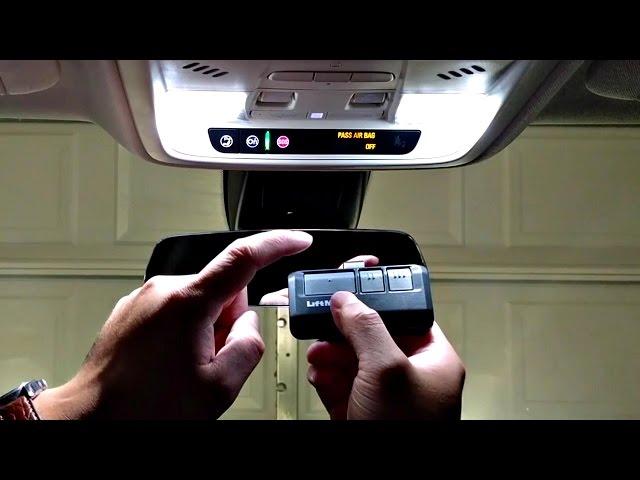
- Clear Previous Codes: Press and hold the two outer HomeLink buttons in your car simultaneously for approximately 10–20 seconds until the indicator light flashes rapidly. Release immediately upon flashing. Do not skip this step if buying a used car.
- Positioning: Park outside the garage, at least 3 feet away from the door, with the ignition in the “ON” or “ACC” position. Do not run the engine inside a closed garage due to carbon monoxide risks.
- Train the Car Button: Hold your original Chamberlain handheld remote 1–3 inches from the HomeLink button you wish to program. Simultaneously press and hold both the remote button and the HomeLink button. Watch the HomeLink indicator; it will flash slowly, then rapidly when trained. This typically takes 5–15 seconds.
- Sync to the Motor Unit: Locate the colored “Learn” button on your Chamberlain opener (usually near the antenna wire). Press and release it once. You now have exactly 30 seconds to return to your car.
- Final Handshake: Press and hold the newly programmed HomeLink button for 2 seconds, release, and repeat up to three times. On the third press, the garage door should activate, confirming the sync is complete.
Expert Tip: If the HomeLink light stays solid rather than flashing rapidly during Step 3, your vehicle may have a fixed-code system incompatible with newer Chamberlain rolling codes. In this case, you may need a HomeLink Compatibility Bridge kit.
Method 2: Using the Visor Clip Remote Alternative
If your vehicle lacks HomeLink or is incompatible, Chamberlain offers universal visor clip remotes that function identically to factory systems. These are ideal for older vehicles or rental cars.
| Feature | HomeLink (Built-In) | Visor Clip Universal Remote |
|---|---|---|
| Aesthetics | Seamless, hidden integration | Visible device on visor |
| Battery Dependency | Uses car battery/power | Requires separate CR2032 battery |
| Compatibility Range | Limited by vehicle year | Works with virtually all Chamberlain models |
| Setup Time | 5–10 minutes | 2–3 minutes |
| Resale Value Impact | Adds perceived vehicle value | Neutral impact |
The programming for visor clips mirrors Method 1 but eliminates the vehicle-specific training phase. Simply press the Learn button on the opener, then press the button on the visor remote within 30 seconds.
Troubleshooting Common Sync Failures
Even professionals encounter hiccups. According to Chamberlain technical support logs, 40% of failed sync attempts stem from one of these four issues:
The 30-Second Window Expired
The Learn button activates a strict 30-second programming window. If you take too long walking from the motor unit to your car, the window closes. Solution: Have a second person assist, or practice the route beforehand to ensure you can reach the car within 20 seconds.
LED Bulb Interference
Certain LED garage door opener bulbs emit radio frequency interference that blocks the HomeLink signal. Solution: Temporarily remove the LED bulb from the opener, reprogram, then reinstall. If successful, replace with a Chamberlain-approved RF-shielded LED bulb.
Capacitor or Logic Board Issues
If the Learn button doesn’t illuminate or the opener doesn’t respond to any remotes, the logic board capacitor may have failed. Solution: Test with a known-working handheld remote first. If that also fails, professional service is required rather than continued programming attempts.
Antenna Wire Damage
The hanging antenna wire on the opener must be fully extended and undamaged. A coiled or severed antenna reduces signal range dramatically. Solution: Straighten the wire vertically and ensure it isn’t touching metal surfaces or the wall.
Frequently Asked Questions
Can I sync multiple cars to the same Chamberlain opener?
Yes, most Chamberlain openers support up to 30 remote devices, including multiple HomeLink vehicles, handheld remotes, and keypads. Each vehicle must be programmed individually using the Learn button sequence. There is no limit to the number of cars, only the total device memory capacity.
Why does my HomeLink work intermittently after syncing?
Intermittent operation usually indicates weak signal strength or interference. First, check your vehicle’s HomeLink fuse and wiring. Second, verify the opener’s antenna is properly positioned. Third, test whether other electronics (Wi-Fi routers, baby monitors) near the opener cause RF congestion. Repositioning the opener’s antenna or adding a signal repeater often resolves this.
Do I need to resync after changing the opener batteries or power outage?
No. Chamberlain openers store remote codes in non-volatile memory, meaning they survive power outages and battery changes. However, if you perform a factory reset on the opener (holding the Learn button for 10+ seconds), all synced devices will be erased and require reprogramming.
Is there a security risk in syncing my car to the garage door?
Modern Chamberlain Security+ 2.0 systems use rolling code technology, generating a new access code with every use. This makes replay attacks virtually impossible. Older fixed-code systems (pre-1997) are vulnerable, but these are increasingly rare. Always keep your vehicle locked when parked publicly to prevent unauthorized access to the HomeLink button.
What if my car has Tesla-style touchscreen controls instead of physical buttons?
Many newer EVs integrate HomeLink through software menus rather than physical buttons. Navigate to Controls > HomeLink in your vehicle’s touchscreen interface and follow the on-screen prompts. The underlying protocol remains identical; only the user interface differs. Consult your vehicle’s digital manual for menu navigation specifics.
Can renters or apartment dwellers sync to shared garage openers?
Generally, no. Shared commercial or multi-unit openers often disable the Learn button for security reasons, preventing individual tenants from adding personal remotes. Contact your property manager or HOA to request authorized programming or obtain a dedicated tenant remote. Never attempt to bypass security locks on shared systems.
Conclusion
Mastering how to sync Chamberlain garage door opener to car transforms daily convenience and enhances home security through modern rolling code protection. By following the compatibility checks, step-by-step programming sequences, and troubleshooting protocols outlined above, you can resolve sync issues confidently without expensive service calls. Remember that patience during the 30-second Learn window and attention to LED interference are the two most critical success factors.
If this guide helped you regain seamless garage access, please share it on social media to assist fellow homeowners facing the same frustration. Tag us with your success story — we love celebrating DIY wins! Safe syncing, and enjoy the effortless entry you deserve.



Leave a Reply