Have you ever stood in your driveway during a power outage, frantically pressing the remote button, only to realize your garage door won’t budge? It is a frustrating scenario that leaves many homeowners asking, is there a battery in Liftmaster garage door opener? The answer is not a simple yes or no, as it depends heavily on the specific model you own and whether it was equipped with an optional backup system. Understanding how your unit handles power failures is crucial for maintaining security and convenience in your home.
Understanding the Power Source of Your Liftmaster
To truly answer whether your device has a battery, we must first distinguish between the two main components of a garage door system: the motor unit (the box attached to your ceiling) and the remote control (the handheld device).
Most standard Liftmaster openers are designed to run directly off your home’s AC electrical supply. They do not have an internal battery that powers the motor for daily operations. However, many modern models come with a Battery Backup Unit (BBU). This is an optional accessory or a built-in feature in higher-end models that allows the opener to function for a limited number of cycles when the main power goes out.
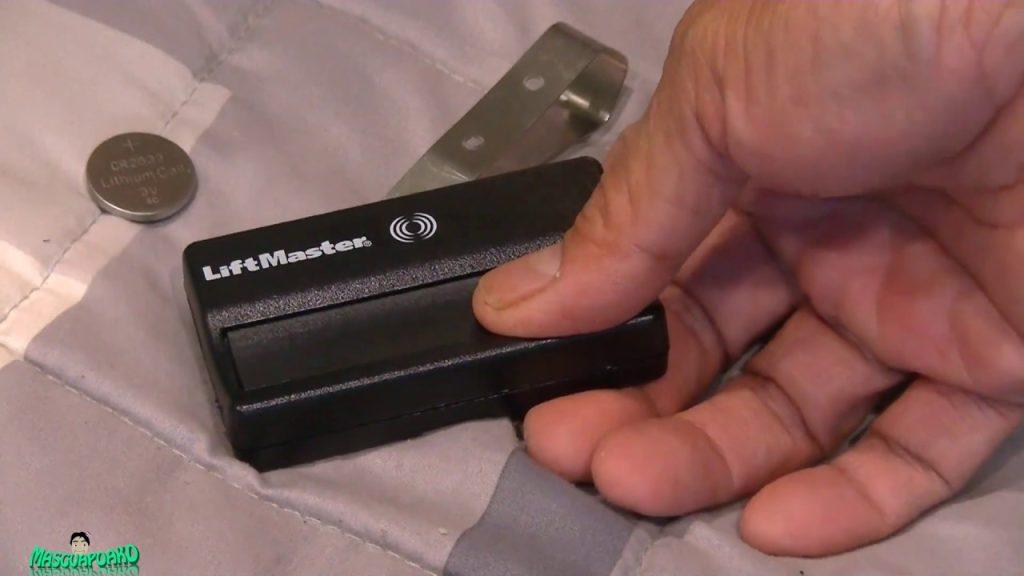
On the other hand, your remote control absolutely contains a battery. If your remote stops working, it is almost always due to a dead coin-cell battery, not an issue with the main opener unit. Confusing these two power sources is common, so let’s break them down separately.
The Motor Unit: AC Power vs. Battery Backup
The primary power source for the Liftmaster motor is your home’s electricity. Without a Battery Backup Unit installed, your garage door will not operate during a blackout. This is a safety feature; if the power is out, the electronic sensors and motors cannot function safely without a dedicated power reserve.
If you have a newer model, such as the Liftmaster 8500W or the 87504-267, it may include a built-in backup battery. For older models, you can often purchase a BBU separately. According to industry standards, a fully charged backup battery should allow for approximately 20–50 cycles of opening and closing, depending on the weight of your door and the age of the battery.
Expert Insight: “Homeowners often assume their opener is ‘smart’ enough to handle outages automatically. However, unless a specific Backup Battery Unit is installed and maintained, the opener is strictly dependent on grid power.” – Source: Garage Door Openers – Wikipedia
How to Check If Your Liftmaster Has a Battery Backup
Not sure if your specific model includes this feature? Here is a step-by-step guide to identifying if your Liftmaster opener has a battery backup system.
- Look for the LED Indicator: Most Liftmaster units with battery backup have a specific LED light on the motor housing. Look for a label that says “Battery Backup” or an icon resembling a battery. If this light is green, the system is charged and ready. If it is red or off, there may be an issue.
- Check the Model Number: Locate the model number sticker on the back or side of the motor unit. Common series with backup capabilities include the 8500, 8750, and Elite Series. You can cross-reference this number on the official Liftmaster website.
- Inspect for a Separate Box: In some installations, the battery backup is not integrated into the main motor but is housed in a separate small black box mounted nearby. Look for a unit with a vented cover and a status light.
- Test During an Outage: The most definitive test is to wait for a power outage (or unplug the unit briefly) and try to operate the wall console. If the door moves, you have a functional battery backup.
Comparison: Standard vs. Battery Backup Models
| Feature | Standard Liftmaster Opener | Liftmaster with Battery Backup |
|---|---|---|
| Power Source | AC Electricity Only | AC Electricity + DC Battery |
| Operation During Outage | No | Yes (Limited Cycles) |
| Initial Cost | Lower | Higher |
| Maintenance | Minimal | Battery Replacement Every 3–5 Years |
| Ideal For | Areas with stable power | Areas prone to storms/outages |
Replacing the Battery in Your Liftmaster Remote
While the motor unit might not have a battery, your remote control certainly does. If your remote is unresponsive, replacing the battery is the first troubleshooting step. Most Liftmaster remotes use a 3V CR2032 coin-cell battery.
Here is how to replace it safely:
- Open the Remote: Use a small flathead screwdriver or a coin to twist the back cover of the remote counter-clockwise. Some models have a sliding compartment instead.
- Remove the Old Battery: Note the orientation of the positive (+) and negative (-) sides. Gently pop out the old battery.
- Insert the New Battery: Place the new CR2032 battery with the positive side facing up (usually visible). Ensure it sits flush in the compartment.
- Close the Remote: Snap or twist the cover back into place. Test the remote by pressing the button while standing near the garage door.
Tip: Always dispose of old lithium batteries at a designated recycling center. Do not throw them in regular household trash.
Maintaining Your Battery Backup Unit
If you do have a Battery Backup Unit, it requires maintenance to ensure it works when you need it most. Lithium-ion or lead-acid batteries degrade over time, even if they are not used frequently.
- Regular Testing: Press the “Test” button on the motor unit once a month. This simulates a power outage and verifies that the battery can engage the motor.
- Charge Cycle: Keep the unit plugged in at all times. The battery maintains its charge through the AC connection. Unplugging it for extended periods will drain the battery.
- Replacement Schedule: Expect to replace the backup battery every 3 to 5 years. Signs of failure include the LED turning red, a chirping sound from the unit, or the door failing to operate during a test.
Troubleshooting Common Battery Issues
Even with a battery backup, you might encounter issues. Here are solutions to common problems:
- Remote Works, Door Doesn’t: If the remote has a fresh battery but the door won’t move, check the main power supply to the opener. Ensure the unit is plugged in and the circuit breaker hasn’t tripped.
- Beeping Sound: A continuous beep usually indicates that the backup battery is low or failing. Replace the battery immediately.
- Intermittent Operation: If the door works sometimes but not others, check the safety sensors. Dirty or misaligned sensors can prevent operation regardless of battery status.
FAQ Section
1. Can I add a battery backup to my old Liftmaster opener?
Yes, in many cases. Liftmaster sells universal Battery Backup Units that are compatible with most models manufactured after 1993. However, you should check your specific model’s compatibility chart on the Liftmaster website or consult a professional installer to ensure proper wiring.
2. How long does a Liftmaster backup battery last during a power outage?
A fully charged backup battery typically provides enough power for 20 to 50 cycles of opening and closing. This varies based on the size and weight of your garage door. Lighter doors will allow for more cycles than heavier wooden or insulated doors.
3. What type of battery is in the Liftmaster remote control?
Most Liftmaster remote controls use a 3V CR2032 lithium coin-cell battery. Some older or larger keychain remotes may use a 9V battery or AA batteries, but the CR2032 is the industry standard for modern visor clips and keychain remotes.
4. Why is my Liftmaster battery backup light red?
A red light on the battery backup indicator usually means the battery is low, disconnected, or failed. It could also indicate that the unit is in “lock” mode. Try pressing the lock button on your wall console to see if it resolves the issue. If the light remains red, the battery likely needs replacement.
5. Is it safe to leave my garage door opener unplugged?
No, it is not recommended. Leaving the opener unplugged will drain the backup battery completely, which can damage the battery’s ability to hold a charge in the future. Additionally, you will lose all smart features and remote access capabilities.
Conclusion
So, is there a battery in Liftmaster garage door opener? The answer is nuanced: your remote always has one, but your motor unit only has a battery if you have installed a Battery Backup Unit. Understanding this distinction is vital for maintaining your home’s security and convenience.
By regularly testing your backup system and replacing remote batteries promptly, you can avoid being stranded outside your garage. Don’t wait for a storm to find out if your system works—take a few minutes today to check your status lights and test your remote.
If you found this guide helpful, please share it with your neighbors or on social media to help others stay prepared for power outages!



Leave a Reply