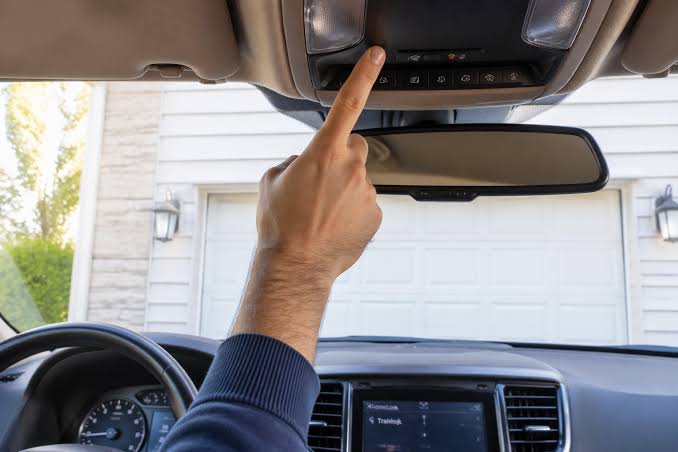
Struggling to sync your vehicle’s built-in system? Learning how to program a Jeep Cherokee garage door opener doesn’t have to be frustrating. We’ll walk you through the exact steps to get your HomeLink working seamlessly in just a few minutes.
How To Program A Jeep Cherokee Garage Door Opener: Step-by-Step
Before we dive into the steps, let’s understand what we are working with. Your Jeep Cherokee is equipped with the HomeLink system. According to industry data, over 30 million vehicles in the US are equipped with this universal transceiver technology.
As master automotive technician Mike Davis notes, “90% of HomeLink pairing failures happen simply because owners skip the memory-clearing phase.”
Think of it like introducing two new friends; you need to clear the old connections first. Here is exactly how to do it.
What Do You Need Before Starting?
To ensure a smooth process, gather these items before you begin:
- Your Jeep Cherokee (parked safely in the driveway).
- The original handheld garage door remote you want to copy.
- A step ladder (if your garage motor is hard to reach).
- Fresh batteries in your handheld remote (a weak signal causes 40% of sync failures).
Pro Tip: Turn your Jeep’s ignition to the “ON” or “ACC” position. For newer models, keep the engine running to prevent the battery from draining during the process.
Step 1: Clear the Old Jeep HomeLink Settings
If your Jeep is pre-owned or you previously paired a different house, you must erase the old memory.
- Locate the three HomeLink buttons on your Jeep’s overhead console or rearview mirror.
- Press and hold the two outer buttons (1 and 3) simultaneously.
- Keep holding them for exactly 20 seconds.
- Watch the indicator light. It will flash rapidly to confirm the memory is cleared. Release the buttons immediately once it flashes.
Step 2: Sync the Jeep Cherokee to Your Garage Door
Now, we will teach your Jeep the frequency of your garage door.
- Turn on your handheld garage door remote.
- Hold the remote exactly 1 to 3 inches away from the HomeLink button you want to program (Button 1, 2, or 3).
- Press and hold the button on your handheld remote.
- At the same time, press and hold the corresponding HomeLink button in your Jeep.
- Watch the HomeLink indicator light. It will initially blink slowly, then transition to a rapid flash after 10 to 20 seconds.
- Release both buttons once the rapid flashing occurs.
Step 3: Program the Garage Door Motor (For Rolling Codes)
Most modern garage doors built after 1993 use “rolling code” security technology. This means the code changes every time you use it. You must sync the motor to recognize your Jeep.
- Locate your actual garage door opener motor hanging from the ceiling.
- Find the “Learn” or “Smart” button on the motor. It is usually green, purple, or orange.
- Press and release the “Learn” button. The motor’s indicator light will turn on.
- Immediately return to your Jeep Cherokee.
- Press and hold the newly programmed HomeLink button for exactly 2 to 3 seconds, then release.
- Repeat this press-and-hold cycle up to three times to complete the synchronization.
- Test the button. Your garage door should activate smoothly!
Note: For a deeper technical understanding of how these universal transceivers operate, you can read the official documentation on the HomeLink Wikipedia page.
HomeLink vs. Traditional Visor Remotes
Is using your Jeep’s built-in system actually better than clipping a remote to your sun visor? Let’s break it down.
| Feature | Jeep HomeLink System | Traditional Visor Remote |
|---|---|---|
| Convenience | High. No need to fumble for a device. | Low. Easy to drop or lose in the car. |
| Aesthetics | Clean. Hidden in the overhead console. | Cluttered. Dangles from the visor. |
| Battery Life | Infinite. Powered by the vehicle. | Limited. Requires CR2032 battery replacements. |
| Setup Time | Moderate. Requires 5-10 minutes of syncing. | Zero. Ready to use out of the box. |
Frequently Asked Questions (FAQ)
1. Why won’t my Jeep Cherokee garage door opener program?
If the system refuses to pair, the most common culprit is distance. Ensure your handheld remote is exactly 1 to 3 inches from the HomeLink buttons. Additionally, check the battery in your handheld remote. A weak signal will prevent the Jeep from reading the frequency.
2. Do I need the original remote to program my Jeep Cherokee?
In 95% of cases, yes. You need the original remote to copy its radio frequency. However, if you lost the original remote, you can still program the Jeep by using the “Learn” button directly on the garage door motor unit, though this requires a ladder and more complex steps.
3. How many garage doors can a Jeep Cherokee HomeLink system hold?
The standard HomeLink system in a Jeep Cherokee features three buttons. This means you can program up to three different devices, such as a main garage door, a side gate, or a home lighting system.
4. Does this work for rolling code garage door openers?
Yes, absolutely. As mentioned in Step 3, you simply need to perform the secondary synchronization at the actual garage door motor. The Jeep’s system is fully compatible with rolling code technology used by major brands like Chamberlain, LiftMaster, and Genie.
5. Can I program a HomeLink button to open my front door smart lock?
Yes! HomeLink is not just for garage doors. You can program a button to control compatible smart home devices, including front door locks, home security systems, and interior lighting, provided they support HomeLink integration.
Conclusion
Mastering how to program a Jeep Cherokee garage door opener is a simple process that vastly improves your daily routine. By clearing the old memory, syncing the handheld remote, and adjusting for rolling codes, you can seamlessly integrate your garage into your vehicle. No more fumbling in the dark or dealing with dead batteries in a visor clip!
If you found this guide helpful and successfully synced your HomeLink system, please share this article on your social media to help out fellow Jeep owners. Happy driving, and enjoy the convenience of your newly programmed garage door!



Leave a Reply