Introduction
Struggling to juggle your coffee, keys, and a separate garage remote every time you pull into your driveway? You are not alone. Many BMW 328i owners find the integrated HomeLink system incredibly convenient but often feel intimidated by the programming process. If you are wondering how to program garage door opener in BMW 328I, this guide will walk you through the exact steps to sync your vehicle with your home garage efficiently and safely.
The HomeLink system in your BMW is designed to replace up to three different handheld remotes, decluttering your car’s interior and simplifying your daily routine. Whether you have a newer F30 model or an older E90 generation, the core principles remain similar, though button placements may vary slightly. By the end of this article, you will have a fully functional garage door opener integrated into your rearview mirror, saving you time and hassle every single day.
Understanding the BMW HomeLink System
Before diving into the buttons, it is essential to understand what you are working with. The HomeLink system is a universal transceiver that learns the radio frequency signals from your existing garage door opener. It does not “hack” your garage; rather, it mimics the signal of your original remote control.
Why Use HomeLink in Your BMW 328i?
- Convenience: No more searching for lost remotes in your bag or glove compartment.
- Security: Modern HomeLink systems use rolling code technology, which changes the access code every time you use it, preventing code grabbing by thieves.
- Aesthetics: Keeps your car interior clean and clutter-free.
According to HomeLink’s official documentation, the system is compatible with over 95% of garage door openers manufactured since 1982. This high compatibility rate makes it a reliable solution for most US homeowners.
Step-by-Step: How to Program Garage Door Opener in BMW 328I
Programming your BMW 328i’s HomeLink involves two main phases: clearing any old codes (if necessary) and training the system to recognize your garage door. Follow these steps carefully.
Phase 1: Preparation
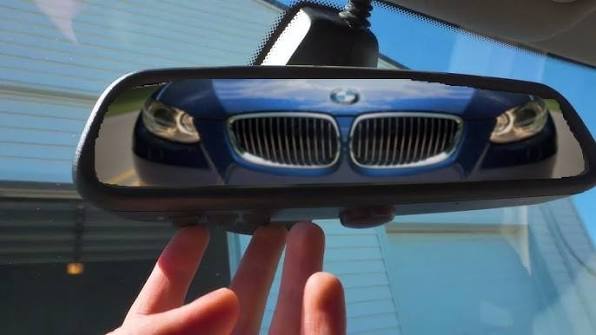
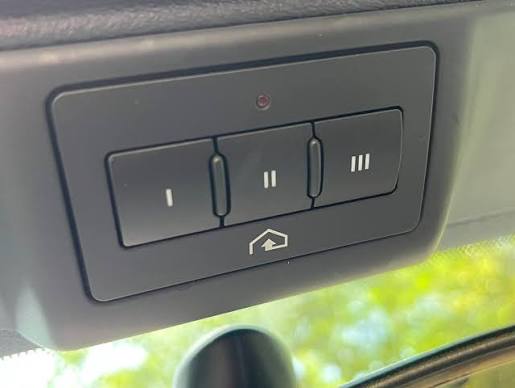
- Locate the HomeLink Buttons: In most BMW 328i models (F30/F31/F34 generations), the three HomeLink buttons are located on the underside of the rearview mirror. In older E90 models, they might be on the overhead console near the sunroof controls.
- Check Your Garage Door Opener: Identify if your garage door opener uses a “rolling code” or a “fixed code.” Most modern openers (LiftMaster, Chamberlain, Genie) use rolling codes. If you have a rolling code system, you will need access to the “Learn” or “Smart” button on your actual garage door motor unit inside the garage.
- Clear Previous Codes (Optional): If you bought the car used or want to reset a button, press and hold the two outer HomeLink buttons simultaneously for about 20 seconds until the indicator light flashes rapidly. This clears the memory.
Phase 2: Training the HomeLink Button
This is the core process of how to program garage door opener in BMW 328I.
- Position Your Vehicle: Park your BMW 328i outside your garage, ensuring you have a clear line of sight to the garage door opener motor. Keep the engine running or the ignition in the “On” position.
- Select a Button: Choose one of the three HomeLink buttons you wish to program.
- Initiate Learning Mode: Press and hold the chosen HomeLink button. Do not release it yet.
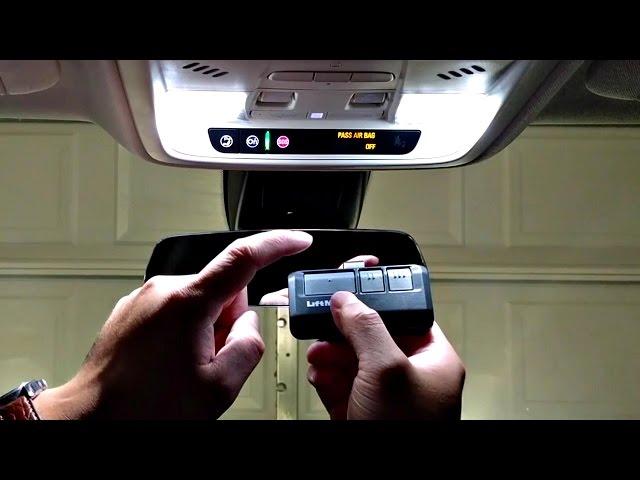
- Bring Your Original Remote: Take your original handheld garage door remote and hold it 1–3 inches away from the HomeLink button on your mirror.
- Sync the Signals: While still holding the HomeLink button, press and hold the button on your handheld remote that operates the garage door. Hold both buttons down.
- Watch the Indicator Light: The LED light on the HomeLink button will start flashing slowly. Continue holding both buttons until the light changes from a slow flash to a rapid flash. This indicates that the signal has been successfully learned.
- Note: This process can take anywhere from 20 to 60 seconds. Be patient.
Phase 3: Programming Rolling Code Openers
If your garage door uses a rolling code system (which most do), the above step is only half the battle. You must now complete the pairing at the garage door motor itself.
- Go to Your Garage Door Motor: Locate the motor unit hanging from your garage ceiling.
- Find the “Learn” Button: Look for a button labeled “Learn,” “Smart,” or “Program.” It is usually colored yellow, purple, or red.
- Press the Learn Button: Press and release the “Learn” button on the motor. You typically have 30 seconds to complete the next step.
- Return to Your BMW: Go back to your car within the 30-second window.
- Finalize the Sync: Press and hold the programmed HomeLink button in your BMW for two seconds, release it, and then press and hold it again for two seconds. Repeat this “press-hold-release” cycle up to three times.
- Test the Door: Press the HomeLink button once. Your garage door should activate. If it does, the programming is complete.
Troubleshooting Common Issues
Even with careful following, things don’t always go smoothly. Here are common problems and solutions.
| Issue | Possible Cause | Solution |
|---|---|---|
| Light Flashes Slowly But Never Rapidly | Weak battery in handheld remote or distance issue. | Replace remote battery. Move remote closer (1 inch) to the HomeLink sensor. |
| Door Moves But Doesn’t Stay Open | Safety sensors misaligned. | Check the infrared sensors at the bottom of your garage door tracks. Ensure nothing is blocking them. |
| HomeLink Not Responding | Fuse blown or system disabled. | Check your BMW’s fuse box for the HomeLink fuse. Ensure the feature isn’t disabled in the iDrive settings. |
| Rolling Code Sync Fails | Timing error at the motor unit. | Reset the motor unit by unplugging it for 10 seconds. Try the “Learn” button process again, moving faster. |
Expert Tip:
If you have a Chamberlain or LiftMaster opener with a yellow “Learn” button, you may need to press the HomeLink button in your BMW three times rapidly after pressing the Learn button on the motor. This is a specific requirement for certain security protocols.
Frequently Asked Questions (FAQ)
1. Can I program multiple garage doors to my BMW 328i?
Yes, the HomeLink system in the BMW 328i supports up to three different devices. You can program your home garage, a vacation home garage, and even a gate opener, assigning each to a separate button.
2. What if I don’t have the original handheld remote?
If you have lost your original remote, you cannot program the HomeLink system using the standard method. You will need to purchase a universal compatible remote or contact your garage door manufacturer to get a new remote. Alternatively, some modern smart garage openers allow programming via a mobile app, which may have a “virtual remote” feature you can use to transmit the signal to your car.
3. Does programming HomeLink void my garage door warranty?
No, programming a universal remote like HomeLink does not void your garage door opener’s warranty. It simply adds another authorized transmitter to the system. However, always refer to your specific garage door manual for any brand-specific restrictions.
4. Why is my HomeLink light solid green but the door doesn’t open?
A solid green light usually indicates that the button has been trained successfully. If the door doesn’t open, the issue is likely with the final rolling code synchronization at the motor unit. Return to your garage door motor and repeat the “Learn” button process described in Phase 3.
5. Can I program a HomeLink system from a different car brand?
Generally, no. HomeLink systems are proprietary to the vehicle manufacturer’s integration. While the underlying technology is similar, the button interface and power requirements differ. You must use the HomeLink buttons built into your BMW 328i.
6. Is it safe to leave my car running while programming?
Yes, it is recommended to keep the ignition in the “On” position or the engine running to ensure consistent power delivery to the HomeLink module during the programming process. Always ensure your car is in “Park” and the parking brake is engaged for safety.
Conclusion
Learning how to program garage door opener in BMW 328I is a straightforward process that significantly enhances your driving convenience. By following the steps outlined above—preparing your vehicle, syncing the handheld remote, and finalizing the rolling code connection—you can enjoy seamless access to your home without fumbling for extra keys.
Remember, patience is key during the signal learning phase, and having your original remote handy is crucial. Once set up, your BMW 328i becomes not just a luxury driving machine, but a smart hub for your home access needs.
Did you find this guide helpful? Share this article with fellow BMW owners on Facebook or Twitter who might be struggling with their HomeLink setup. If you have any unique troubleshooting tips or success stories, leave a comment below to help the community!
Leave a Reply