Introduction
Struggling to sync your garage door with your Chrysler Pacifica? You’re not alone. Many Pacifica owners find the HomeLink system confusing at first, but once programmed, it offers unmatched convenience. Knowing how to program garage door opener on Chrysler Pacifica can save you time and eliminate the hassle of juggling multiple remotes. In this guide, we’ll walk you through every step clearly and safely.
What Is HomeLink in the Chrysler Pacifica?
Before diving into the programming steps, it’s essential to understand what HomeLink is. HomeLink is a built-in universal transmitter that allows your vehicle to communicate with garage doors, gate operators, and even home lighting systems.
Key Features of HomeLink:
- Universal Compatibility: Works with most major garage door opener brands.
- Secure Encryption: Uses rolling code technology to prevent unauthorized access.
- Convenience: Eliminates the need for separate remotes cluttering your car.
According to Wikipedia, HomeLink has been integrated into millions of vehicles worldwide, making it one of the most trusted in-car automation systems.
Step-by-Step: How To Program Garage Door Opener On Chrysler Pacifica
Programming your HomeLink system may seem intimidating, but it’s straightforward if you follow these steps. Below is a detailed, easy-to-follow tutorial.
Step 1: Prepare Your Garage Door Opener Remote
Ensure you have your original garage door remote handy. You’ll need it during the programming process. Also, check that your garage door opener is compatible with HomeLink (most models from LiftMaster, Chamberlain, Genie, and Craftsman are compatible).
Step 2: Clear Existing HomeLink Buttons (If Necessary)
If your HomeLink buttons were previously programmed, clear them first:
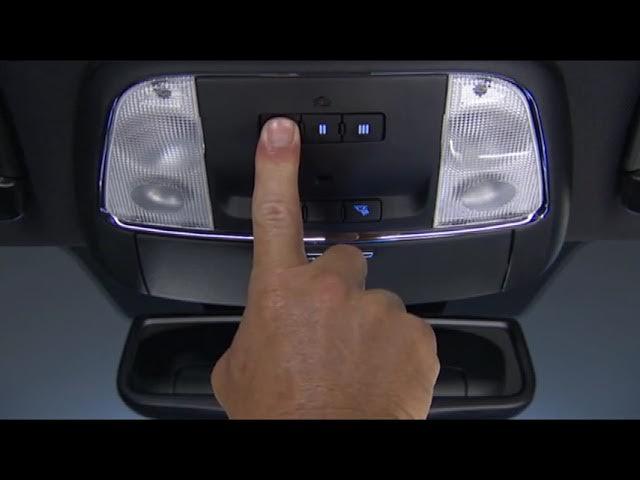
- Press and hold the two outer HomeLink buttons simultaneously.
- Keep holding until the indicator light begins to flash rapidly (about 10–20 seconds).
- Release the buttons. The memory is now cleared.
Step 3: Program the HomeLink Button
- Sit in your Chrysler Pacifica with the ignition turned to the “ON” position (engine can be off).
- Hold your garage door remote 1–3 inches away from the HomeLink buttons on your rearview mirror or overhead console.
- Press and hold the desired HomeLink button and the button on your garage remote simultaneously.
- Continue holding both buttons until the HomeLink indicator light changes from a slow blink to a rapid flash. This may take up to 30 seconds.
- Release both buttons.
Step 4: Test the Programming
- Press the programmed HomeLink button.
- Observe if the garage door responds.
- If it doesn’t work, repeat Step 3, ensuring the remote is close enough and batteries are fresh.
Step 5: Sync with Rolling Code Openers (If Applicable)
Many modern garage door openers use rolling code technology for enhanced security. If your door didn’t respond in Step 4:
- Locate the “Learn” or “Smart” button on your garage door opener motor unit (usually found on the ceiling-mounted box).
- Press and release the “Learn” button. The indicator light will turn on or blink.
- Within 30 seconds, return to your Pacifica and press the programmed HomeLink button three times.
- Test the door again. It should now operate smoothly.
Common Issues and Troubleshooting Tips
Even with careful programming, issues can arise. Here’s how to resolve the most common problems:
| Issue | Possible Cause | Solution |
|---|---|---|
| HomeLink light doesn’t flash | Weak remote battery | Replace the battery in your garage remote |
| Garage door doesn’t respond | Incorrect syncing procedure | Repeat Step 5 for rolling code openers |
| Light flashes but door doesn’t move | Interference or distance issue | Move closer to the garage door opener motor |
| Multiple doors not working | Button not cleared properly | Clear all buttons and reprogram from scratch |
People Also Ask: Quick Answers
Can I program multiple garage doors on my Chrysler Pacifica?
Yes! The HomeLink system typically has three buttons, allowing you to program up to three different devices (e.g., garage door, gate, and lighting).
What if my garage door opener is older than 10 years?
Older openers may use fixed-code technology instead of rolling codes. In this case, skip Step 5 and test directly after Step 4. If it still doesn’t work, consult your garage door manual or contact the manufacturer.
Is HomeLink secure?
Absolutely. HomeLink uses encrypted signals and rolling code technology, making it highly secure against hacking or unauthorized access.
Do I need professional help to program HomeLink?
No. Most owners can complete the process in under 10 minutes without any special tools. However, if you encounter persistent issues, a certified Chrysler dealer can assist.
Why Programming HomeLink Is Worth It
Programming your Chrysler Pacifica HomeLink system offers several benefits:
- Time-Saving: No more searching for lost remotes.
- Enhanced Security: Rolling code encryption protects your home.
- Increased Resale Value: A fully functional HomeLink system adds appeal to potential buyers.
A study by J.D. Power found that vehicles with integrated smart features like HomeLink receive higher customer satisfaction ratings, particularly among families who value convenience and safety.
FAQ Section
Q1: How long does it take to program HomeLink on a Chrysler Pacifica?
A: Typically, it takes 5–10 minutes if you follow the steps correctly. Rolling code synchronization may add an extra 2–3 minutes.
Q2: Can I reset HomeLink if I sell my car?
A: Yes. Simply clear the buttons by holding the two outer buttons until the light flashes rapidly. This erases all stored codes.
Q3: Does HomeLink work with all garage door brands?
A: HomeLink is compatible with most major brands, including LiftMaster, Chamberlain, Genie, Craftsman, and Stanley. Check your opener’s manual for specific compatibility details.
Q4: What should I do if the HomeLink light doesn’t change during programming?
A: Ensure your garage remote has fresh batteries and is held close to the HomeLink buttons. If the issue persists, try clearing the memory and restarting the process.
Q5: Can weather affect HomeLink performance?
A: Extreme temperatures or heavy interference from nearby electronic devices may occasionally impact signal strength. Parking closer to the garage door usually resolves this.
Q6: Is there a video tutorial available?
A: Yes, Chrysler’s official YouTube channel and various automotive blogs offer visual guides. However, this written guide provides all the necessary details for a successful setup.
Conclusion
Learning how to program garage door opener on Chrysler Pacifica is a simple yet rewarding task. With just a few minutes and your original remote, you can enjoy seamless access to your garage without fumbling for extra keys or remotes. Follow the steps outlined above, troubleshoot if needed, and enjoy the convenience of a fully integrated smart vehicle.
If you found this guide helpful, share it with fellow Pacifica owners on social media! Let’s help more drivers unlock the full potential of their HomeLink system. 🚗🏠



Leave a Reply