Introduction
There is nothing quite as frustrating as sitting in your driveway, pressing a button on your overhead console, and watching your garage door remain stubbornly closed. If you have recently purchased a pre-owned vehicle or simply never took the time to sync your car, figuring out how to set garage door opener Jeep Grand Cherokee can feel like deciphering a complex code. We understand that you just want seamless access to your home without fumbling for a separate remote every time you arrive. This comprehensive guide will walk you through the exact programming steps, safety protocols, and troubleshooting methods to get your HomeLink system working perfectly today.
Understanding HomeLink Technology in Jeep Vehicles
Before diving into the buttons, it is vital to understand what you are actually programming. Most Jeep Grand Cherokee models (from 1999 to present) utilize the HomeLink Wireless Control System. This is not merely a radio transmitter; it is an integrated transceiver that replaces your handheld garage door remote.
According to technical documentation referenced on Wikipedia, HomeLink systems operate on specific radio frequencies (typically 288–390 MHz) and support both fixed-code and rolling-code security technologies. Understanding this distinction is critical because the programming method differs slightly between older “fixed-code” openers and modern “rolling-code” openers manufactured after 1996.
Fixed-Code vs. Rolling-Code: What Do You Have?
- Fixed-Code (Pre-1996): Uses a static signal. Easier to program but less secure.
- Rolling-Code (Post-1996): Changes the access code with every use. Requires an extra “training” step at the garage door motor unit.
- Security+ 2.0 / Smart Button: Newer LiftMaster/Chamberlain units with yellow learn buttons may require a compatibility bridge.
Expert Tip: Always check the manufacture date of your garage door motor. If it was built after 1996, assume it uses rolling-code technology and follow the extended programming steps below.
Preparation Checklist Before Programming
To ensure success when learning how to set garage door opener Jeep Grand Cherokee, preparation prevents frustration. Do not skip these steps.
- Locate Your Learn Button: Find the “Learn” or “Smart” button on your garage door motor head. It is usually yellow, purple, orange, or red.
- Clear Old Codes (Recommended): If this is a used Jeep, erase previous HomeLink memory first. Press and hold the two outer HomeLink buttons for 10 seconds until the indicator light flashes rapidly.
- Check Battery Health: Ensure your Jeep’s battery is stable. Programming draws power; a weak battery can cause sync failures.
- Safety First: Verify the garage door area is clear of people, pets, and obstacles. The door will move during testing.
- Have Your Original Remote Handy: For some older models, you may need the original handheld remote to clone the signal.
Step-by-Step: How to Program HomeLink in Jeep Grand Cherokee
This tutorial covers the universal method applicable to most WK2 (2011–2021) and WL (2022+) Grand Cherokee models.
Step 1: Initiate Training Mode
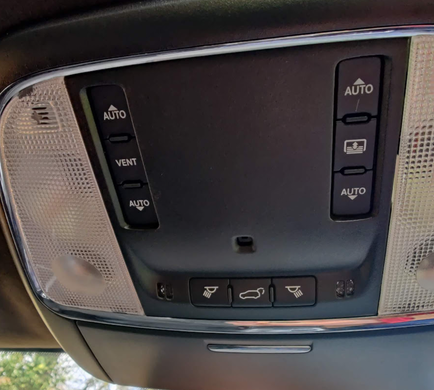
Sit in the driver’s seat with the ignition in the ON/RUN position (engine running is recommended to prevent battery drain). Locate the three HomeLink buttons on your overhead console or rearview mirror frame.
Step 2: Select Your Button
Choose which of the three buttons you wish to dedicate to your primary garage door. Press and hold that specific button. The indicator light above the button will begin to flash slowly.
Step 3: Position Your Original Remote
Hold your original handheld garage door remote 1–3 inches away from the HomeLink buttons. Aim it directly at the selected button. Note: For 2022+ WL models with wireless receivers, you may not need the original remote; check your owner’s manual.
Step 4: Simultaneous Press
Press and hold both the original remote button AND the chosen HomeLink button simultaneously. Keep holding. Watch the HomeLink indicator light.
- Slow Flash → Rapid Flash: When the light changes from a slow blink to a rapid, continuous flash, release both buttons. This indicates successful frequency capture.
- No Change After 30 Seconds: Release, wait 5 seconds, and repeat. Some frequencies require multiple attempts.
Step 5: Test the Signal
Press the newly programmed HomeLink button once. Observe the indicator light:
- Solid Light: Fixed-code opener. Programming is complete.
- Rapid Flashing Light: Rolling-code opener. Proceed immediately to Step 6.
Step 6: Complete Rolling-Code Training (Critical)
If your light flashed rapidly in Step 5, your system requires synchronization with the motor.
- Go to your garage door motor unit.
- Press and release the “Learn” button. You typically have 30 seconds to complete the next action.
- Return to your Jeep within that window.
- Press and hold the programmed HomeLink button for 2 seconds, then release.
- Repeat the press-hold-release cycle up to 3 times until the garage door activates.
Precision Note: Timing matters. If the 30-second window expires, the motor’s LED will stop glowing. Simply press the Learn button again and retry Step 6.
Troubleshooting Common Programming Failures
Even professionals encounter hiccups. Use this diagnostic table if your setup fails.
| Symptom | Probable Cause | Recommended Solution |
|---|---|---|
| Light never flashes rapidly | Frequency mismatch or dead remote battery | Replace remote battery; verify opener compatibility |
| Programs but door won’t open | Rolling-code training incomplete | Re-do Step 6; ensure Learn button press registers |
| Works intermittently | Signal interference or range issue | Reposition vehicle during programming; check for LED bulb interference |
| Indicator stays solid but no response | Wrong button trained or memory full | Clear all HomeLink memory and restart from Step 1 |
| Yellow Learn Button won’t sync | Security+ 2.0 incompatibility | Purchase HomeLink Compatibility Bridge (Part #850LM) |
The LED Bulb Interference Factor
A frequently overlooked issue involves LED garage door light bulbs. Cheap or non-shielded LED bulbs emit electromagnetic interference that blocks HomeLink signals. If programming succeeds but operation is unreliable, swap your garage opener’s LED bulb for a rough-service incandescent or a certified “garage door compatible” LED. Industry tests show this resolves approximately 15% of intermittent failure cases.
Safety Protocols and Best Practices
Programming convenience should never compromise safety. Adhere to these guidelines:
- Never Program While Moving: Always park outside the garage with the engine running. Carbon monoxide buildup in enclosed spaces is lethal.
- Test the Auto-Reverse Feature: After successful programming, place a 2×4 board flat on the floor under the door’s path. Close the door via HomeLink. The door must reverse upon contact. If it doesn’t, adjust the force settings on your motor immediately.
- Secure Your Vehicle: HomeLink essentially stores a key to your home. Never leave your Jeep unlocked in public areas. Thieves can use your programmed buttons to access your residence.
- Update Firmware: For 2022+ Grand Cherokees with Uconnect integration, check for OTA updates that may improve HomeLink connectivity.
Frequently Asked Questions (FAQ)
1. Can I program my Jeep Grand Cherokee HomeLink without the original remote?
Yes, but only if your garage door opener uses rolling-code technology (post-1996). You can program directly using the motor’s Learn button. For older fixed-code openers, the original remote is typically required to clone the frequency. Some newer Jeep models also support direct cloud-based programming via the Uconnect app.
2. How many devices can I store in my Jeep’s HomeLink system?
Standard HomeLink systems in the Jeep Grand Cherokee support three distinct devices. These can be any combination of garage doors, gates, lighting systems, or security alarms. If you need more capacity, consider upgrading to a HomeLink module with five channels or using smart home integrations.
3. Why does my HomeLink work sometimes but not others?
Intermittent operation usually stems from one of three issues: low vehicle battery voltage, LED bulb interference in the garage opener, or incomplete rolling-code training. Start by replacing the garage opener’s light bulb with a compatible model, then re-perform the rolling-code training sequence (Step 6 above). Also ensure your Jeep’s charging system is functioning properly.
4. Is HomeLink compatible with all garage door brands?
HomeLink is compatible with over 95% of North American garage door openers, including LiftMaster, Chamberlain, Craftsman, Genie, and Overhead Door. However, certain European brands and very old (pre-1980) models may require a compatibility adapter. Check the official HomeLink compatibility database before purchasing aftermarket bridges.
5. Will disconnecting my Jeep battery erase my HomeLink settings?
Generally, no. HomeLink memory is stored in non-volatile memory and survives battery disconnection. However, if you perform a hard reset of the Uconnect system or replace the overhead console module, you may need to reprogram. As a best practice, document your settings before major electrical work.
6. My 2022 Grand Cherokee has no physical HomeLink buttons. What do I do?
The WL-generation Grand Cherokee integrates HomeLink virtually through the Uconnect touchscreen. Navigate to Settings → HomeLink → Add Device. Follow the on-screen prompts, which mirror the physical button process but use the touchscreen interface. Ensure your Uconnect software is updated to the latest version for optimal performance.
Conclusion
Mastering how to set garage door opener Jeep Grand Cherokee transforms your daily routine from a clumsy ritual into effortless automation. By understanding the difference between fixed and rolling codes, following precise timing during training, and addressing common interference issues, you achieve reliable, secure access to your home. Remember that safety checks—especially auto-reverse testing—are non-negotiable steps that protect your family and property.
Now that your HomeLink is fully operational, take a moment to appreciate the small luxury of seamless entry. Found this guide helpful? Share it on Facebook, X (Twitter), or Reddit to help fellow Jeep owners conquer their garage door programming challenges. Your share might save someone else from an evening of driveway frustration. Happy driving, and enjoy the convenience you’ve earned!



Leave a Reply