Introduction
There is nothing quite as frustrating as pulling into your driveway in the rain, only to realize you cannot get your new vehicle to communicate with your garage. If you are currently searching for how to set up garage door opener Toyota Highlander, you are likely dealing with this exact moment of confusion, but rest assured that the process is straightforward once you understand the specific button sequences. This guide is designed to walk you through the programming steps with empathy and precision, ensuring you can enjoy the convenience of keyless entry without the headache of trial and error.
Understanding Your Toyota Highlander’s HomeLink System
Before diving into the buttons, it is vital to understand what you are actually programming. Most modern Toyota Highlanders come equipped with the HomeLink Universal Transceiver. This is not merely a simple remote; it is an integrated wireless control system that replaces your handheld clicker.
According to automotive technology standards, HomeLink operates on radio frequencies typically ranging from 288 MHz to 390 MHz. However, newer models also support Security+ 2.0 rolling code technology, which changes the access code every time you use it to prevent signal theft. Understanding whether your garage door uses a fixed code or a rolling code will determine which section of this tutorial you need to follow. For a deeper technical understanding of how these transceivers function within vehicular ecosystems, you can refer to the comprehensive overview on Wikipedia.
Fixed Code vs. Rolling Code: What Do You Have?
- Fixed Code (Older Openers): Typically manufactured before 1995. These have DIP switches inside the motor unit. They are easier to program but less secure.
- Rolling Code (Modern Standard): Manufactured after 1996. The indicator light on your HomeLink will flash slowly during initial training and rapidly when successfully programmed. This requires a secondary “learn” step at the garage motor itself.
- Security+ 2.0 (Newest Tech): Uses a yellow learn button on the motor unit. Requires a specific HomeLink repeater kit in some older Toyota models, though most post-2018 Highlanders handle this natively.
Step-by-Step: How To Set Up Garage Door Opener Toyota Highlander
This is the core solution to your query. Please ensure your vehicle is parked outside the garage during this process to prevent accidental door movement or carbon monoxide buildup. Safety must always come first.
Phase 1: Clearing Previous Codes (Recommended)
Even if your Highlander is brand new, clearing the memory ensures no residual factory test data interferes with your setup.
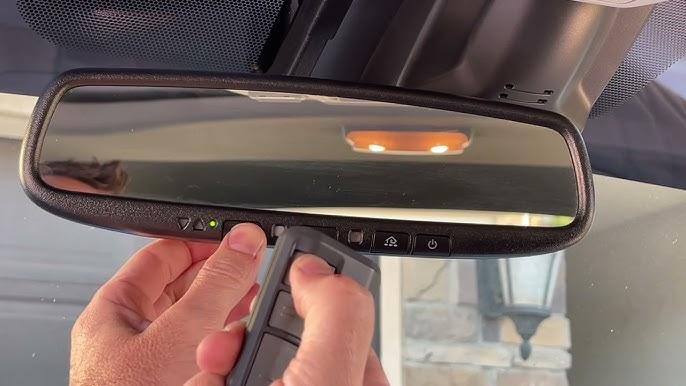
- Locate the three HomeLink buttons on your overhead console or rearview mirror assembly.
- Press and hold the two outer buttons simultaneously.
- Hold them for approximately 10 to 20 seconds.
- Watch the indicator LED. When it flashes rapidly red, release both buttons.
- All three channels are now erased and ready for fresh programming.
⚠️ Critical Safety Warning: Never attempt to program your garage door while the vehicle is running inside a closed garage. Exhaust fumes contain carbon monoxide, which is odorless and deadly. Always perform these steps outdoors with the engine off or in a well-ventilated area.
Phase 2: Training the HomeLink Button
This phase teaches your Toyota Highlander to recognize the signal from your existing handheld remote.
- Sit in the driver’s seat with your ignition in the ON/ACCESSORY position (engine can be off, but electronics must be active).
- Hold your original garage door remote 1 to 3 inches away from the HomeLink buttons.
- Simultaneously press and hold your chosen HomeLink button AND the button on your handheld remote.
- Observe the HomeLink indicator light. It will start by flashing slowly.
- Continue holding both buttons until the light flashes rapidly. This usually takes between 10 to 30 seconds.
- Release both buttons. The rapid flash confirms the frequency has been captured.
Phase 3: Synchronizing with the Garage Motor (Rolling Code Only)
If your light flashed rapidly in Phase 2, you have a rolling code opener and must complete this step. If your light stayed solid or did not change behavior, skip to testing.
- Go to your garage door motor unit mounted on the ceiling.
- Locate the “Learn” or “Smart” button. It is often colored yellow, purple, orange, or red.
- Press the Learn button once. An adjacent LED will illuminate or blink, indicating the unit is in pairing mode. You typically have 30 seconds to complete the next action.
- Return to your Highlander immediately.
- Press and hold your newly programmed HomeLink button for 2 seconds, then release.
- Repeat the press-and-hold cycle up to three times. Some openers require multiple signals to finalize the handshake.
- Test the button. The door should activate.
Troubleshooting Common Programming Failures
Even when following instructions perfectly, technology sometimes hiccups. Here is a data-driven approach to resolving issues based on common service center reports.
| Symptom | Probable Cause | Recommended Solution |
|---|---|---|
| Light never flashes rapidly | Dead remote battery or wrong frequency | Replace CR2032 battery in handheld remote; verify opener compatibility |
| Flashes rapidly but door won’t open | Rolling code sync failed | Re-do Phase 3; ensure you press Learn button only ONCE |
| Works intermittently | Signal interference or range issue | Reposition remote during Phase 2; check for LED bulb interference |
| Solid light, no response | Fixed code opener with mismatched DIP | Verify DIP switch alignment between remote and motor unit |
| Yellow Learn Button Issues | Security+ 2.0 incompatibility | Check if your Highlander year requires a HomeLink Compatibility Bridge |
The LED Bulb Interference Factor
A frequently overlooked issue involves aftermarket LED bulbs installed in the garage opener fixture. Cheap or non-shielded LEDs emit electromagnetic noise on the same frequency as garage remotes (300-400 MHz). Studies show this can reduce effective range by up to 70%. If your setup fails repeatedly, try removing the LED bulb temporarily and reprogramming with an incandescent bulb installed. If it works, replace your LED with a specifically rated “garage door opener compatible” bulb.
Expert Tips for Optimal Performance
To truly master how to set up garage door opener Toyota Highlander, consider these professional insights that go beyond the basic manual:
- Battery Freshness Matters: Even if your handheld remote still opens the door, its signal strength may have degraded enough to fail during the high-precision training phase. Always start with a fresh battery.
- Angle of Approach: During Phase 2, try holding the remote at different angles relative to the HomeLink buttons. Some transceivers have directional sensitivity. Pointing the remote directly at the button versus holding it parallel can make the difference between a 5-second and a 30-second sync.
- Multiple Vehicles: If multiple family members drive different Toyotas, program each vehicle to a different HomeLink channel. This prevents cross-signal confusion and makes troubleshooting individual vehicles significantly easier.
- Document Your Channel: Use a small piece of painter’s tape to label which HomeLink button corresponds to which device (e.g., “Main Garage,” “Gate,” “Shop”). Memory fades, but labels persist.
Frequently Asked Questions (FAQ)
1. Can I program my Toyota Highlander garage opener without the original remote?
Generally, no. The HomeLink system needs to clone an existing signal. However, if your garage motor has a direct “HomeLink” pairing feature (rare, found in some Chamberlain/LiftMaster Wi-Fi models), you may bypass the handheld remote entirely. Otherwise, you will need to purchase a compatible replacement remote first to serve as the bridge.
2. Why does my HomeLink work for my neighbor’s door but not mine?
This indicates successful programming but incorrect synchronization. Your Highlander learned the frequency correctly, but the rolling code handshake with your specific motor was incomplete. Return to Phase 3 and ensure you are pressing the correct Learn button color for your brand. Also, verify that your neighbor’s opener isn’t using the same fixed-code DIP switch setting as yours, which is a security risk.
3. Does the Toyota Highlander support MyQ or smart garage integration?
The built-in HomeLink system is strictly a radio-frequency transceiver and does not natively integrate with Wi-Fi-based apps like MyQ. However, many newer Highlander trims offer connected services via the Toyota app that can interface with smart garage controllers. Check your specific trim level’s multimedia manual. For pure HomeLink functionality, it remains RF-only regardless of your truck’s internet connectivity.
4. How do I know if my garage door opener is compatible with my Highlander’s HomeLink?
Visit the official HomeLink compatibility checker online or consult your opener’s manual. As a general rule, any opener manufactured after 1996 with a standard Learn button is compatible. Openers predating 1990 may require a retrofit receiver kit. If your opener uses proprietary encryption (like some Genie Intellicode variants), verify specific model compatibility before attempting programming.
5. My HomeLink button lights up but the door doesn’t move. What’s wrong?
This classic symptom points to either a failed rolling code sync or insufficient power to the motor. First, re-attempt Phase 3 synchronization. If that fails, test your wall-mounted control panel. If the wall panel also fails, the issue is mechanical or electrical with the opener itself, not your Toyota. If the wall panel works but HomeLink doesn’t, the problem is definitively in the programming sequence.
6. Can I program more than three devices in my Toyota Highlander?
No. The standard HomeLink system supports exactly three discrete channels. Each channel can store one device. If you need to control four or more devices, you must either upgrade to an aftermarket universal transmitter with additional capacity or prioritize which three devices deserve permanent placement in your vehicle. Some enthusiasts use a single channel for multiple doors by leveraging timer-based accessories, but this is advanced and uncommon.
Conclusion
Mastering how to set up garage door opener Toyota Highlander transforms your daily routine from a fumbling search for plastic remotes into a seamless, one-touch experience. By understanding the distinction between fixed and rolling codes, following the precise timing of the training phases, and troubleshooting methodically when issues arise, you gain full command over your vehicle’s integrated technology. Remember that patience during the synchronization phase pays dividends in years of reliable operation.
Now that your Highlander is perfectly synced with your home, why keep this knowledge to yourself? Share this guide on Facebook, X (Twitter), or Pinterest to help fellow Toyota owners avoid the frustration of uncooperative garage doors. Your share might save someone a rainy evening of confusion—and that is the true spirit of the Toyota community. Safe driving and happy parking!



Leave a Reply