Struggling with a disconnected garage can be deeply frustrating, especially when you are fumbling for keys in the rain or snow. If you are wondering how to sync garage door opener with Subaru Outback, you are in the exact right place to permanently solve this daily hassle. Let’s get your vehicle’s integrated system connected so you can finally enjoy seamless, push-button entry into your home.
The Benefits of Learning How To Sync Garage Door Opener With Subaru Outback
Upgrading your daily commute starts with small, impactful conveniences. By mastering the universal transceiver system built into your vehicle, you eliminate the need to dig through your center console or purse for a plastic remote.
For Subaru owners, particularly those living in regions with harsh winters or heavy rain, this integration is a game-changer. You get to keep your windows rolled up and your car securely locked while the heavy lifting is done by your vehicle’s built-in overhead console.
Beyond mere convenience, vehicle-to-home automation drastically improves your personal security. You never have to leave your car running unattended while you manually open the garage door. Furthermore, maintaining a fully functional integrated system helps preserve the resale value of your Outback.
What You Need Before Programming HomeLink
Before we dive into the technical steps, proper preparation is critical for a successful setup. Rushing this process is the number one reason drivers experience synchronization failures.
Here is your essential checklist before you begin:
- Your Subaru Outback: Ensure the vehicle is parked safely outside the garage to prevent accidental closure on the roof or hood.
- The Original Remote: You will need the handheld remote that currently operates your garage door.
- Fresh Batteries: Install a brand-new battery in your handheld remote. Weak signals cause 80% of all programming failures.
- A Step Ladder: Required if your garage motor requires you to press a physical “Learn” button on the overhead unit.
- Your Owner’s Manual: Keep it handy for specific trim-level variations regarding the ignition sequence.
Expert Insight: Always ensure your vehicle’s battery is fully charged. Programming draws a small but steady current from the car’s electrical system, and a weak car battery can interrupt the signal transfer.
Step-by-Step: How To Sync Garage Door Opener With Subaru Outback
Now, let us get your system fully operational. This process is divided into two distinct phases: clearing old data and training the new signal.
Phase 1: Erase Previous Codes (Crucial First Step)
If you recently purchased a used Outback, the previous owner’s codes might still be active. To protect your home security, you must wipe the system clean.
- Turn your ignition to the “ON” or “ACC” position. (For push-button starts, press the START button twice without your foot on the brake pedal).
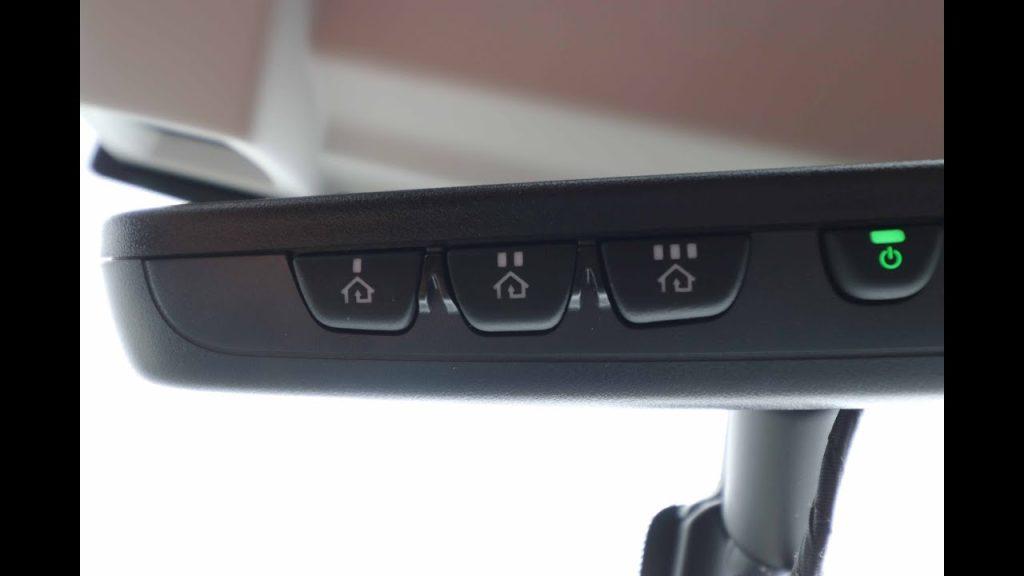
- Locate the three HomeLink buttons on your overhead console or rearview mirror.
- Press and hold the two outer buttons simultaneously.
- Hold them for exactly 20 seconds.
- Wait until the indicator LED begins to flash rapidly, then release both buttons. Your system is now factory-reset.
Phase 2: Train the Vehicle Buttons
Now we will teach your Subaru the unique radio frequency of your garage door.
- Hold your handheld remote 1 to 3 inches away from the HomeLink buttons.
- Simultaneously press and hold the button on your handheld remote and the desired button on your Subaru’s console.
- Keep holding both. Watch the LED indicator on the console closely.
- The light will flash slowly at first, then transition to a rapid, continuous flash.
- Once it flashes rapidly, release both buttons. Your Outback has successfully memorized the signal!
Phase 3: The “Rolling Code” Synchronization
Most modern garage doors manufactured after 1996 use rolling code technology for security. If your LED flashed rapidly in Phase 2, you must complete this final step.
- Locate the “Learn” or “Smart” button on your actual garage door motor unit (usually hanging from the ceiling).
- Press the “Learn” button. An LED light on the motor will turn on or begin blinking.
- You now have exactly 30 seconds. Rush back to your Subaru Outback.
- Press and release the newly programmed HomeLink button in your car.
- Press and release it a second time.
- Press and release it a third time.
- Your garage door should activate, confirming a successful sync.
Rolling Code vs. Fixed Code: What Subaru Owners Should Know
Understanding the technology behind your door ensures long-term reliability. The vast majority of synchronization issues stem from misunderstanding which system your home utilizes.
For more background on this technology, you can read about the history of the HomeLink wireless control system on Wikipedia.
Below is a quick comparison to help you identify your system:
| Feature | Fixed Code Systems | Rolling Code (Security+) Systems |
|---|---|---|
| Security Level | Low (Static signal) | High (Changes every use) |
| Syncing Process | Simple (1-step training) | Complex (2-step with motor) |
| Manufacture Year | Pre-1996 | 1996 to Present |
| Indicator Light | Solid light after sync | Rapid flash after sync |
| Popular Brands | Older Genie/Stanley units | LiftMaster, Chamberlain, Genie Intellicode |
Note: If your home uses a fixed code system, Phase 3 of our tutorial is unnecessary. Your door will open immediately after Phase 2.
Troubleshooting Common HomeLink Syncing Issues
Even with perfect execution, technology can sometimes be finicky. If your Subaru Outback refuses to open the door, do not panic. Review these common roadblocks.
1. The LED Never Flashes Rapidly This usually means your handheld remote has a weak battery or operates on an incompatible frequency. Some European imports or very old custom gates do not communicate with North American Subaru receivers.
2. The Door Opens but Won’t Close This is a safety sensor issue, not a synchronization issue. Check the infrared beams at the base of your garage door tracks. If they are misaligned or blocked by a cobweb, the door will reverse automatically.
3. Range is Extremely Short If you have to be within five feet of the house for the remote to work, your vehicle’s antenna amplifier might be malfunctioning, or the handheld remote you used to train the system needs a fresh battery.
4. The 30-Second Window Expired If you took too long climbing the ladder during Phase 3, the garage motor’s “Learn” mode timed out. Simply climb back up, press the motor’s button again, and quickly repeat the three presses inside your Outback.
Frequently Asked Questions (FAQ)
1. Can I sync more than one garage door to my Subaru Outback?
Yes, absolutely. Most Subaru Outback trims come equipped with a three-button overhead console. You can dedicate one button to your primary home garage, a second to your workplace or gym, and a third to a community gate or smart home lighting system. Just repeat Phase 2 for each individual button.
2. Why is my Subaru HomeLink light blinking fast continuously?
A continuously blinking light (even when you aren’t pressing anything) usually indicates an error in the rolling code sync. It means the car and the garage motor failed to handshake securely. You will need to erase the system (Phase 1) and start the entire process over from scratch.
3. Does syncing the opener drain my Subaru’s battery?
No. The HomeLink system draws an incredibly minuscule amount of standby power—similar to your car’s digital clock or radio memory. It will not drain your battery, even if the Outback sits unused in a driveway for a few weeks.
4. What if my garage door opener doesn’t have a “Learn” button?
If your motor unit lacks a colored “Learn” or “Smart” button, you likely own an older, fixed-code system. You can skip Phase 3 of our tutorial. Once the car’s LED turns solid during Phase 2, the programming is complete and ready to use.
5. Do I need a special app to sync my Subaru Outback?
No third-party apps or Wi-Fi connections are required for the standard HomeLink system. It relies on direct Radio Frequency (RF) communication between your car and the door motor. However, if you have the newer Subaru Starlink smart home integration package, you may use the MySubaru app to control cloud-based smart garage controllers.
Conclusion
Learning how to sync garage door opener with Subaru Outback is an essential skill that upgrades your daily driving experience, enhances your home security, and saves you from frustrating weather exposure. By following the exact preparation, timing, and troubleshooting steps outlined above, you ensure a flawless connection between your vehicle and your home.
Did this guide save you from a headache in the driveway? Share this article on Facebook, Twitter, or your favorite Subaru owner’s forum to help a fellow driver master their vehicle’s technology today! Safe travels and enjoy the seamless entry!



Leave a Reply