Introduction
There is nothing quite as frustrating as pulling into your driveway after a long day, only to realize your van’s built-in garage remote isn’t responding. If you are searching for how to set up Toyota Sienna garage door opener systems, you are likely dealing with a new vehicle, a replaced battery, or a changed gate code. We understand that technical manuals can be confusing, but getting your HomeLink system synced should be a seamless experience, not a headache. This guide walks you through the exact process with empathy and precision, ensuring you get back to enjoying the convenience of hands-free entry safely and quickly.
Understanding Your Toyota Sienna HomeLink System
Before diving into buttons and lights, it is crucial to identify which generation of HomeLink your Sienna possesses. Toyota has integrated this technology for decades, but the interface varies significantly between model years. According to automotive documentation, most Siennas from 2011 onward use HomeLink Version 4 or 5, while newer 2021+ models may feature Version 6 or 7 with enhanced rolling-code security.
Knowing your version matters because older “fixed-code” openers require a different synchronization sequence than modern “rolling-code” systems. For a comprehensive technical background on how these radio frequency transmitters communicate with residential receivers, you can refer to the HomeLink Wikipedia page, which details the evolution of this universal standard.
Key Differences by Model Year
| Feature | 2011–2020 Sienna | 2021–Present Sienna |
|---|---|---|
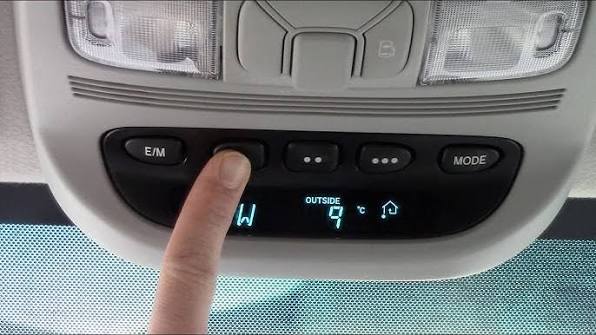
| Button Location | Overhead Console / Rearview Mirror | Integrated into Rearview Mirror |
| Indicator Light | Red/Amber LED above buttons | Small LED within button face |
| Programming Mode | Hold outer buttons 20 sec | Hold outer buttons 20 sec |
| Rolling Code Support | Yes (V4/V5) | Yes (V6/V7 Enhanced) |
| Battery Dependency | Vehicle Ignition Required | Vehicle Ignition Required |
Note: Always ensure your vehicle is parked outside the garage during programming to prevent accidental door movement.
Step-by-Step: How to Program Rolling-Code Openers
The vast majority of garage door openers manufactured after 1996 utilize rolling-code technology for security. If your Sienna is a 2011 or newer model, follow these precise steps. Accuracy here is vital; rushing through timing windows is the #1 cause of failure.
Phase 1: Clear Previous Codes (If Applicable)
If you bought the van used or are reprogramming a button, start fresh.
- Turn the ignition to ON (or press the START button twice without braking).
- Press and hold the two outer HomeLink buttons simultaneously.
- Hold for approximately 20 seconds until the indicator light flashes rapidly.
- Release both buttons. The memory is now cleared.
Phase 2: Train the HomeLink Button
- Choose one of the three HomeLink buttons to program.
- Hold your original handheld garage remote 1–3 inches away from the HomeLink buttons.
- Simultaneously press and hold the handheld remote button AND your chosen HomeLink button.
- Watch the HomeLink indicator light closely. It will flash slowly at first, then rapidly once the signal is captured. This typically takes 5–15 seconds.
- Release both buttons immediately upon seeing the rapid flash.
Phase 3: Sync with the Garage Motor Unit
This step bridges the van and the actual garage ceiling motor.
- Locate the “Learn” or “Smart” button on your garage door opener motor unit (usually near the antenna wire or light lens). Colors vary: yellow, purple, orange, red, or green.
- Press and release the Learn button. You have exactly 30 seconds to complete the next step.
- Return to your Sienna and press the programmed HomeLink button firmly for 2 seconds, then release.
- Repeat this press-hold-release cycle up to three times. On many units, the second or third press completes the handshake.
- Test the button. The door should activate.
Troubleshooting: When Programming Fails
Even professionals encounter sync issues. Before visiting a dealer, run through this diagnostic checklist based on common field failures.
The Indicator Light Never Flashes Rapidly
- Cause: Weak battery in the handheld remote or incorrect distance.
- Fix: Replace the CR2032 or AA battery in your original remote. Try holding the remote at different angles (flat vs. vertical) and distances (try 6 inches instead of 1). Some European or Canadian remotes operate on different frequencies; verify compatibility on the HomeLink website.
Light Flashes But Door Doesn’t Move
- Cause: Rolling-code handshake incomplete or wrong Learn button color identified.
- Fix: Re-do Phase 3. Ensure you are pressing the correct Learn button—some motors have separate buttons for lights vs. doors. If your opener uses DIP switches (pre-1996), you must manually match the switch positions inside the HomeLink module, though this is rare in Siennas post-2010.
Works Intermittently or Only When Very Close
- Cause: RF interference or failing HomeLink antenna.
- Fix: Remove aftermarket dash cams, phone chargers, or LED bulbs near the overhead console temporarily. These devices often emit noise on the 300–400 MHz band. If problems persist, the vehicle’s internal antenna amplifier may need service.
Smart Garage Controllers Won’t Pair
- Cause: Wi-Fi-enabled openers (MyQ, Tailwind) sometimes block direct RF training.
- Fix: Use the manufacturer’s app to generate a temporary “training mode” or bridge device. Many smart openers require a specific HomeLink Compatibility Bridge sold separately.
Safety Considerations and Best Practices
Programming convenience features should never compromise household safety. The Consumer Product Safety Commission mandates auto-reverse mechanisms on all openers post-1993, but proper setup ensures they function correctly with your Sienna’s transmitter.
- Never Program Inside the Garage: Carbon monoxide buildup is a real risk. Always park outside with clear line-of-sight to the door.
- Test Auto-Reverse Monthly: Place a 2×4 board flat on the floor under the door path. Activate via HomeLink. The door must reverse upon contact. If it doesn’t, adjust the force settings on the motor unit before using the van’s remote regularly.
- Secure Your Original Remotes: Once HomeLink is programmed, store spare handhelds securely. They still grant full access and lack the vehicle-specific pairing of HomeLink.
- Update Firmware: Some 2021+ Siennas receive HomeLink updates via Toyota OTA software. Check your multimedia system settings periodically for connectivity improvements.
Frequently Asked Questions (FAQ)
Can I program my Toyota Sienna garage door opener without the original remote?
Generally, no. HomeLink requires cloning an existing signal. However, if your garage motor has a “Learn” button and supports direct-to-Homelink pairing (rare), or if you purchase a compatible bridge device for smart openers, it may be possible. Otherwise, buy a universal replacement remote ($15–$25) specifically matched to your opener brand to serve as the training source.
Why does my HomeLink work for the garage but not my community gate?
Community gates often use fixed-code systems or proprietary frequencies that differ from residential rolling-code openers. Your Sienna may need to be programmed using the “Fixed Code” method outlined in your owner’s manual, which involves a different button-holding sequence. Additionally, some HOA gates require dealer-level programming or a special access fob that cannot be cloned.
Does programming HomeLink drain my Sienna’s battery?
No. HomeLink draws negligible power when idle and only activates during transmission. However, leaving the ignition in ACC mode for extended programming sessions (>30 minutes) can drain the 12V auxiliary battery. Always program with the engine running or in READY mode (for hybrids) to prevent voltage drops that could corrupt the learning process.
How do I erase a single HomeLink button without clearing all three?
Unfortunately, most HomeLink versions do not support individual button erasure. You must clear all three buttons simultaneously (Phase 1 above) and reprogram the remaining two. Plan accordingly and have all household remotes ready before starting. Newer Version 7 systems in select 2024+ models may offer individual deletion via the infotainment screen.
Is HomeLink compatible with LiftMaster, Chamberlain, and Genie openers?
Yes. HomeLink is designed as a universal system compatible with over 95% of North American garage door opener brands, including LiftMaster, Chamberlain, Genie, Craftsman, and Overhead Door. Compatibility issues typically arise only with very old (pre-1993) units or specialized commercial operators. Always check the HomeLink compatibility tool online using your opener’s model number if unsure.
Conclusion
Mastering how to set up Toyota Sienna garage door opener functionality transforms daily arrivals from a chore into effortless convenience. By following the phased approach above—clearing memory, training the button, syncing with the motor, and verifying safety—you ensure reliable performance aligned with Toyota’s engineering standards. Remember that patience during the 30-second Learn window and attention to indicator light patterns solve most issues without professional intervention.
Your Sienna was designed to simplify family life, and a properly configured HomeLink system is central to that promise. If this guide helped you regain seamless garage access, please share it with fellow Sienna owners on Facebook, Reddit’s r/ToyotaSienna, or Nextdoor. Helping another parent avoid driveway frustration is the best kind of community support. Safe driving, and enjoy the smooth entry!



Leave a Reply