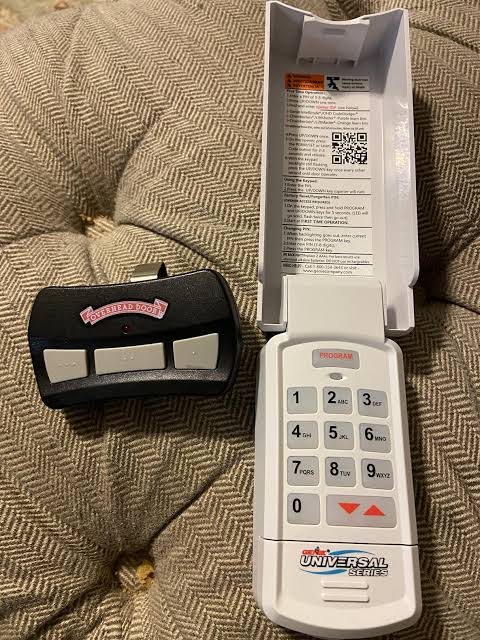
Have you ever stood in the rain, pressing your garage door remote button repeatedly, only to watch it remain stubbornly closed? It is a frustrating experience that disrupts your daily routine and compromises your home’s security. If you have recently purchased a new remote or reset your system, knowing how to program a Genie universal garage door opener is essential to restoring convenience and peace of mind to your household.
Understanding Your Genie System Before You Start
Before diving into the buttons and codes, it is crucial to identify which type of Genie opener you own. Genie has manufactured several models over the years, and the programming method varies significantly between them. The two most common technologies used by Genie are Intellicode (rolling code) and Fixed Code (DIP switches).
Most modern Genie openers use Intellicode technology, which changes the access code every time you use the remote. This feature enhances security by preventing code grabbing. Older models may use DIP switches, which are small physical switches inside the remote and the motor unit that must match exactly.
Identifying your model ensures you follow the correct procedure. Look for a label on the motor unit hanging from your garage ceiling. It will typically list the model number (e.g., G3T, H4000, or SilentMax). If you are unsure, consult your owner’s manual or visit the Genie Company official support page for specific model identification guides. For a broader understanding of garage door automation history and standards, you can also refer to Wikipedia’s entry on garage door openers.
Step-by-Step Guide: Programming an Intellicode Remote
If your Genie opener uses Intellicode technology, you will not find DIP switches. Instead, you will use a “Learn” button on the motor unit. Follow these precise steps to sync your universal remote.
Step 1: Locate the Learn Button
Climb a sturdy ladder to access the motor unit. Look for a square button labeled “Learn” or “Program.” It is usually located near the antenna wire and may be purple, red, or orange depending on the model year. Press and release this button. The LED indicator next to it should turn on or blink, indicating the unit is in programming mode. You have about 30 seconds to complete the next step.
Step 2: Program the Remote
Within 30 seconds of pressing the Learn button, take your universal remote and press the button you wish to program three times. Ensure you press it firmly and consistently. After the third press, wait a moment. If the LED on the motor unit blinks or turns off, the programming was successful.
Step 3: Test the Connection
Stand clear of the garage door and press the programmed button on your remote. The door should activate immediately. If it does not, repeat the process, ensuring you are within range and that the remote has fresh batteries.
Programming Older Models with DIP Switches
If your Genie opener is an older model, it likely uses DIP switches. These are small toggle switches found inside the battery compartment of the remote and on the back of the motor unit.
- Open the Remote: Remove the battery cover of your universal remote. You will see a row of small switches, usually numbered 1 through 8 or 1 through 12.
- Match the Switches: Look at the motor unit’s DIP switches. Set the switches in your remote to match the exact pattern of the motor unit. For example, if switches 1, 3, and 5 are “UP” on the motor, they must be “UP” on the remote.
- Secure and Test: Replace the battery cover and test the remote. Since this is a fixed code system, no learning phase is required. However, note that fixed codes are less secure than rolling codes and are more susceptible to interception.
Troubleshooting Common Programming Issues
Even with careful following of instructions, things can go wrong. Here are the most common issues and how to fix them.
| Issue | Possible Cause | Solution |
|---|---|---|
| Remote Not Responding | Dead Batteries | Replace with fresh alkaline batteries. Ensure polarity is correct. |
| LED Does Not Light Up | Learn Mode Expired | Press the Learn button again and retry within 30 seconds. |
| Door Moves Then Stops | Safety Sensor Misalignment | Check the photo-eye sensors near the floor. Ensure nothing blocks the beam. |
| Interference from LEDs | Signal Noise | CFL or LED bulbs in the opener can emit interference. Try incandescent bulbs temporarily. |
Dealing with Signal Interference
Modern LED light bulbs can sometimes emit electromagnetic interference that disrupts garage door signals. If your remote works intermittently, try turning off the light kit on your opener or replacing the bulbs with high-quality, shielded LEDs designed for garage door openers.
Why Proper Programming Matters for Security
Programming your garage door opener correctly is not just about convenience; it is a critical component of home security. A poorly programmed or outdated remote can leave your home vulnerable.
- Rolling Code Protection: Intellicode remotes generate a new code with each use. This prevents thieves from using “code grabbers” to capture your signal and replicate it later.
- Preventing Unauthorized Access: If you lose a remote, you should reprogram all remaining remotes to invalidate the lost one. This ensures that anyone who finds your old remote cannot enter your garage.
- Smart Home Integration: Many newer Genie openers integrate with smart home systems like Aladdin Connect. Proper programming ensures these digital connections remain secure and functional.
According to security experts, the garage door is often the most vulnerable entry point in a home. Ensuring your opener is programmed with the latest rolling code technology significantly reduces this risk.
Frequently Asked Questions (FAQ)
1. Can I program a universal remote to work with any Genie opener?
Most universal remotes are compatible with Genie openers manufactured after 1995. However, compatibility depends on the frequency (usually 315 MHz or 390 MHz) and the technology (Intellicode vs. Fixed Code). Always check the packaging of your universal remote for a compatibility list.
2. How do I know if my Genie opener uses Intellicode?
Look at the motor unit. If you see a “Learn” button and no DIP switches, it uses Intellicode. Additionally, if your original remote has a single button or a few buttons without visible switches inside, it is likely an Intellicode model.
3. What should I do if I lose my remote?
For security reasons, it is recommended to erase all previously programmed remotes and reprogram the ones you still have. To erase codes, press and hold the Learn button for about 10 seconds until the LED goes out. Then, reprogram your remaining remotes using the steps above.
4. Can I program a car’s built-in garage door opener to work with Genie?
Yes, many vehicles have built-in homelink systems. To program these, you typically need to put your Genie opener into learn mode and then follow the specific instructions provided in your vehicle’s owner manual. Some newer Genie models require a compatibility bridge for certain car brands.
5. Why does my remote work only when I am very close to the door?
This issue is usually caused by weak batteries or signal interference. Replace the batteries first. If the problem persists, check for LED light bulb interference or obstructions near the motor unit’s antenna. Extending the antenna wire slightly may also improve range.
Conclusion
Learning how to program a Genie universal garage door opener is a straightforward task that can save you time and money. Whether you are using a modern Intellicode system or an older DIP switch model, following the correct steps ensures reliable access and enhanced security for your home. By keeping your remotes updated and addressing interference issues promptly, you maintain a seamless and safe entry point for your family.
Did you find this guide helpful? Share it with friends or family members who might be struggling with their garage door remotes. Let’s help everyone enjoy the convenience of a perfectly functioning garage door!



Leave a Reply